Download Samsung Android 5 keyboard for Note 3 Neo

Samsung introduced new improved keyboard in Android 5 lollipop but has not made it available for the Galaxy Note 3 Neo. Fortunately XDA has made it available by porting it to Note 3 Neo. 

Download Samsung Android 5 keyboard for Note 3 Neo

To use it, you must download and flash the Note 4 Mini V6 ROM on your Note 3 Neo and then flash it. Download Samsung Android 5 keyboard from here and flash it using Note 3 Neo custom recovery but if you had earlier installed the Note 4 Mini v6 ROM, you must be having the custom recovery already installed. The ROM is very efficient and will improve your battery life as well.

You will find multitude of enhancements on this Samsung keyboard compared to the one you already have on your Note 3 Neo. It feels much polished and better to type on. 

Mlais M7 Specifications, 4G Phablet with Octa Core processor and 3GB memory for only 119 euro

If you are looking for a cheap but powerful 4G smartphone, take a look at Mlais M7 that goes on sale for 119 euro starting today. Mlais M7 specifications include 5.5 inch IPS HD display packing 1280 x 720 pixel resolution, Mediatek MT6792 processor, Mali T-760 GPU, 3GB RAM, micro SD card slot, 13MP rear camera and 8MP selfie camera.

Mlais M7 review specs

Continue reading “Mlais M7 Specifications, 4G Phablet with Octa Core processor and 3GB memory for only 119 euro”

Asus WI501Q WI502Q Review, Photos and Video

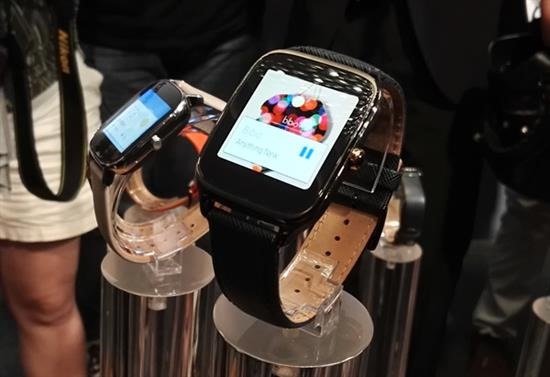
Asus Zenwatch 2 models namely WI501Q and WI502Q have been reviewed and their first impressions are in. Both smartwatches are resistant to water and dust which means they are IP67 certified.

Asus WI501Q WI502Q Review

Asus Zenwatch 2 WI501Q WI502Q Review: Battery life – It is very important that a smartwatch comes with good battery life. The WI501Q and WI502Q are two day of use which is better than Apple Watch that has one day of real world battery life.

Continue reading “Asus WI501Q WI502Q Review, Photos and Video”

Download Flipboard briefing for Galaxy Note 3 Neo

Flipboard Briefing is originally now bundled with the Samsung Galaxy Note 3 Neo but you can get it by installing the APK from link given at the bottom of this post. This flipboard briefing APK has been extracted from a Galaxy S6 ROM.

Download Flipboard briefing for Galaxy Note 3 Neo

The best part is that the Flipboard briefing APK can be installed as a normal APK file. For those who do not know about Flipboard briefing, it gives you the daily top news, according to your interests, all in one place – all powered by your Flipboard account.

After installing the APK file, from the home screen, swipe left to the Flipboard Briefing panel and select Get Started that is located at the bottom. Review the terms and conditions and tap on I Agree to continue. Then tap on the Menu Icon and follow the on screen prompts.

HTC One X Android Lollipop available for Download

While HTC One X development has been halted by HTC, folks at XDA are still churning out ROM for it on full swing. For instance, we now have its Android lollipop 5.0 ROM available for download. While it is not official by any means, it is great alternative.

HTC One X Android Lollipop

HTC One X Android Lollipop download link

Since Gapps are not included in the ROM, you can install them separately from below link:

HTC One X Android Lollipop Installation instructions

1. Make sure you have custom recovery like CWM or TWRP pre installed.
2. Then copy ROM’s ZIP file along with Gapps file to the internal SD card and boot into recovery
3. Then flash ROM file first and then gapps file. Make sure to do a factory reset by going into recovery again after those two zip files have been installed.
4. Reboot and never restore apps using titanium backup. Also never use Xposed with this Lollipop ROM.

HTC One X Android Lollipop: Features of the ROM

* Volume panel timeout
* Clear recents location
* Heads up customization
– Quick access button on expanded status bar
– Swipe behavior
– Touch outside behavior
– Time out
– Do not disturb
– Blacklist
* SlimRoms custom lock screen shortcuts
* Navbar on/off
* Hardare keys on/off (in devices supported)
* Power menu in navring targets
* SlimPie controls with all working
* Sound panel option om power menu
* Super user indicator (Notification, Statusbar icon or no indicator)
* Force expanded notifications on expanded status bar
* Power menu and notifications tiles
* Four tiles per row
* Vibrate on tiles touch
* Disable quick settings on secure lock screen
* Kill app back button configurable timeout
* Omni-Ambient Display

Download Galaxy S5 Camera for Note 3 Neo

Samsung Galaxy S5 camera is super feature rich and today thanks to the folks at XDA you will be able to download Download Galaxy S5 Camera to the Samsung Galaxy Note 3 Neo. This will allow you to take 16 megapixel photos too. To install it on your Note 3 Neo, all you need is a rooted device and custom recovery like TWRP and CWM.

Download Galaxy S5 Camera for Samsung Galaxy Note 3 Neo

Installation instructions:

1) Download the S5CameraPorting-v2.zip from this link.
2) Delete the Samsungcamera apk in /system/app.
3) Flash the download S5CameraPorting-v2.zip via custom recovery.
4) wipe cache and reboot.

It shall be noted that Selective focus and Dual Camera are not working.