Download Note 3 TWRP for flashing custom ROMs

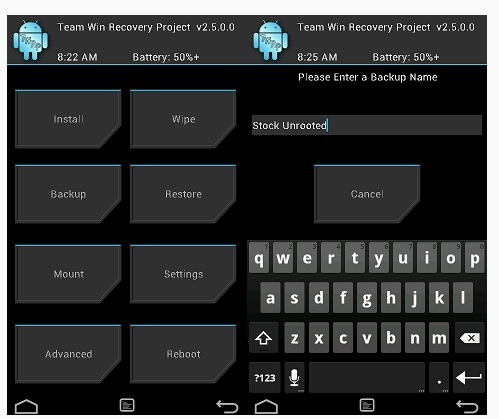
Team win has released latest version of TWRP for Galaxy Note 3. You can download Note 3 TWRP from the link given at the bottom of this page. The TWRP is the most popular custom recovery and many prefer it over CWM as it allows users to interact via touchscreen.

twrp note 3 download

In this Note 3 TWRP you can use onscreen keyboard to input data. In other words it is a must have if you are into flashing custom ROMs. Samsung is really sluggish in pushing firmware update.

This Note 3 TWRP also allows you to backup and restore partitions. Also after some time you may get bored of the user interface but don’t fret as you will be able to easily skin with bucketful of TWRP themes available online.

  • Samsung Galaxy Note 3 Canada (hltecan)
  • Samsung Galaxy Note 3 International Exynos (ha3g)
  • Samsung Galaxy Note 3 International Qualcomm (hlte)
  • Samsung Galaxy Note 3 Sprint (hltespr)
  • Samsung Galaxy Note 3 T-Mobile (hltetmo)
  • Samsung Galaxy Note 3 US Cellular (hlteusc)
  • Samsung Galaxy Note 3 Verizon (hltevzw)
  • Download Galaxy S6 lock screen for Note 3 N900

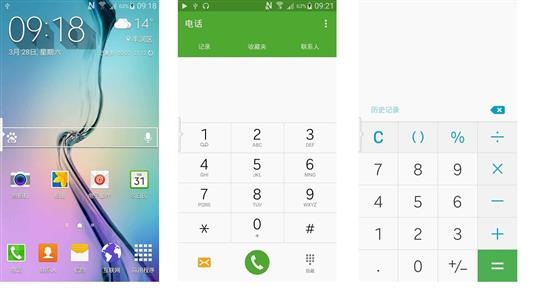
    If you don a Samsung Galaxy Note 3 N900, you can download the new Galaxy S6 lock screen on it. Samsung has a habit of tweaking and updating the lock screen of their Galaxy devices and the Galaxy S6 lock screen looks sleeker and sweeter than ever. It looks very clean and elegant. If you want to get all features of Galaxy S6 on note 3 then we suggest installing this ROM from galaxy note news portal.

    galaxy s6 lock screen note 3

    You can download it link given below. Then to install it, go into custom recovery of Note 4  and browse for the file you downloaded. Select Install to install the Galaxy S6 lock screen on Note 3 N900.

    To further make it like Galaxy S6, you can install touch wiz themes of S6 on Note 3 using our tutorial.

    Galaxy S6 ROM for Note 3 N9005

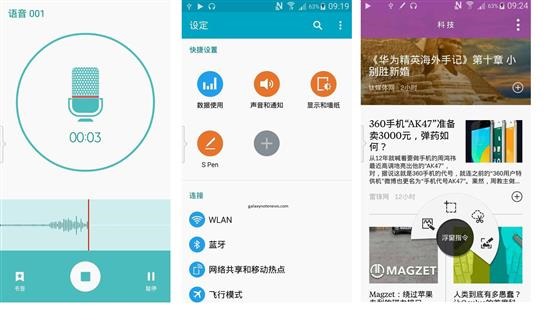
    Folks at XDA developers have ported Galaxy S6 ROM to Note 3 N9005 USA LTE version. The final build is very stable and is perfect for day to day use. It includes the new Samsung official memory manager and following Galaxy S6 features:

    galaxy s6 rom for note 3

    S6 transplant weather (can stretch the weather display optional AROMA)
    S6 transplant starter (5×5 optional AROMA does not currently support the overall theme S6)
    S6 transplant Calculator
    S6 transplant wallpaper
    S6 transplant recorder
    S6 browser transplant
    S6 transplant Calendar
    S6 transplant newsletter
    S6 transplant Samsung store
    Transplant S6 File Manager
    S6 transplant Task Manager
    S6 start-up tone
    S6 transplant dialers (AROMA optional)
    S6 transplant powerful intelligent assistant
    S6 transplant email

    samsung galaxy s6 rom for note 3

    Install it using clock work mod or twrp recovery for Note 3. It is great to see S6 features ported to Note 3. Just few days back Note 4 and S5 features were ported to Galaxy Note 3.

    Note 4 S5 ROM ported to Galaxy Note 3

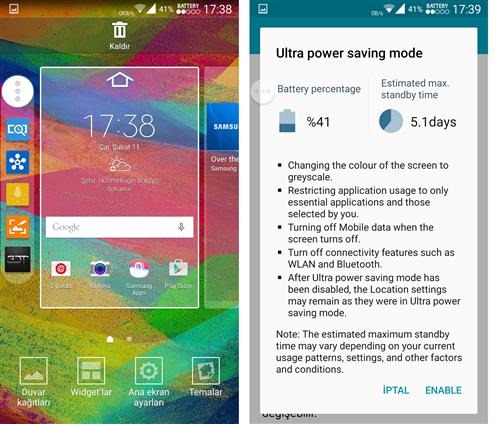
    A new custom ROM brings Galaxy Note 4 and S5 features to Samsung Galaxy Note 3. First XDA developers ported Note 4 launcher to S4 and now they have ported Note 4 and Galaxy S5 features to Note 3 N900. Tural, an XDA user has ported Note 4 and S5 features to Note 3.

    Note 4 S5 ROM ported to Galaxy Note 3

    * Stock Russian based (BO6)
    * S5 Gallery (Lollipop)
    * UPSM
    * Toolbox
    * Sidekey (full work)
    * 3 dot Menu with app switch
    * Note 4 ,S5 Accuweather
    * 3d minit batery mod
    * New TouchWiz with Theme select
    * AOPS SystemUI
    * S Memo Lollipop
    * S5 style camera
    * MultiWindow all apps
    * Note 4 Music Player
    * Note 4 My files
    * Notə 4 voice recorder
    * Extra apps (Activity, S5 Toolbox Addon,S Reminder )etc.
    * 8 lockscreen Effect
    * Note 4 Multi User

    Here are the flashing instructions:

    1) Flash Stock Russian rom with Odin
    2) Root and open twrp or cwm
    3) Full Wipe Factory Reset
    4) Flash this firmware
    5) and reboot

    Galaxy Note 3 N900 Lollipop Android 5 ROM, has ultra power saving mode

    You can now download the un official Android 5 lollipop firmware from XDA for the Samsung Galaxy Note 3 N900 model. Based on N900XXUEBOC4_N900ODDEBOB2_N900DDUEBOB1_HOME firmware, this new ROM features ultra power saving mode, emergency mode and customizable torch light settings. This custom firmware comes with pekaka advance tweak that adds following features:
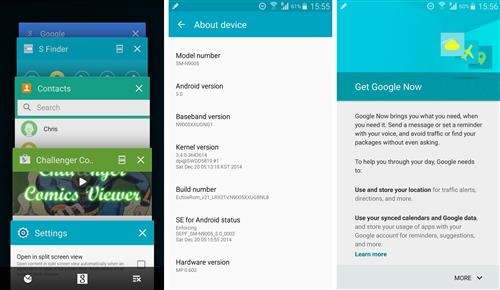
    Galaxy Note 3 N900 Lollipop

    * stutas date_show mod|small/big/disable
    * stutas ampm show mod|small/big/disable
    * stutas clock position mod|left/middle/right/disable
    * Netspeed color
    * Statusbar clock color
    * Status expander clock color
    * Statusbar Signal icon color
    * Statusbar wifi icon color
    * Memkiller color
    * status bar color
    * StatusBarHeader color
    * quick setting container background color
    * quick setting tile background color
    * toggle slider color
    * sfinder qconnect background color
    * Locksrceen Carrier text and color
    * Quick setting button number
    * Enabled UI stock color(unchecked for stock,checked disable stock color to enable customer color mod)
    * Used battery color
    * Rest battery color
    * Num color in battery
    * Pullup app settings

    It is suggested by its ROM developer to do a full wipe before installing the firmware. You can download from following links:

    Flashing instructions:

    1. before flashing this ROM, your phone firmware should have been updated to lollipop 5.0 already
    2. need custom Note 3 recovery to flash.
    3. download ROM copy to your phone’s SD card
    4. just go to recovery to flash the ROM but before select full wipe.
    5. When the flashing process finishes, the phone will auto reboot into new ROM.