Root Grand Prime, SM-G530H Samsung Galaxy rooted successfully

Chainfire is yet to release a root for the Samsung Galaxy Grand Prime GM-G530H but we have the instructions on how to get it done. To get Galaxy Grand Prime rooted, you will have to download the modified version of CF-auto root from here  and put it on your computer. The zip file contains three files, Odin v3.07, 2_cache_recovery_stock_mohan_sm-g530h.md5 and 1_cfroot_sm-g530h_mohan.tar.md5.

Root Grand Prime

To root Grand Prime, boot your phone into download mode (power button, home button and volume down key simultaneously) and connect it to the computer. Start up Odin on your computer and flash the first file by clicking on PDA and selection this file: 2_cache_recovery_stock_mohan_sm-g530h.md5. The device will boot up again.

Also check out instructions to root Galaxy Grand Quattro.

Again go into download mode and flash the second file (select PDA again): 1_cfroot_sm-g530h_mohan.tar.md5. The device will reboot and you will find SuperSU installed. Open it and it will ask to disable knox notification. Press Cancel and if SuperSU asks for su binary update, just press the Normal button.

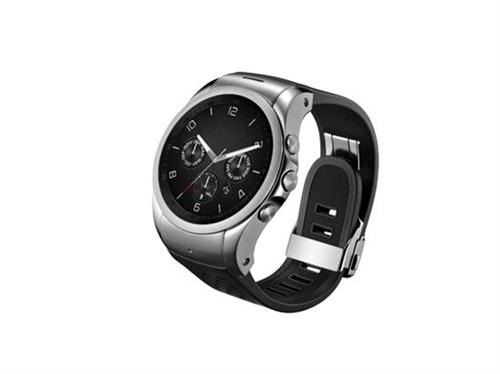
LG Watch Urbane LTE is a smartwatch with 4G

LG Watch Urbane LTE is now officially available in the market. It is the first smartwatch in the world with 4G LTE which is something that has never been equipped on a wearable device.

LG Watch Urbane LTE packs 1.3 inch OLED display, Qualcomm Snapdragon 400 1.2 GHz quad core processor with several days of standby time. Since it has 4G LTE, it will enable you to make and receive calls and send and receive text messages.

LG Watch Urbane LTE

Continue reading “LG Watch Urbane LTE is a smartwatch with 4G”

Free Fitbit Flex with Nokia Lumia 830 on AT&T

Great news for those who had eyes set on Nokia Lumia 830. AT&T is now giving away a free Fitbit Flex activity tracker when you buy a Nokia Lumia 830 on contract on Microsoft store. It is also possible to buy it off contract for $ 399 and you will still get the $ 90 Fitbit Flex for free. Amazon too is offering Fitbit Flex for free.

nokia lumia 830 fitness tracker

However we feel that it would have made more sense to offer the Nokia Lumia 830 for free under contract and a free Microsoft Band or may be for $ 99 instead of $ 199.

Change Moto X boot animations and starting logo, download few for free

If you do not like the boot animation of your Motorola Moto X, you can easily change it. Same goes for the logo – if you do not like it, you can change it easily. The only requirement is that you need a rooted Moto X which fortunately can done easily.

moto x boot animation

Installation instruction for changing Moto X boot animation are given below:

1. Download the file from here and rename it to bootanimation.zip
2. Copy to /system/media/
3. Set permissions to root:root and rw-r-r
4. Reboot.

Instructions for changing logo are:

1. Download and rename to logo.bin
2. Reboot to bootloader.
3. Run "fastboot flash logo logo.bin" (No quotes)
4. Reboot

That is it – you can enjoy and install custom bootscreen and logo on your Moto X.

Download Moto X official Cyanogen Mod 12, comes with ad blocker

Cyanogen Mod 12 a k a CM12 is now available for the Motorola Moto X. Cyanogen Mod has its own fanbase and the development is also much faster than the standard android that comes preinstalled on your Moto X. This particular ROM comes with ad blocker pre installed so no more ads in apps.

Download Moto X official Cyanogen Mod 12

The complete feature list includes:
Nav bar customizations;
Animated rotation tile;
Wake up on plug;
Development shortcut;
Clock and time clickable in expanded status bar;
Notification ticker;
Quick unlock;
PIN keypad shuffler;
Custom lockscreen shortcuts;
Answer calls with hardware home button;
Status bar clock tweaks (right, center or hide clock with many dates formats to show. Custom colors included);
Notifications counter;
Volume keys wake the device;
Ability to hide the alarm clock icon from status bar;
Dialer Lookup;
Profiles form CyanogenMod (new merges and lollipop style);
Protected apps (using trebuchet launcher);
Filter spam notifications;
CyanogenMod SuperUser;
Clear all button in recent panel with custom option (hide, top right or top left);
Privacy guard from CyanogenMod;
Quick settings pull down with one finger (right, left or off);
Smart pull down;
Configurable 0, 90, 180 and 270 degree rotation;
Toggle to not allow quick settings on secure lockscreen;
Brightness control through status bar;
Double tap status bar sleep;
Data activity indicators;
Call blacklist support;
Increasing ring tone;
In call vibrations;
Advanced reboot menu;
Option to hide adb notification;
Screen shot quick delete with confirmation;
Long press back to kill with configurable timeout;
Less frequent notifications sound;
Advanced keyboard features (auto rotation with timeout, disable full screen, selector notification, show enter key, volume key cursor control);
New Eleven music player and AudioFX from CyanogenMod;
Statusbar network speeds;
AOKP system animations;
Left handed navbar during landscape mode;
App circle sidebar;
Toast Animations;
Media Scanner on boot behaviour;
Gesture Anywhere;
Omniswitch;
Screenrecorder;
Weather banner;
Search bar in recents;
Ability to use Omniswitch instead of aosp recents;
Wakelock blocker;
Advanced powermenu;
Lcd density;
cLock;
Ad blocker;

Installation instructions are given below:

– Make sure you’re running a proper working Recovery (CWM or TWRP)
– Copy GApps and crDroid zip to your internal SDCard
– Boot into Recovery
– Wipe system,data and cache
– Flash crDroid zip
– Flash GApps zip
– DO A DATA WIPE / FACTORY RESET
– Reboot