Samsung Galaxy S5 ROM on Note 1 N7000

Some of us are still on our contracts and cannot purchase the S5 and some of us are just not interested in the S5 as it lacks S-Pen – a note taking accessory which makes the entire Galaxy Note series unique and popular. However an XDA user has ported the ROM of S5 and added S-pen apps to it. The end result is amazing and very useful.
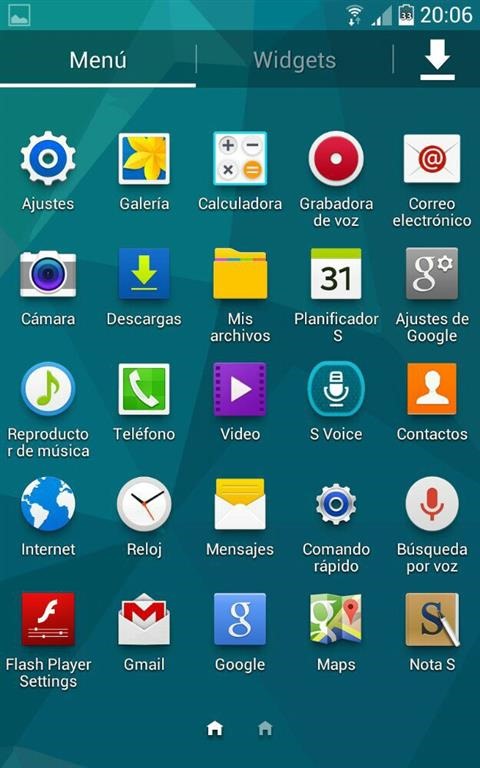
Samsung Galaxy S5 ROM on Note 1 N7000

The ROM is in Spanish but you can select English as your preferred language. Here is the list of its features.

– Disposal apk
– Deoxeded and Zipaligned
– Airview
– 4 Options reset.
– Custom AccuweatherWidget
– Custom Keyboard
– Limitlessness in multiwindow.
– Lantern on lock screen
– Button menu to kill applications.
– Launcher 270 º rotation
– Note 2 S voice
– Application Note 3 SketchBook
– Wallpapers, 30 funds of known terminals.
– 24 personalized toggles
– SecPhone HD
– Call Recorder
– Lock screen with transparent reporting.
– Removal of lock transparent curtain
– Call Button contact.
– Horizontal Calibration
– S Pen Gesture
– Configuration clock position
– AOSP lock screen

And here is how to install it. First download it from here and follow these steps.

1 Make sure you are using a safe kernel. Otherwise hop on to this link to install the kernel and then restart the recovery.
2 In Wiper make full recovery (The first wiper goes into recovery you will like the phrase new rom).
3 Install the rom and reboot.
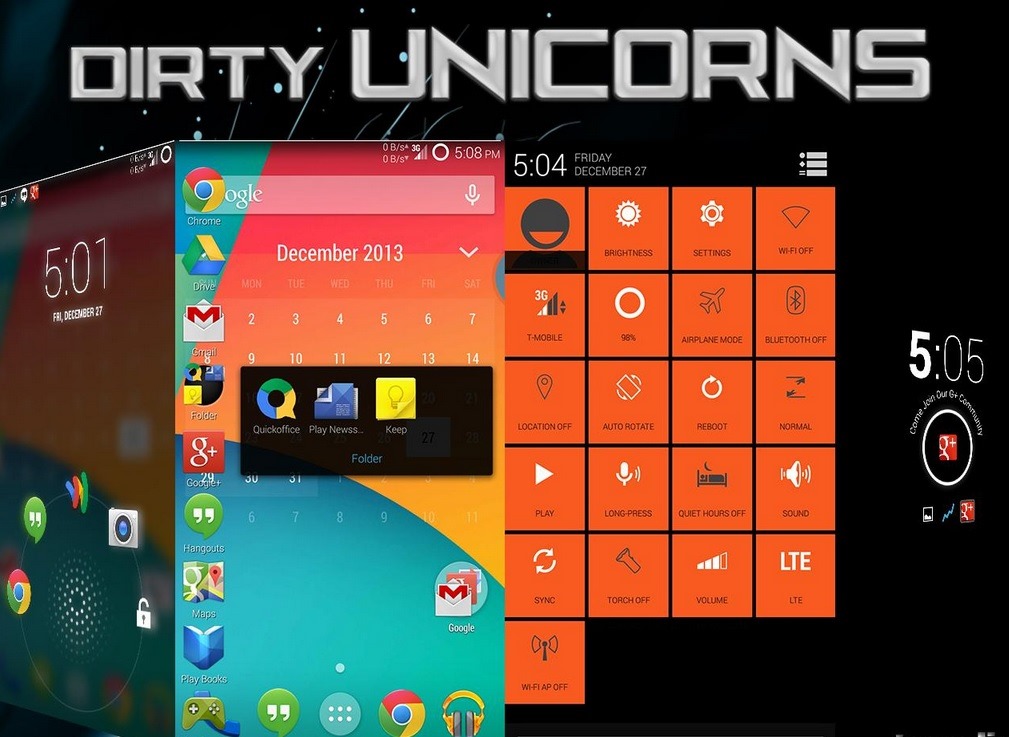
Android 4.4.2 ROM for Galaxy Note N7000

Samsung might have stopped supplying latest updates to the first generation Galaxy note n7000 but XDA developers is still churning out ROMs on a daily basis. In fact we now have an Android 4.4.2 ROM for it that works pretty well. The ROM has pretty exhaustive list of features too. 

* Facebook Sync Hack
* PDroid patches included
* Immersive mode
* Hot Reboot Option
* Appbar (ribbons)
* Customizable Quick Settings
* Customizable power menu
* Customizable lockscreen shortcuts
* App Ops access in Settings
* TRDS (built in theme in settings)
* Statusbar Clock options
* NavBar Options
* Halo from Paranoidandroid
* Halo size changer
* Hardware key remap mod
* Battery Bar / Circle batteries
* Network speed indicators in statusbar
* CF’s SuperSU
* Build.prop mods
* Init.d Tweaks
* Active Display (Moto X notifications)
* ListView Animations
* Custom System Animations
* Custom BusyDialog
* Advanced Low Battery Indicator options
* ScreenShot QuickTrash
* Color Changing PhaseBeam
* Gesture Anywhere
* Button Light Notification
* Statusbar Color options
* Hosts file manager (ad-free option)
* OmniSwitch (multi-tasking tool)
* Driving Mode
* Lockscreen theme options

android 4.4.2 n7000

Flashing this ROM is pretty easy if you follow the following steps correctly.

– Copy the ROM and Gapps zips to your device
– Make sure you have TWRP or CWM Selinux compatible recovery
– If you don’t know what the previous line means, flash this kernel first to get the proper recovery, then reboot the recovery (not the system)
– Wipe everything but your external/internal storage
– Flash the Rom followed by the Gapps and reboot
– Now just flash the Rom zip and reboot, no wipes or Gapps needed

Download Stock Deodexed Rom for Motorola Moto E XT1022

Stock Deodexed Rom for Motorola Moto E XT1022 is now available courtesy of XDA developers. Flashing instructions are given below but before you proceed download the ROM from here and store it on your computer.

1. Boot into TWRP / CWM and wipe data and cache
2. Flash the deodexed rom
3. Reboot

We have installed it on Moto E XT1022 and can confirm that it works.

Download Stock Deodexed Rom for Motorola Moto E XT1022

So what is the difference between a deodexed and odexed ROM? Deodexing is basically repackaging of these APKs in a certain way, such that they are reassembled into classes.dex files. By doing that, all pieces of an application package are put together back in one place, thus eliminating the worry of a modified APK conflicting with some separate odexed parts.

Apacer AH175 OTG Dual Interface flash drive released

Apacer has released AH175, a OTG Dual Interface flash drive that works with any Android phone that supports OTG functionality. The drive has both normal size and micro USB connectors both of which make use of USB 2.0 technology.

As expected the Apacer AH175 is backwards compatible with USB 1.1. It comes in 8, 16 and 32GB capacities. It has a loop that lets you to use it in a chain.

Apacer AH175

For those who do not know about USB OTG, it lets you use your smart phone as host to a flash drive – just like your PC. This one has micro USB on one side as mobile phones have micro USB ports and not full size USB port. It shall be noted that there is no performance difference between the two.

Toshiba WT10 is a Windows Tablet with 10 inches, possible specifications

We have not heard much from Toshiba from quite sometime. Last year the company released Encore 8 a windows 8 tablet with 8 inch display. Now we have spotted another model by the name of Toshiba WT10 on WiFi Alliance website.

While detailed Toshiba WT10 specifications are not available yet we do know that it will come with Intel Atom Bay Trail, 32 gigabytes of eMMC storage, 2 GB of RAM, Bluetooth 4.0, a Micro HDMI port, micro SD slot and a main camera with 8 megapixels and a front camera with 2 megapixels.

toshiba wt10

In other words the Toshiba WT10 will be identical to WT8 but with a 10 inch screen.

Allview X2 Soul Specifications, comes with 5 inch display and 5.5 mm thick chassis

Allview a Romanian manufacture has released AllView X2 Soul which is an Android smartphone. Priced at 333 Euros the Allview X2 Soul will hit market shelves on June 10 in black color. If you are interested in white, then you will have to wait for five more days.

Allview X2 Soul Specifications are given below

5-inch Super AMOLED touchscreen display with Full HD resolution of 1920 x 1080 pixels
MediaTek MT6592 octa-core processor with 1.7GHz
Mali 450 GPU
16 GB internal memory
2 GB of memory
13 megapixel camera back, Full HD Video Recording
5 megapixel camera front
Wi-Fi, Bluetooth 4.0
2,300 mAh battery
Gorilla Glass 3-cover on front and back, metal frame

allview x2 soul

There is no word on the Android version it runs but its Chinese variant runs v4.2 jelly bean at the time of this post.