LG unviels a Touch Screen Watch phone with built-in 3G – LG GD910

LG has come up with a full touchscreen watch which features a full touchscreen interface. It is not just-another-gimmick watches like the ones out there. It has a phone built into too. Now, your dream like a hero from a sci-fi movie is very close to be true.

It has built-in 3G and video calling too. Also, bundled is the text-to-speech software to read out aloud your SMS messages. It also includes support for Bluetooth stereo for your music pleasure. There is also an internal speaker to notify user of the incoming calls and for playing music files. Boy, this gadget oozes out geekism!

No word on the price yet. For more information, please visit www.lge.com

Volume Switcher for Windows Mobile Pocket PC

Volume Switcher automatically sets sound volume or switches silent/vibrate mode(profile) at desired time. This feature is a nice addition to Windows Mobile communicators. Don’t worry about loud calls at the very undesirable moment anymore!

Features:

  • Simple and convenient interface.
  • Automatic switching to silent, vibrate or normal mode/profile on your Pocket PC. Events can be scheduled based on definite time, dates and days of the week.
  • Ability to activate and deactivate scheduled events. There is no need to delete and create them again.

Learn more here

Fring for Windows Mobile Review

Fring is a mobile internet service & community that enables you to access & interact with your social networks on-the-go, make free calls and live chat with all your fring, Skype®, MSN® Messenger, Google Talk™, ICQ, SIP, Twitter, Yahoo!™ and AIM®* friends using your handset’s internet connection.

Fring for Windows Mobile Review

Installation

fring(yes, the first letter is small) takes around 1.8MB on your windows mobile device. The application can be installed via a CAB file or by an EXE. CAB file must be executed on your device directly, while the EXE is meant to be run on the desktop. The installation went fine with no problems at all.

Fring for Windows Mobile Review

Launching the application for the time

If you are launching the application for the first tim, then it will ask you if you would like to activate the today-plugin. The today-plugin is quite basic in nature. It only tells you the status of fring, if it is connected or not. It also shows you the number of missed calls

Here are some screenshots of the today plugin:

Working

The fring is pretty easy to use. I logged-in into many of the services. Also, in this new version, it introduces the use of Widgets, which are actually small internet applications. Unlike other widgets-related applications of Windows Mobile, the widgets are embedded into the fring application. fring supports:

Skype
MSN Messenger
Facebook
Gmail Notifier
Orkut
ICQ
Twitter
SIP
Google Talk
Yahoo
AIM
Yandex.mail

This new fring also support skype-out calls. While you don’t need this since there is already a version of Skype for windows mobile out there, but the support for Skype is appreciated nonetheless.

The best feature of the fring is it’s ability to use the inbuilt earpiece instead of the speaker. This is something even the Skype for Windows Mobile does not provides. This lets you keep your conversations private. This does not mean you cannot use the speaker. You can toggle between earpiece and microphone at any time during the call. The chat feature works well in all the services. The smileys do not work though.

Widgets of Social-sites like Facebook, Orkut etc worked fine in displaying the basic information like how many friends, messages, photos etc you have. If you click on messages, it would launch IE mobile and load the mobile version of the facebook. In short, the widgets provide limited usefulness and just give you an overview of your profile. Some of the things just didn’t work though. I could not update my status at all in any of the social-website related widgets. Also, if I clicked on the photos, I should get a list of my pictures that I’ve uploaded, but it refused to open my picture folders after repeated attempts. If someone has been able to get these working, let me know.

Gmail notifier launches IE mobile inside fring.

Final Verdict

It is a complete application for those who want to stay connected to their friends irrespective of the Instant Messenger they are using. Also, it’s ability to use the built-in earpiece for VOIP calls is a big plus as it helps to maintain privacy. Widgets only show an overview and uses IE mobile for most of the operations.

Get the fring from the following link:

http://www.fring.com/download/

OQO launches OQO model 2+

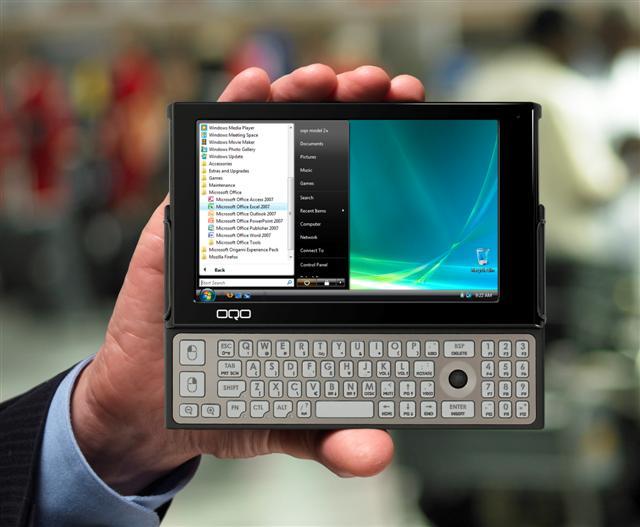
OQO model 2+ claims to be world’s smallest Vista running PC with OLED screen. The new model 2+ comes with a much faster 1.86GHz Intel Atom processor and 2GB RAM unlike it’s older sibling OQO model 2, which ran a VIA processor and 1GB of RAM. According to the folks at OQO, the new OQO model 2+ offers performance up to twice as fast as its predecessor. It also comes with an embedded passive touchscreen for easier input. This will allow you to use your hands to use the touch screen and you won’t have to search for the stylus just to tap on something on the screen. It comes with inbuilt 3G, thus giving you great speed wherever you get mobile coverage.

So, with the newer model, you get the fastest available Atom Z540 CPU running at 1.86GHz. Since the RAM in the OQO is non-upgradble, it makes sense to give the users as-much RAM as possible to make the Vista experience better. The display is still WVGA (800×480), but the colors look great thanks to the OLED display. The white color looks whiter and black color looks more dark. The model 2+ supports large external displays up to 1920×1200 with HDMI/DVI and VGA interfaces. The keyboard has not change as it was already very usable in the original OQO 2.

Also, ApoTheTech was also able to gather information about it’s ability to provide hardware video decoding. Hi-def H264 video plays fine on the OQO 2+. Also, since it provides hardware video decoding, it does not burn a lot of power while running CPU-intensive videos.

Regarding battery life, you will be able to get nearly 3.5 hours of juice before the OQO 2+ shuts down. This means that with extended battery, you will be able to squeeze nearly 7 hours of battery life.

OQO 2+ official webpage

HP releases Pavilion dv3

Normally, we do not cover notebook news much, but HP Pavilion dv3 has caught our attention. HP has recently announced the Pavilion dv3 series, which comes with the a 13.3″ LED lit screen and super multi DVD drive. It’s perfect device for those who are so lazy that they do not want to carry extra accessories with them. It is a worthy successor to the Pavillion dv2 series as that didn’t include the DVD driver and featured a smaller 12″ display.

hp Pavilion dv3

HP Pavilion dv3 has a AMD 2.4GHz dual-core processor, 8GB RAM, three USB ports, SATA combo and HDMI connector, which makes it a great overall deal. It is attractively priced at $799 for the base model. Truly, HP has not forgotten the proper notebook lovers. HP Pavilion dv3 page.

HP unveils the new Mini 2140 Netbook

HP has recently launched new netbook, HP Mini 2140.  This is a long-awaited upgrade for the HP-mini lovers, who were let down by the snail-speed VIA processor. The HP has completely ruled out the VIA processor from the scene and have opted for the Intel Atom N270 processor running at 1.6Ghz. Like it’s sibling mininote 2133, it is surrounded by by all-aluminum casing. HP has also bumped up both the screen-size and resolution to 10.1″ and 1366 x 768 respectively although a lower resolution model with 1024 x 576 resolution is also available. With the 3-cell battery, it weighs a modest 1.3kg

Features

  • Intel Atom N270 processor @ 1.6Ghz
  • 10.2-inch diagonal scratch-resistant HP Illumi-Lite LED display
  • 1024 x 576 or 1366 x 768 resolution
  • 80GB SSD or HDD
  • 92%  full-size QWERTY keyboard
  • VGA webcam
  • Wi-Fi, Bluetooth 2.0
  • 3-cell or 6-cell battery pack
  • HP Dura Keys HP 3D Drive Guard and HP Panel Protection System

From the specifications, it is clear that the HP mini 2140 offers much more than the regular netbooks have to offer. It has a built-in accelerometer to detect free-falls, which locks the head of the HDD so that it does not get damaged. It maintains the excellent keyboard, which was there in the mininote 2133. It has HP Dura-finish on the keys to prolong the life of the keys. It will be launched sometime this month with a competitive price tag of $499.

HP 2140 official webapge

Presenting SONY’s new baby: VAIO P-series – comments on keyboard, screen and more

SONY said something big was coming on Jan 7, 2009 and they were right. Actually, it is not big but quite small and thin. The new SONY VAIO P-series is less than an inch thin and weighs just 0.63kg (1.4pounds). This means that it weighs same as the little Fujitsu U2010, but it has a bigger frame. It comes with a new, but slower Atom Z530 processor running at 1.33-GHz and it runs Windows Vista. It also comes with 2GB of RAM.

Presenting SONY's new baby: VAIO P-series - comments on keyboard, screen and more

Continue reading “Presenting SONY’s new baby: VAIO P-series – comments on keyboard, screen and more”

Future EEE PCs will have a better keyboard layout

ASUS is planning to do a lot of hardware changes to their EEE PC line. One of those changes is little, but a quite important one. It is about changing the placement of the right shift key and making it bigger, thus making the overall typing experience more pleasant.

Future EEE PCs will have a better keyboard layout

The right shift is now placed at more comfortable and natural position. I touch-type at a fairly high speed and fortunately unfortunately, I am quite used to the right shift key. Although, I’ve been able to adapt my fingers to the little right shift key of the EEE PCs so far, but it does bugs me sometimes, when I have to some programming where it involves the use of characters like “< > { }.” According to some reports, the ASUS has already implemented the above mentioned keyboard in the EEE 1002HA and S101H.

TIP: If you are guy really that uses the right shift key a lot, then I recommend you to swap the keys. Read this article to easily swap the functions of the keys without doing any dangerous registry edits.

EMTEC launches Gdium Netbook computer

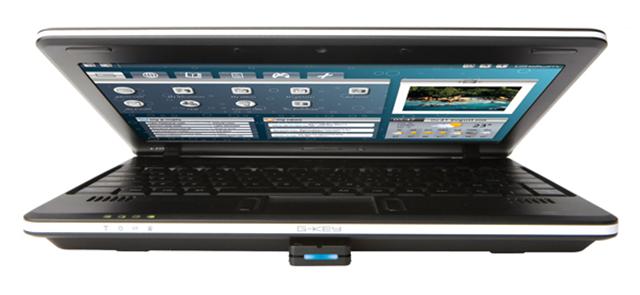
This new netbook from EMTEC boasts a compact size and light weight netbook, while still offering a respected resolution of 1024 x 600 and 10-inch screen size with a full keyboard.

The software application included with Gdium is based entirely on Open Source Software and includes an  impressive variety of programs:  FireFox, Thunderbird e-mail client,  Instant Messaging, VoIP, Blog editor, audio/video players, and security  utilities, as well as a complete Open Office suite of application for word  processing, spreadsheets, and presentations.

What makes Gdium unique is  the G-Key, a bootable USB key on which the Linux operating system,  applications, and personal data are stored.  The G-Key allows each user  to store their personal info and preference securely, without leaving a trace  on the computer. The Gdium will retail for under $400, and comes in 3  colors- White, Black, and Pink.

So, does that means that the Netbook won’t boot without the USB key? Also, there is no update of getting one with Windows XP. It is available for about $400

Visit Gdium.com for more information Continue reading “EMTEC launches Gdium Netbook computer”

ASUS P565 benchmarked – It truly seems to be the Fastest Windows Mobile for sure!

Here comes the highly awaited phone from ASUS, which claims to be world’s fastest PDA-Phone. It arrived yesterday and after posting unboxing pictures, I went straight to do some benchmarking. Without wasting more time, let us take a look at the benchmarks.

For the benchmarking test, we used 3 devices: ASUS P565, ASUS P552W and HTC DIAMOND. The ASUS P565 is the first windows mobile device powered by Intel Marvell Tavor 800MHz processor. Infact, it is the first mobile device to be powered by such a powerful processor. ASUS P552W is also an extremely fast device powered by Intel Marvell Tavor 624MHz processor. The HTC DIAMOND is powered by Qualcomm 528MHz processor.

Let the game begin!

As one can observe, the ASUS P565 scored the best in almost everything. Note that since ASUS P552W is a QVGA device, it’s processor has to do comparatively less work when it comes to graphic processing. Since, the users would be having their eyes on the VGA devices, which in this scene are ASUS P565 and HTC DIAMOND, it would be more appropriate to pay more attention to their performance.

Now, let us take the ASUS P552W out of the scene to make the comparison more fairer.

Leave the benchmarks aside, does it really feel snappy?

Yes, it does. It is definitely lot snappier than the HTC DIAMOND, whose processor is shared by the likes of HTC TOUCH PRO and HTC TOUCH HD too. Overall, a very nicely made device and we are indeed very impressed with the ASUS P565.

On a side note, the touch screen is very very sensitive. Stay tuned for the full review, which will be published in few days!

update: see unboxing pictures here.