How To: Install Windows 7 on HTC Shift [UMPC]

HTC Shift comes with Windows Vista only. There is no official support for Windows XP. But, Vista drivers seems to work fine on the Windows 7 (of course in compatibility mode). The snapvue also seems to work fine in Windows 7. To install Windows 7 on the HTC Shift, you will need an external DVD drive.

Here is a step-by-step guide to install Windows 7 on Shift. (thanks to deadnex at xda-devs)

• Download the beta image from Microsoft

• Burn the image to a DVD

• Enable wifi and Bluetooth in Vista.

• If you want to dualboot Windows 7 and Vista you need to partition your harddrive before starting the installation. Use a suitable partition manager such as Paragon Partition Manager and shrink c:/ to approximately 15-17 GB. Create a new partition in the free space.

• Connect the USB DVD drive to your shift

• Press fn+0 (F10) after turning on your shift – select the DVD drive

• Follow the steps for installing Windows. Remember to select partition 2 as target partition if you want to dualboot with Vista. If not you can safely format the existing partition. This will not affect the recovery partition. If you prefer to upgrade from Vista to keep your files and programs you can start the installation from Vista instead of booting the DVD. However, since Windows 7 is still a beta OS this might cause some unknown problems. I recommend installing a fresh copy and dualboot with Vista.

• Download the shift drivers from HTC Continue reading “How To: Install Windows 7 on HTC Shift [UMPC]”

After Blue Angel, Windows Mobile 6.5 ported to HTC DIAMOND and HTC TOUCH HD [Windows Mobile]

Well, it did not take them long to do it. First, we heard about Windows Mobile 6.5 ported to old Blue Angel. Well, it has now been ported to the latest and the greatest devices by HTC: HTC TOUCH DIAMOND and HTC TOUCH HD. They have able to get most of the things working correctly, but not everything is working. We are pretty sure, it won’t take the folks at xda-devs much time to get all the components working correctly.

After Blue Angel, Windows Mobile 6.5 ported to HTC DIAMOND and HTC TOUCH HD

—

Read ApoTheTech’s HTC TOUCH DIAMOND review

Read our ApoTheTech’s HTC TOUCH HD review

Multiple Windows 7 versions = Ok. But will there be a netbook version? [Netbook]

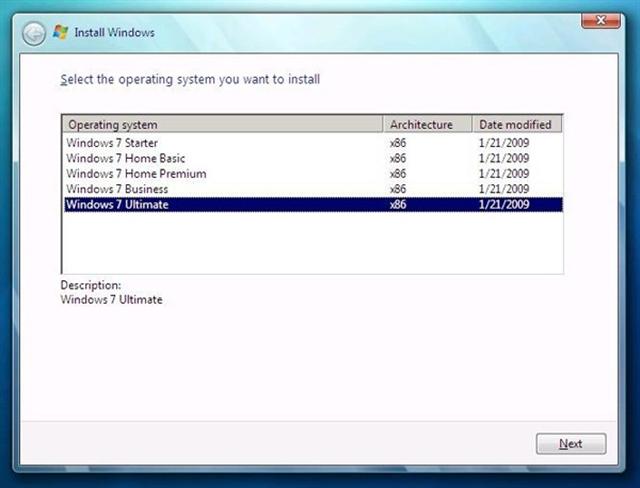
Here is a screenshot from the Windows 7 beta, build 7025. As we can see, upon it’s install, it asks user which version would he like to install. But, it makes the netbook community wonder one thing. What about the netbook version which is supposed to be lighter than the bulkier full verison of Windows 7?

People who would be using Windows 7 on their netbooks, UMPCs and MIDs generally won’t be needing all the featues that they use on their desktops and laptops. Although, there are many rumors from various sources that say that Microsoft would be making a special version for the netbooks and UMPCs, which would be lighther and cheaper. But, may be not in this version.

[pcbeta] [via engadget]

Acer working on a Mobile Internet Device [MID]

Soon after releasing the 10-inch Acer Aspire One, Acer may be now working hard on a MID with a pretty sizable touchscreen. The unit also seems to have a dock connector at the bottom to connect to other peripherals. The little hole looks like to be a 3.5mm headphone jack.

Acer working on a Mobile Internet Device

There is no other information like the type of processor it will be using and the amount of storage space. But, if we follow the market trend, all the latest MIDs are coming with Atom processors, which also opens the possibility to use Desktop-class operating systems like Windows XP or Windows 7. So, it will likely have an Atom processor. [electronicpulp]

Samsung SGH-i780 ROM update [Windows Mobile]

This new ROM update for the Samsung i780 will upgrade the software version from Windows Mobile 6.0 to Windows Mobile 6.1. It seems like folks at Samsung took a really long time to come up with this update especially when the Windows Mobile 6.5 is around the corner.

Note that since this will a ROM update, it will erase all the contents of your device. So, you should do a backup of all of your data before performing the update.

[related ROM update webpage]

thanks to John for the tip