Bitcoin BTC – USD July 2016 analysis

The bitcoin price technical analysis for the july 2016 is in and our verdict is that it is still stuck in consolidation. However, we are quite sure it is getting ready to make a strong breakout soon. Right now, when converting from BTC to USD, one can see that the price is stuck inside a triangle pattern but we feel it might breakout since it is now at its peak.

Bitcoin BTC – USD July 2016 analysis

We also feel that a breakout in either direction will set a long term tread for the bitcoin rate. Some technical experts say that the price of bitcoin is likely to go down in a big way. Right now, it sits just below the 800-dollar level.

That said if the oscillator reaches the overbought area, then the sellers will be able to regain control of the price action. According to the US NFP report, there was a bit of increase in demand for the US dollar last Friday and the economy added 287000 jobs in June which is higher than the projected 175000 increase.

On the other hand, the unemployment rate rose from 4.7 -> 4.9 percent that is higher than the projected increase to 4.8 percent. Right now, the bitcoin price is waiting to see how the uncertainties of the market stay before deciding on the direction.

Download OnePlus 2 TWRP custom recovery

Download the all in one tool for fetching OnePlus 2 Drivers, Unlock, TWRP, Factory Image, Stock Recovery and so on. Maunronofrio at xda-developers has churned out an all in one tool for install oneplus 2 drives, unlocking bootloader and flashing TWRP or stock recovery. The tool is very easy to use and will help you in hacking your new android phone easily.

Download OnePlus 2 TWRP custom recovery

Here is what you can do with it:

Install Drivers
Unlock Bootloader
Lock Bootloader
Flash TWRP Recovery
Flash Stock Recovery
Flash Stock Factory Image
Reboot Phone
Update the Tool to last version
Delete downloaded files

Installation process:
Download .zip file;
Extract all its contents into a folder;
Click on setup.exe;
Click on “Install”;
Waiting for the end of the process;

Download official CM13 for OnePlus 2: Vanilla android marshmallow ROM for OnePlus 2

Official cyanogen mod 13 aka CM13 for OnePlus 2 is now available for download. This will give you plain android aka vanilla android experience on the OnePlus 2. Also no need to worry about voiding warranty as OnePlus warranty covers software modifications.

Download official CM13 for OnePlus 2

Installation instructions:

* You must unlock OnePlus 2 bootloader via fastboot.
* Make sure you flashed OOS Beta 2.
* You must have a oneplus 2 custom recovery installed
* Go to http://get.cm/?device=oneplus2 and download the latest CM13.0 nightly.
* Locate 6.0 Gapps via a quick Google search.
* Fully wipe your device from Recovery if you are not coming from CM13.0 already.
* Reboot into recovery and install.

The only thing that is not said to be working is encryption but that is not working in oxygen OS 3 either.

Download OnePlus 3 camera for OnePlus 2: OnePlus 2 Oxygen OS Camera 3.0.2 download links

Oxygen OS Camera 3.0.2 available for download

You can now download OnePlus 3 camera for OnePlus 2. Yes, final version of the Oxygen operating system has been released and team at xda developers have ported OxygenOS 3.0.2 camera to the OnePlus 2 android phone. This port is available for download and said to be fully working. To install it, simply flash in oneplus 2 recovery like TWRP or CWM and enjoy.

Download OnePlus 3 camera for OnePlus 2

Keep in mind that stock or other camera apps will NOT be replaced by installing Oxygen camera on OnePlus 2. Both RAW and manual modes are supported. It is said to be working on CM13 OnePlus 2 ROM as well.

There are two versions to choose from: One comes with gallery and one comes without one.

So if you want to enjoy OnePlus 3 gallery on OnePlus 2, go for the one that comes with gallery otherwise if you just want the port of camera app, go for the latter.

There is only one bug to solve right now which is opening recorded videos with stock player inside camera let’s crash gallery. go to gallery instead or use other player/gallery.

Download Galaxy S3 Android 6 paranoid ROM i9300

Folks at paranoid have churned out Android 6 ROM for the old Samsung Galaxy S3 i9300 phone. It is great for putting a new life into your old android phone as this ROM will give you pure android experience so no or very less lags here and there.

Galaxy S3 Android 6 paranoid ROM

Download the ROM from here and flash it using CWM or TWRP of S3 i9300. Gapps may not install at first and you will make the ROM boot first > and then flash gapps. Wipe the data and then reboot again. Other than this, there are no other bugs. In case your device as difficulty in booting, try this fix.

This ROM is designed to give you better performance and stability and we are sure you will love it.

The last update Samsung rolled out was Android 4.3 that dates way back in November of 2013 which is dumping someone after an year or so. Since this S3 android phone was the best selling galaxy phone of all time, Samsung should have supported it a bit more but fortunately we have XDA to rescue us.

Lollipop ROM for LG Optimus G Pro

You can now download android lollipop ROM for the LG Optimus G Pro and this custom lollipop ROM comes with root functionality. For flashing this ROM, you need to have latest custom recovery.

download Lollipop ROM for LG Optimus G Pro

1) Download ROM from bottom of this article and install / restart recovery
2) factory reset existing ROM, clear dalvik cache.
2) install rom in recovery

Here are its list of features.

# base Lollipop 240L30C
# Integrated into flash rom
# Clear app Korea
# Root
# Reboot into G Pro custom recovery and use hardware keys Home + Power + VOL- to go into recovery.
# Fix overheat, battery power
# Fix Fast Charger
# Fix rom smooth
# Fix rom stable
# Fix call recording
# Taction
# LGTaskManager G3
# Apply ear receive calls
# Vietnamese goods
# Fix memory card 98x
# Fix getting the right card in 98x
# Fix for external speakers 98x
# NFC.
# Volume wake
# Knock on, knock code
# 6 lock screen effect
Effects Lockscreen weather outside (no fix is)
# Navigate the virtual
# Miniview
# Add 4 seasons G3 theme 5.0.1
# Add 2 theme Glex
# Toggle flashlight
# Add lunar
# 2G only

LG G5 ROM ported to Optimus G Pro

LG has forgotten about the LG Optimus G Pro and is no longer pushing updates to it but folks at XDA developers are still supporting the phone pretty nicely. Now, LG G5 user interface and its new apps have been ported to LG Optimus G Pro. The ROM is pre rooted and comes with super SU and busybox installed. There is a automatic call recorder function as well.

lg g5 port optmius g pro

Here are its list of features:

* Based on 5.0.2 F310L 30B firmware
* Ported UX 5.0 from the LG G5 H850 V09H
* Aroma installer
* SuperSU
* Busybox + runparts
* init.d support
* Debloated
* Brightness and Volume toggle
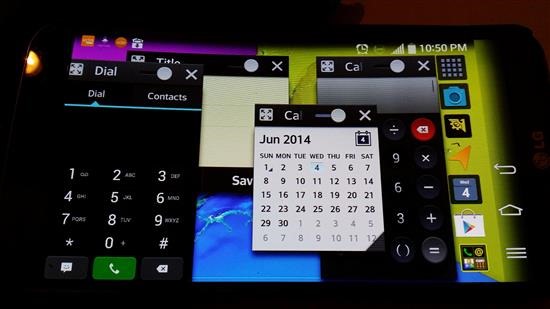
* Split View
* Auto Calling Recorder
* Knock Code support
* All lockscreen weather animations
* LG’s hidden menu

The ROM comes with LG G5 Home Ux40, EasyHome, Keyboard, Health, Video, weather style and full smart notice functions.

Here is how to install it.

* Download ROM from here. Perform a full nandroid backup.
* Make sure you have a custom recovery installed. (TWRP tested)
* Full wipe recommended
* Flash ROM
* First boot may take up to 10 minutes

If you do not get signal on your LG G Optmius Pro

1. Flash rom, don’t reboot
2. Flash this patch
3. Reboot