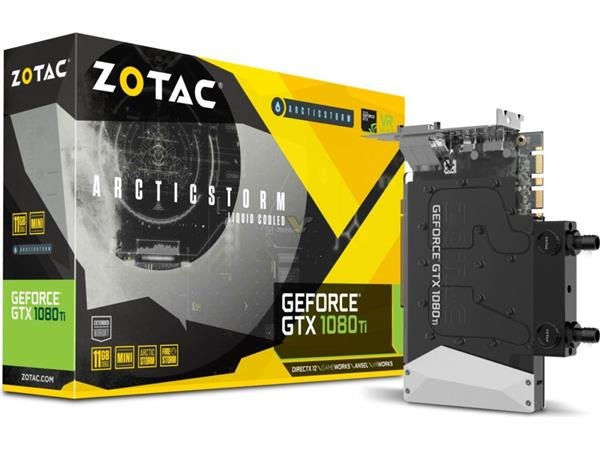
Liquid Cooled Zotac 1080Ti price and specifications: Zotac GeForce GTX 1080Ti Mini with Fanless Liquid cooling launched

Liquid Cooled Zotac 1080Ti price specs

Unlike the Zotac 1060 Mini, the company does not offer a single fan version of the GTX 1080Ti. It does offer a mini variant but it is not as small as the GTX 1060 Mini since 1080Ti mini makes use of two fans. To counter that problem, Zotac has churned out liquid cooled version Zotac 1080Ti graphics card. It is almost as small as the Zotac GTX 1060 Mini and offers same power and performance as the three / two fan GTX 1080Ti. This will allow desktop manufactures and assemblers to squeeze top-of-the line graphics card into small desktop cabinets.

Continue reading “Liquid Cooled Zotac 1080Ti price and specifications: Zotac GeForce GTX 1080Ti Mini with Fanless Liquid cooling launched”

Galaxy Note 8 G950, G955 Renovate Custom ROM

Renovate, a custom ROM for the Samsung galaxy note 8 is available for download. It runs android 7.1. Support Note 8 variants include G950 and G955 and for some excellent reason, the Knox is set to 0x0 when it first boots. Here are the details of the ROM.

Galaxy Note 8 G950, G955 Renovate Custom ROM

N950FXXU1AQI1
Android 7.1
Knox set to 0x0 when booted
Fully working private mode
Support for G95XF/FD/N
Customizable AROMA installer with option to debloat & remove knox
Choose from no root, magisk or supersu
Optimized for improved battery/perfomance
Tweaks app to control your experience
Device status set to official
5 way reboot menu added
Added outdoor mode to settings
Added LED notifications to settings
Added screen recorder quicksettings tile
Removed OEM unlock toggle from settings to avoid accidentally re-locking device
Enabled SystemUI Tuner, activate by long press settings button in quicksettings panel

To install the ROM, download the ROM from above mentioned link. Then copy the ROM to your phone’s external SD card and then boot into galaxy note 8 TWRP custom recovery. After that, browse for the ROM and install it from there. That is it, you have successfully installed renovate’s custom ROM for the Samsung Galaxy Note 8 android phone.

Galaxy Note 8 Overclocking and Underclocking using Custom Kernel – SM-N950F/FD/N SM-G95XF/FD/N custom kernel

Galaxy Note 8 Overclocking and Underclocking download

Do you want to squeeze out more performance or improve battery life of your Samsung galaxy Note 8? The best way to do is by installing Note 8 custom kernel that enables overclocking and unclocking of CPU clock and cores. For that, you will have to install iron kernel that lets you choose between various CPU governors including performance, powersave, userspace, ondemand, interactiv (default), conservative and schedutil.

To install this Note 8 kernel, follow these instructions:

0. Have a working Note 8 custom recovery and encryption removed.
1. Download kernel and copy it to your sd card
2. Boot into twrp recovery mode (press bixby + volume up + power)
3. Flash kernel
4. Flash any other file which affects ramdisk (Magisk or SuperSU)
5. Reboot

Here are other features of this Note 8 kernel.

* Build with latest 6.4.0 GNU GCC toolchain
* Build with AQI1 kernel source code
* Latest Linux version 4.4.89, is always up to date
* Performance and Batterylife improved
* Includes latest AQI8 ramdisk
* I/O schedulers: CFQ (Default), No-op, Deadline
* NTFS enabled
* TCP (Network) control: Bic (default), Reno, cdg, cubic, dctcp, Westwood, Highspeed, Hybla, HTCP, Vegas, Veno, Scalable, LP, Yeah, Illinois, Lia, Olia, Wvegas, balia
* Selinux is set to permissive
* Supports Private Mode
* F2fs on /data partition
* Init.d support
* All samsung security related configs disabled (as knox, tima, restrict rooting)

Download S8 ROM for Galaxy J7 2016: Nemesis Nougat ROM for J7

Download S8 ROM for Galaxy J7 2016

A ROM developer has ported Samsung Galaxy S8 ROM to the J7 2016 android phone. The ROM is based on S8 AQH3 Nougat firmware. It has permissive kernel and is fully stock at the moment. However, the developer has debloated and deknoxed it. To install this S8 ROM for the Samsung Galaxy S8 ROM, you will need latest J7 2016 TWRP custom recovery which is only way of installing third party ROMs.

Installation instructions:
1) Put the zip file in your SD Card
2) Reboot in Recovery Mode (use Twrp or Philz Recovery)
3) Wipe Data, Cache, Dalvik Cache and format /System (If running Philz Recovery use the “Clean before install a new rom” option)
4) Install the ROM
5) Install Magisk or Supersu if you want root
6) Reboot

Here are features of this ROM:

* Base Updated to Official J710FN Nougat one
* Ported S8 AQH3 Rom
* Fixed NFC
* Fixed Pin Unlock delay
* Fixed Dual Sim
* Added N8 Launcher
* Added N8 Phone/Contacts
* Added N8 SMS
* Added N8 Keyboard
* Added N8 Livedrawing (is laggy because of our gpu but works)
* Added Native Blur
* Added Full working People Edge

Download Note 8 TWRP recovery: Custom recovery TWRP for Samsung galaxy note 8

Download Note 8 TWRP recovery

TWRP custom recovery for Samsung galaxy note 8 is available for download. This Galaxy Note 8 TWRP custom recovery is required to flash custom ROMs and all other sorts of hacks that are required to make system-level changes on your new Note 8 smartphone. Right now, the TWRP custom recovery is compatible with only Exynos variants and that means it cannot be flashed to American(U/A/T/P/V), Chinese(0/8/6), Hong Kong(0), Japanese(SC-*), Canadian(W) variants.

Continue reading “Download Note 8 TWRP recovery: Custom recovery TWRP for Samsung galaxy note 8”

Asus FX553 VD VE Overheating Problem solution

Asus-FX553-VD-VE-Overheating-Problem-solution

If you own a Asus FX553 VD or VE and find the laptop running incredibly hot, we have a solution for your problem. But first we need to understand why the Asus FX553 runs so hot. The main reason is the fact it comes with a standard voltage processor which has a tendency to run so hot. However, there is a limit to everything and if the temperature crosses a limit, the laptop will turn itself off.

Many users of Asus FX553 laptop say that the processor reaches as high as 88 degrees Celsius and GPU reaching as high as 80 degrees. Excessive heat is not good for either graphics card or the processor and can significantly reduce the lifespan of your Asus FX553 laptop.

Even if you take your Asus FX553 to service center, they would not do anything other than applying some simple thermal paste here and there.

There is a solution to overheating problem though – by buying the IC Diamond thermal paste, the laptop’s temperature will go down considerably. This means you will have open the laptop to get access to the motherboard where you will find both the processor and graphics card. Applying some IC Diamond solves this problem.