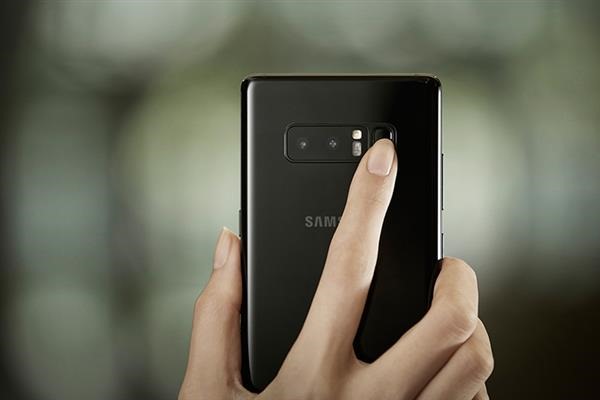
Download IronKernel for SM-N950F/FD/N and SM-G95XF/FD/N

Download Iron kernel for Galaxy Note 8

Custom kernel for the Samsung Galaxy Note 8 is now available. It is for the SM-N950F/FD/N and SM-G95XF/FD/N variants. If your variant is not listed, try this custom kernel that can be used to overclock / underclock note 8. Flashing custom kernel will make your device lose its warranty and knox will display 0x1. Here are the features of this kernel.

Here is how to install the kernel on Galaxy Note 8

0. Have a working recovery and encryption removed!
1. Download kernel from here and copy it to your sd card
2. Boot into twrp recovery mode (press bixby + volume up + power)
3. Flash kernel
4. Flash any other file which affects ramdisk (Magisk or SuperSU)
5. Reboot

Features of the Iron kernel for Galaxy Note 8

– Build with latest 6.4.1 GNU GCC toolchain
– Build with BQK6 kernel source code
– Latest Linux version 4.4.104, is always up to date
– Performance and Batterylife improved
– Choose between different CPU governors: performance, powersave, userspace, ondemand, interactiv (default), conservative, schedutil
– Includes latest BQK6 ramdisk
– I/O schedulers: CFQ (Default), No-op, Deadline, BFQ
– NTFS enabled
– TCP (Network) control: Bic (default), Reno, cdg, cubic, dctcp, Westwood, Highspeed, Hybla, HTCP, Vegas, Veno, Scalable, LP, Yeah, Illinois, Lia, Olia, Wvegas, balia
– Selinux is set to permissive
– Supports Private Mode
– F2fs on /data partition
– Init.d support
– All samsung security related configs disabled (as knox, tima, restrict rooting)
– Boeffla wakelock control

Root Snapdragon Note 8: Samsung Galaxy Note 8 Rooting instructions for Qualcomm Snapdragon phone

Galaxy Note 8

Qualcomm Snapdragon version of Samsung Galaxy Note 8 can now be rooted. These instructions come from the awesome XDA developers. This method will not trip the Knox counter so the warranty of your android phone will not get void. It is only for the Snapdragon variant and will not work on the Exynos or Chinese models. The root method is pretty much straight forward since the developer has done most of the hard work for you. All you need to do is follow the steps given below. Make sure you have followed all the pre-requisites. One thing to keep in mind though is to make entire backup of the internal as rooting procedure will delete everything stored on it.

Pre-requisites for rooting Samsung Galaxy Note 8

– Note 8 Pre-Rooted System.tar/PIT File Zip https://www.androidfilehost.com/?fid=745849072291693824
– Note 8 PART 2 Firmware Zip https://androidfilehost.com/?fid=745849072291692665
– ODIN app https://www.androidfilehost.com/?fid=745849072291680035
– A PC and ready to use Download Mode.

Part 1

1) Unzip the SamFAIL Note 8 Pre-Rooted System.tar and PIT File to your PC.
2) Have Comsey ODIN up and ready. Place your Note 8 into Download Mode and Connect to PC
3) In the AP slot, select the Pre-Rooted system.tar.
root galaxy note 8 snapdragon
4) Now go to the PIT tab(Click OK or close on the warning box) and click and navigate to the PIT file you also just downloaded and select it.
5) On the OPTIONS tab, you will select the following: Auto Reboot, F. Reset Time, NAND ERASE ALL, and Re-Partition.
6) Once you have everything in place and the correct options selected, press START.
7) ODIN will say FAIL at the end of the flash and the phone will have rebooted to upload mode saying "Unknow Error". Don’t fret however, the system should have still been written!
8) You will have to get the phone back into Download mode( Hold Power, VOL- and bixby together and the phone will reboot to download mode and tell you its in emergency mode. THIS IS NORMAL.) and then proceed to Part 2 Instructions!

Part 2 instructions:

1) Download and Extract the SamFAIL Note 8 Part 2 Firmware Zip to your PC
2) Click Reset in Comsey ODIN or close it out and re-open it so it is COMPLETELY cleared out
3) Now select the firmware. BL goes in BL, AP goes in AP, CP goes in CP, dont press start yet!
4) Now, this time we ARE NOT SELECTING A PIT FILE, We should just select Auto Reboot and F. Reset Time. DO NOT DO NAND ERASE ALL OR YOU WILL HAVE TO START OVER.
5) Once you got the partitions in place and the right options selected, Press Start!
7) Once phone boots up, Setup your device as normal and proceed to the SuperSU app. It may ask you to update the SU Binary. Select Normal method and let it do its thing. Follow its instructions then SU should say it was Successful in updating and it needs to reboot(You may have to do it multiple times. I believe its 2 or 3 times then its good) ENJOY SamFAIL ROOT!

ECS Liva Plus ZE with RS232 connectivity for industrial equipment

The manufacturer specializing in mini PCs and motherboards, ECS has announced the launch of the new addition to its catalog, the new ECS Liva Plus ZE, a mini PC that stands out for incorporating two RS232 ports to make it compatible with old and industrial devices, and equipped of a high power in small format to be able to supply any type of need that the user may have.

Continue reading “ECS Liva Plus ZE with RS232 connectivity for industrial equipment”

Intel Z390 motherboard spotted in SiSoft Sandra benchmark

Intel-Z390-motherboard

Z390 Express Socket LGA1151 manufactured by SuperMicro has been spotted on SiSoft Sandra benchmark. It is surprising to find indications of this chipset since its launch is scheduled for the second half of 2018, which indicates that Intel may be trying to accelerate its launch. According to the manufacturer’s official launch schedule, the Z390 Express chipset should be launched in the second half of next year, and would come after the H370 Express, B360 Express and H310 Express chipset that will arrive in the first half of 2018. This is the reason why it is strange to see already signs that there are already motherboards with the Z390 chipset, and not only because it seems too early because we should have seen something from the others before, since they will be launched to the market beforehand. 

The Intel Z390 Express chipset adds some improvements to the existing platform (Z370) but nothing particularly substantial. Things like a programmable quad-core DSP audio processor or the SoundWire audio interface are fine, but they can not be considered important. There are other things that do have something more important, such as the integrated USB 3.1 controller, the WLAN controller 802.11ac integrated – yes, with an external PHY, SDIO controller for card readers also integrated, or compatibility with the new controller Thunderbolt 3.0 “Titan Ridge”. They are improvements to the platform that have more or less weight, but as we said nothing that has a real weight on the platform.

We’ll see anyway what happens in the end. Since the manufacturer of the plate is SuperMicro, a manufacturer that usually focuses on OEM and industrial systems rather than the general public, it is quite possible that it was simply an oversight by an Intel engineer who was doing the first tests and forgot to uncheck the option to upload the benchmark result directly to the database after the test.

HP 12 inch convertible laptop with Snapdragon 835 processor running Windows 10 spotted on Geekbench, specs inside

hp-snapdragon-835

First HP laptop with Qualcomm Snapdragon 835 processor and windows 10 has been spotted on popular benchmark website, geekbench that has given us some information on its specifications. Scheduled to be launched at the end of 2017, this HP 12 inch laptop is a convertible laptop with touchscreen display that can be used as slate tablet by folding the screen. Specifications include Qualcomm Snapdragon 835 processor and it runs Windows 10S / Windows 10 32 bit OS. Processor’s clock speed is said to be between 1.9-2.2GHz backed by 4GB / 8GB RAM so the performance is not going to win any awards.

However, the price is going to be much cheaper than its Intel counterparts. Plus, the battery life is going to be much more than any other Intel processor. We are not saying there are no Intel-powered laptops with long battery life but they are no way as efficient as the Qualcomm Snapdragon 835.

HP-12-inch-convertible-laptop

That being said, if you are planning to use your laptop for heavy duty tasks like Auto CAD or Solidworks or gaming, do not even think of buying a laptop with ARM processor like Qualcomm because they simple do not have enough power to run 3D modeling applications smoothly.

The new tech of video gaming in 2017: comparison between mini PC VS Xbox Vs Online

Not a day is passed when one does not come across a mini PC vs Xbox console debate. In 2017, mini PC gaming is going get even better thanks to the introduction of pre-built gaming PCs from companies like Valve Corporation which recently churned out Steam Machines. Let us not forget the third player that is giving both of these a tough competition – online gaming. This new type of gaming does not require you to have the latest gaming console or high end mini PC as almost all game processing is done in the cloud – on some very powerful computer on the server end.

174317582

Continue reading “The new tech of video gaming in 2017: comparison between mini PC VS Xbox Vs Online”