How to take screenshot on Motorola Moto E

Moto E is the first smartphone for many of us and most of them do not know how to take a screen grab / screenshot. Screenshots are great for saving or sharing a screen with someone.

So here is a little tutorial on how to do it. Just hold the power button and volume down key for a second. That is it – you have successfully taken a screenshot on your Motorola Moto E. The image will be saved on your device.

How to take screenshot on Motorola Moto E

If it does not work for you, you need to ensure that you press both buttons at the same time and keep them pressed for a second or so until you hear a shutter sound.

Download MIUI ROM for Galaxy Core Duos

There is a CM11 ROM for the Samsung Galaxy Core Duos so why not a MIUI ROM? The ROM is based on KitKat ROM. Here are the features of this ROM:

1. Deodexed
2. Highly modified
3. All build Prop tweaks
4. Fully themed
5. Smooth performance
6.Miui Launcher
7. Miui File explorer
8. Miui Music player
9. Miui Gallery
10. Miui Camera
11. Miui lockscreen
12. Themed statusbar
13. Themed every app
14. Fully tweaked
15. Theme changer

Download MIUI ROM for Galaxy Core Duos

For installation follow these steps:

Download the ROM from here
Root Samsung galaxy core by following these instructions
Install cwm recovery from here 
Boot to cwm by pressing home+power+volume up simultaneously
Clear data . cache
Install Miui style v5

Get Lewa OS on Nokia X

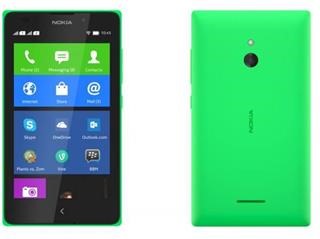
Nokia X is an Android phone so it is very hack able. An XDA user has been able to install Lewa operating system on Nokia X and judging by its screenshot it is looking pretty slick.

Lewa OS on Nokia X

Here are the installation instructions:

1. Download the driver file and extract it to your desktop
2. Download the configuration file and extract it.
3. Download the tool to let you jump into the recovery and extract it.
4. Download Lewa ROM.

Just keep in mind that you will loose all data after installing it so make sure to create a backup before proceeding.

Download AOSP Nokia XL X ROM

Not exactly full AOSP but semi AOSP ROM for the Nokia XL and X devices. It looks and feel totally like an AOSP ROM and is very light. 

Features

– AOSP look
– Very slim and light
– Fast booting
– RAM usage very good
– Stable

Download:

WiFi would not work out of the box but there is an easy fix. After flashing rom:

Step 1) Flash Superuser SU through CWM
Step 2) Flash the Null Kernel 20140609 link
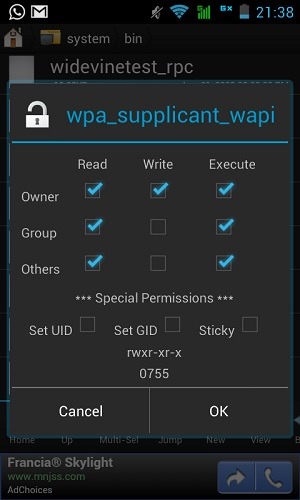
Step 3) Copy the wifi_supplicant_wapi file from miniromS5 from /system/bin and paste it in Semi AOSP rom’s /system/bin folder with similar permissions that of bin folder. usage of Root explorer is highly preferred.

Download AOSP Nokia XL X ROM

I have included a screenshot of the permission you need to set after copying.

Root Note 3 Neo the easy way

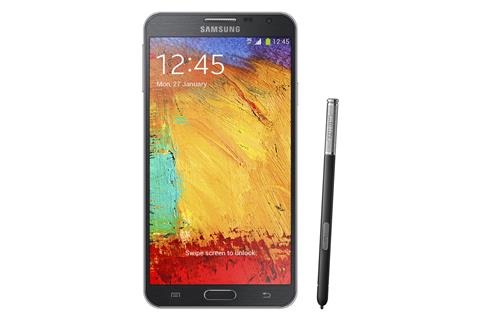
So you just bought the Samsung Galaxy Note 3 Neo and now you want to root it. We finally have the steps on how to do it quickly. For now they only work on the SM-N7505 model which is the LTE model.

We have the instructions on how to root the Samsung Galaxy Note 3 Neo N7505 using CF-auto root method.

First you need to make sure that you are running the official Jelly bean 4.3 ROM for N7505. If you are unsure then download it from here. Steps for flashing it are given in that post. Also you should have a custom recovery something like TWRP or CWM should just do the job well.

Then download the CF-auto root from here and flash it by following these instructions.

root samsung galaxy note 3 neo

Flash the CF-Auto-Root package as PDA in ODIN, and your device should reboot into a modified recovery and it will install SuperSU for you and restore the stock recovery, and reboot back into Android.

Download Stock Deodexed Rom for Motorola Moto E XT1022

Stock Deodexed Rom for Motorola Moto E XT1022 is now available courtesy of XDA developers. Flashing instructions are given below but before you proceed download the ROM from here and store it on your computer.

1. Boot into TWRP / CWM and wipe data and cache
2. Flash the deodexed rom
3. Reboot

We have installed it on Moto E XT1022 and can confirm that it works.

Download Stock Deodexed Rom for Motorola Moto E XT1022

So what is the difference between a deodexed and odexed ROM? Deodexing is basically repackaging of these APKs in a certain way, such that they are reassembled into classes.dex files. By doing that, all pieces of an application package are put together back in one place, thus eliminating the worry of a modified APK conflicting with some separate odexed parts.

Nokia X and XL Double Tap To Wake UP now working as expected

Most Nokia Lumia devices come with double tap to wake up functionality but it does not work as expected in the Nokia’s Android phones, X and XL. The reason is X and XL use Vibrator and Accelerometer to implement Double Tap on these devices.

This is same for the Nokia 5XX series so it does not work as expected. You must tap really hard and at other times even hitting the phone at its back would wake it up.

Nokia X and XL Double Tap To Wake UP now working as expected

Nokia did this to reduce wastage of battery, the screen was not used to implement this feature.

Root Motorola Moto E using ODIN or ADB

We finally have the instructions on how to root the Motorola Moto E using either ODIN or ADB. Before you proceed you must have:

TWRP on your Moto E or ADB installed on your computer.

Method 1: Rooting using recovery

If you want to follow this method, first follow our instructions on how to install TWRP on Moto E. This requires you to unlock your bootloader too. Do not fret – just open the TWRP link and you will be guided for each and every step.

After you have TWRP on your phone, just download Super SU utility from playstore and install it. Here is a direct link to it.

Root Motorola Moto E

Method 2: Rooting using ADB

After you have ADB or fast installed on your computer, you can root it using ADB. Connect your phone and use these commands to flash it.

adb reboot bootloader
fastboot boot recovery.img

Download Stock Factory ROM for Moto E XT1021 XT1022 XT1025

So you have made myriad modifications on your phone and you want to just go back to stock. Or you want to sell it to someone and completely wipe everything stored on your Moto E. Folks at droid-developers have uploaded the original stock firmwares / ROMs of it.

ROMs for all variants of Moto E have been made available which includes XT1021, XT1022 and XT1025. Each firmware has a size of 400MB.

Blur_Version.20.11.13.condor_retbr.retbr.en.BR
Blur_Version.20.11.14.condor_o2gb.o2gb.en.GB
Blur_Version.20.11.14.condor_retaildsds.retaildsdsall.en.03

To install them you have ADB and fast boot installed on your computer. After you have installed it, use these commands to flash it.

adb reboot bootloader
fastboot flash recovery recovery.img
fastboot reboot

Download Stock Factory ROM for Moto E XT1021 XT1022 XT1025

Make sure you change the image file name to recovery.img before using above mentioned commands.

Moto E TWRP CWM Recovery Download

TWRP for the Motorola Moto E has been released and that means you will now be install ADB and flash new ROM. You will also be able to sideloading. There are few bugs though such as touchscreen would not work if you suspend the phone. So do not make go into suspended mode after you are in TWRP recovery mode.

To install it on your Moto E you must first unlock the bootloader as other wise you will not be able to do any sort of modifications to your device. Then download the recovery image file from here and make sure you have set up ADB on your computer. Then run these commands.

adb reboot bootloader
fastboot flash recovery recovery.img
fastboot reboot

Reboot to recovery and type

adb reboot recovery

moto e twrp cwm download

That is it. You’ve successfully installed TWRP. If you want CWM (clock work mod) recovery you will have to wait bit longer as developers are still working on it.