Samsung rolling out WP8.1 GDR1 update for Ativ S

The official WP 8.1.1 update for Ativ S released by Samsung. You need to be on official GDR3 to receive this update. To get it, open SamWP8 tools > Tweak > region to “000-AT”. Then check for updates on your phone (Settings > “Check for updates”).

New Update details:

SO 8.0.14157.200
Rev.Firm.: 2424.14.9.3
Rev.Hardw.:15.15.10
Soft.Radio:2424.14.9.3
Bootl.:14.09.3.16

If you’re currently on the dev preview you can flash an 8.0.3 build to get the update.

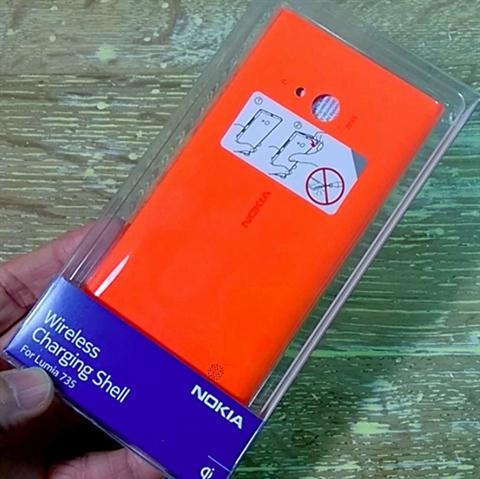
Nokia Lumia 735 730 CP-3086 Review, official wireless charging shell

The Nokia Lumia 735 and 730 are the latest windows phone cellphones in the market and they offer great value for money. It does not come with built in wireless charging like Lumia 830 and 930 but you can add this high end feature by using CP-3086 wireless charging shell accessory.

nokia-lumia-735-wirelesss-charging-shell-unboxing-01

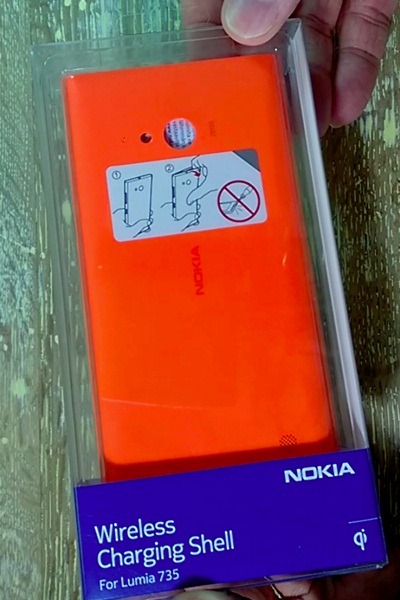
The official Nokia Lumia 735 wireless charging shell a k a CP-3086 let you make the most of the phone. Of course to use it you must buy a wireless charging plate. Nokia sells it for as low as $40 and it is compatible with all wireless charging phones.

Coming back to the wireless charging shell – it is made of very high quality polycarbonate. Also since the case’s color is shot through entire plastic, scratching it will not ruin the color – so no white lines!

nokia CP-3086

Of course since the CP-3086 is the official accessory it fits perfectly. Here is the unboxing of it. It is on sale for 25 dollars.

How to compress video for your Galaxy Note tablet

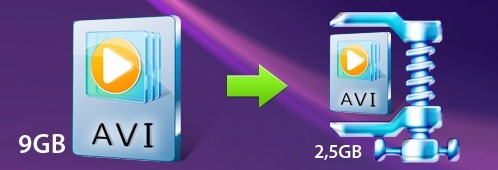
Samsung Galaxy Note are magnificent tablets and can pretty much play any video format out of the box. However not all videos that we play on the tablet are compressed which is where encoding of videos comes into play. Encoding a video may sound like a sci-fi topic to some but it is not difficult at all and with the Movavi video converter, it is actually a child’s play. Any one can compress a video using it.

If you compress, let us say a DVD file to an MP4 file you will save a lot of storage on your Galaxy Note tablet. To use the Movavi video converter http://www.movavi.com/support/how-to/video-compression.html you must first download it from its website and install it on your computer. Installation is very straight forward and you will be able to use it within few minutes. Click on the Add video button to browse and choose the files you want to compress for your Samsung Galaxy Note tablet. It must be noted that the Movavi video converter is capable of handling more than one video at a time. In fact it can batch process your entire uncompressed video collection so feel free to select one video.

How to compress video for your Galaxy Note tablet

Now you will be asked to select the video format you want to encode it. Since you are using a Samsung Note tablet, we suggest using MP4 format. Of course you can choose FLV, AVI or WMV too but for best results choose MP4. In the next steps you can set your desired output folder. It is in this folder the converted files will be saved after compression. If you do not select one, all the converted files will go into your computer’s default video folder.

The application lets you select bitrate too and lowering the bitrate will reduce the overall size of the converted file but will reduce the quality too. Similarly increasing the bitrate will increase the size and quality. After everything is set, feel free to start the conversion process by clicking on the Convert button. The algorithms used by Movavi video converter are very fine tuned which result in quick video conversion.

Very soon the conversion process will be complete and the output folder will open. This is the same folder that you selected as the destination folder in previous step. To transfer them to your tablet, connect it to the computer using USB cable and copy the converted video files into the Video folder.

Lenovo Yoga 3 Pro official, even more thinner and lighter

In a press event in London, Lenovo has officially unveiled the newest member of the Yoga family. Meet the Lenovo Yoga 3 Pro which is a truly remarkable ultrabook laptop with 13.3 inch IPS display packing 3K resolution and latest Intel Broadwell processor.

Lenovo Yoga 3 Pro specifications

The Lenovo Yoga 3 Pro comes with a special ability allowing users to rotate the device’s screen 360 degrees. Inside the Intel Core M 5Y70 powers it that is backed by Intel HD 5300 graphics with a base clock rate of 100 MHz that is capable of reaching 850 MHz.

lenovo yoga 3 pro review

The CPU is paired with 8 gigabytes of RAM, 512GB SSD, 2x USB 3.0 ports, video output and micro HDMI port. Connectivity options include Bluetooth 4.0 and 802.11ac modules. Its 44.8 Wh battery should provide at least 9 hours of battery life.

Lenovo Yoga 3 Pro specifications

The Lenovo Yoga 3 Pro comes with JBL stereo speakers that provide excellent sound quality. The ultrabook is also thinner (12.8 mm versus 15.5 mm) and lighter (1.19 kg vs 1.46 Kg) than its predecessor.

Lenovo Yoga 3 Pro Price

The price should be about $ 1349 for the 256GB version and $1599 for the 512GB variant. European prices are not yet known.

lenovo yoga 3 pro price

With the Lenovo Yoga 3 Pro comes with a new software suite called Harmony which tells applications to automatically adapt to the mode you are using. You can also customize some of its settings. Lenovo has not yet indicated a specific date for the availability of Yoga 3 Pro but we do know that it will come in three different colors, silver , orange and gold.

Why Apple laptops are so successful?

Back when the Apple released its very own laptop, it helped the company to get back on top in the computer world. And with the launch of Apple laptop, the Cupertino giant was able to gain an excellent share of laptop market share quite quickly. The company was able to separate itself from the rest of the herd by making a notebook that is not only visually very attractive but also packs necessary and fine-tuned software to get the job done. In fact, for a very long time, the company has been well appreciated by myriad graphic designers, geeks and other minded people.

The first laptops launched by the company were iBook and Powerbook and both stood apart from other laptop designs at that time. The Apple laptop outperformed windows PCs by a long margin as its Mac OS X operating system ran better even on the same hardware. The Apple laptops came with a built in trackball that made it different from the rest of the competition. No other laptop maker included this feature that was so tightly integrated with the software.

These Apple laptops were equipped with big displays but the computer giant was able to squeeze everything in to a smaller space than other computer manufactures. For instance their computer was less than 2.5 inches thick and was no bigger than a letter-size paper sheet. It weighed mere 6.8 pounds which made it considerably lighter than the laptops at that time. Prices of iBook and PowerBook are not cheap. You can find apple laptop prices in india at compare raja. By incorporating features other vendors did not include, the Apple iBook and PowerBook were able to outsell every single model.

Why Apple laptops are so successful

This helped the company to gain foot in the computer world. Here are few tips while choosing a new Apple laptop. First ask yourself the work that you are planning to do. While all laptops deliver stellar performance and battery life, some models are better optimized for doing specific jobs. Macbook Air laptops are great for those who do not need to cram every single bit of data into one computer. But if you are planning to cram a lot of data, then you should go for bigger models like Macbook Pro 15.6 inch models.

If you are into graphic designing, get a Macbook Pro. Graphics design work requires you to have a larger display so that you can work on an image without squinting your eyes. If you are planning to play games you will require a faster processor and HDD space to store all the game data. Games these days go into tera bytes so having a big hard disk is a plus.

Business users should go for the thin and light Apple Macbook Air. They are super light and have well defined feature set for a wide variety of applications. Macbook Airs are also recommended to those where portability is of biggest concern. If you are going to carry your laptop around whole day then it makes perfect sense to go for the thin and light Macbook Air laptop from Apple.

Microsoft cloud bundle challenges salesforce, which one is better?

Microsoft CEO Satya Nadella and Sales force CEO Marc Benioff might have had some amazing moments earlier this year but MS’s Business solutions unit that offers Dynamics CRM offline and online is now challenging Salesforce’s solution.

Yesterday Microsoft started offering Dynamics CRM online, Office 365 and Power BI for just 65 dollars per user per month. This is exact same price taht Salesforce.com is offering to its customers.

Such tight integration between Salesforce CRM and cloud based office 365 productivity applications are the key components of the mutual understanding between MS and SF’s CEOs.

SF is also set to debut Salesforce1 application for windows and Windows phone platforms this fall. MS’s CRM application is tightly integrated with their office online and Power BI.

microsoft cloud bundle vs salesforce

Since MS is now offering both together at low price, it will make lives of salesforce folks tougher than ever.

Riptide GP2 and Beach Buggy For windows phone coming in November

Folks at vector unit have confirmed that they have postponed the release of Riptide GP2 and Beach Buggy for windows phone. Both games will be making their way for the Microsoft mobile platform in November. 

Riptide is an excellent racing game for those who love water packed action and wonderful mechanics. It is definitely worth the wait though. Riptide GP2 is already available for the windows 8 tablets and PC.

The Riptide GP2 was set to release this month but vector unit said that they postponed it so that they can release it with their other games.

Riptide GP2 and Beach Buggy For windows phone

Download Opera Mini Browser for Galaxy Gear S Smartwatch

The Samsung Galaxy Gear S smartwatch is the first watch to get a web browser as today Opera software has announced the release of its new Opera mini web browser for the Tizen based smartwatch.

You can download the Opera Mini v7.5 web browser  from Samsung Gear apps for free. Like any other Opera Mini browser it comes with smart page feature that shows links based on the websites that you visit frequently.

Download Opera Mini Browser for Galaxy Gear S Smartwatch

It also allows you to save web pages for offline reading. In fact, Opera has optimized it for saving data and reading pages off line.

Opera said in a blog post,

The Internet is something we are used to accessing wherever we are and on practically every device we use. But, for some reason, the smartwatch has been stripped of an Internet browser – until today. We’re happy to announce that Opera Mini has become the first web browser on a Tizen-based smartwatch, the new Samsung Gear S.

HP X360 Stream 11 specifications and prices of all models

We finally have received official prices of latest Stream 11 X360 laptops. The series consists of five models that includes two notebooks, one convertible and two tablets. All come pre loaded with Windows 8 operating system, 1 terabyte of One Drive cloud storage and Microsoft Office 365 Personal software.

HP X360 Stream 11 prices

* Stream HP 11.6-inch from €219 (WiFi) and €269 (3G) with HP DataPass;
* Stream HP 13.3-inch from €249 (WiFi) and €319 (3G) with HP DataPass;
* HP 11.6 inch x360 Stream from €289 (WiFi) and €349 (3G) with HP DataPass.

All the new laptops are entry level and fanless. Detailed configuration data is not available but we have the standard specifications in hand.

HP Stream X360 allows users to easily switch from a notebook to a tablet mode or tent or stand for watching movies and videos while retaining all the functionality of a powerful notebook.

HP X360 Stream 11 specifications

Each laptop comes with an HD display packing 1366×768 pixel resolution with optional touch panel, Intel Celeron N2840 2.16GHz processor, 32GB of eMMC flash storage, 2 gigabytes of RAM, 1x USB 3.0 and 2.0 ports along with an SD card slot.

HP X360 Stream 11 specifications

You also get free 250 MB of free data per month and you can purchase additional monthly data packages at reduced rates.