How to recycle your old gaming laptop in UK

So you have just bought a shiny new gaming laptop. Great but what do you plan to do with the old gaming laptop that you bought seven years back in UK? The simplest thing you can do is throwing it into the trash can and forget that it ever existed. However you can do something that will benefit environment and you too. How to recycle your old gaming laptop in UK?

gaming laptop uk

Continue reading “How to recycle your old gaming laptop in UK”

How to play Pokemon Go on Samsung Galaxy S3

Samsung Galaxy S3 with its official ROM cannot play Pokemon Go as it requires minimum Android 4.4 to run and Samsung stopped development at 4.3. However there is a way to play Pokemon Go on Galaxy S3 and it is not too difficult.

Pokemon Go on Samsung Galaxy S3

What you can do is flash something like S3 paranoid ROM that will bring android 6 marshmallow to S3 i9300. But if you want to have solid and stable experience, we suggest download and installing Ressurection remix along with Boeffla kernel.

You can download both and flash them in custom recovery one by one. For those who do not know, the Russurrection remix is based on cyanogen mod 13 and latest android 6.0.1 release. Installation instructions for ROM and kernel.

– Download the latest build
– Download Gapps https://www.androidfilehost.com/?w=files&flid=41043
– Take a nandroid backup
– Recommended – Full wipe and factory reset
– Flash ROM using latest TWRP 2.8.7.x Recovery
– Flash Gapps
– Flash kernel
– Reboot

And that is it – load up Pokemon go and play all day without any crash on your Samsung Galaxy S3. Just make sure not to install Facebook or any memory-eating app. You would want as much free memory as possible in order for it to not crash.

Samsung Galaxy Note 7 ROM ported to Note 5

Galaxy Note 7 is out and folks at xda developers have successfully ported Note 7 ROM to Note 5. It is called CRISSCROSS ROM Note7port V2.0[2.8.16][PG7][N920C / I / L / G / K / S].

Download note7 rom for note5

Since most of the note 7 features as software related, you will be able to enjoy them on Note 5 without buying new hardware. ROM features:

Base: Note 7 UX
PDA: N930FXXU1APG7
CSC: N930FOLB1APG7
Builddate: FRI Jul 8 10:41:38 KST 2016
Android version: 6.0.1
Kernel: 3.10.61-8686587

To install this ROM, boot into TWRP and flash it. You can download the ROM from here. If you use dual SIM variant, then flash this fix after ROM installation inside TWRP custom recovery.

Here are its features:

– Kernel Noze5 PG5
– RomControl V2
– Aroma Manager
– Pre-rooted BETA-SuperSU-v2.76
– Pre-debloated
– Multilanguage
– AdAware, BetterBatteryStats and OGYouTube downloader in Rom but with debloat option in Aroma
– Knox removed
– App lock
– Call Recording Button
– Forced Enable Security Save in SmartManager
– Enabled Support Recent App Protection
– Show Data usage in expanded SystemUI near brightness auto check
– Shutter Sound option in camera settings
– Enabled White pages to identifier unknown numbers
– build.prop tweak for a faster boot- and shutdown animation
– build.prop tweak to remove ring delay
– build.prop tweak for power saving
– build.prop tweak to remove Knox from About Device info
– build.prop tweak to remove no sim card in phone message
– build.prop tweak to fix black screen after call
– build.prop tweak for Google DNS
– build.prop tweak for 3G signal optimization
– build.prop tweak for internet speed enhancement
– build.prop tweak to fix app issues
– build.prop tweak to improve voice call clarity
– build.prop tweak to disable android device check in
– build.prop tweak for faster scrolling
– build.prop tweak for Wi-Fi fix that don’t forget password
– Multi user mod enabled
– MM Reboot Menu with visibility settings in Rom Control
– Removed confirm buttons in Reboot Menu
– optional plug in/out usb wakeup with on/off toggle in Rom Control
– default animation scales 0.25x at clean install – you cant see, its hidden, if you change one time you cant go back.
– possibility to installing app older versions over newer
– Disables Signature Check
– Custom Background for reboot menu
– Device Info Settings with Rom Control settings in expanded view
– Call Waiting fixed (work on 920C and maybe others)
– rounded notifications with on/off toggle in Rom control
– colored notifications with color picker in Rom Control
– switch in Rom Control to enable/disable Heads-up notifications

Download iOS font on Galaxy Note 5: iPhone font for Note5

Folks at xda have released the official Apple iOS font aka iPhone font for the Samsung Galaxy Note 5 android phone. This is how it looks on the Note 5 after installation. There are three variants of it:

iOS font on Galaxy Note 5

1. San Francisco (Official iOS 9.x Font)
a. Variant 1 : Original Untouched with antialiasing and hinting preserved – download
b. Variant 2 : Rounded Corners + Slightly bolded (with antialiasing and hinting) – download
c. Variant 3 : Rounded Corners + Slightly bolded + Condensed (with antialiasing and hinting) – download
2. Cocon Light  (Modded for size and hinting) – download

To flash the iPhone font, you will need twrp for note 5. To install it, download it on to your device and flash it by going into TWRP recovery. CWM custom recovery would also work just fine.

You can also revert back to the original font by flashing the original galaxy note 5 font. You can download that from here.

Overclock Underclock Moto G4 Plus

A new custom kernel for Moto G4 Plus android phone is released and it lets you Overclock or underclock CPU. In order to flash it, you have to be rooted with Super SU as otherwise Wi-Fi would not work without Super SU installed.

Overclock Underclock Moto G4 Plus

Features of Moto G4 Plus

Easy installation and setup with Aroma installer
Fingerprint sensor as home button
Sweep2sleep
Overclock or underclock CPU
NTFS r/w support
Option to disable fsync
advanced color control
performance and power optimizations
upstream ZRAM with lz4 compression
KSM enabled
brighter HBM
adjust or disable vibration
FIOPS i/o scheduler
Does not modify system partition
Does not overwrite modules
Compatible with systemless root

This is a stable kernel for Moto G4 Plus and it is made for people who depend on your phone.

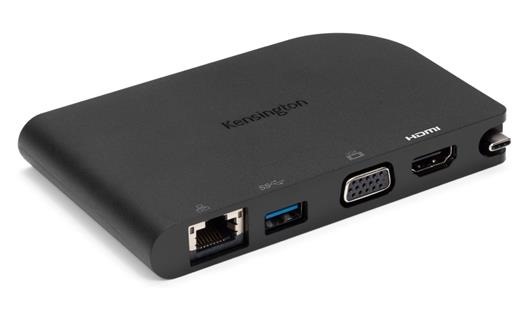
Kensington SD1500 mobile dock is a must have for Macbook users: Kensington SD1500 specs overview

Kensington SD1500 review

Macbook and Macbook Air users often find themselves fiddling between various adapters just to get basic tasks done and Kensington might have found a solution to that problem. Meet the Kensington SD1500 mobile dock which makes use of your Macbook’s USB-C connector to provide you all the ports from past and present in one sleek casing.

Continue reading “Kensington SD1500 mobile dock is a must have for Macbook users: Kensington SD1500 specs overview”

Moto G4 Plus Root Guide for XT1641 / XT1642 / XT1643: Moto G4 Unlock Bootloader Guide

This will guide will help you to root XT1641 / XT1642 / XT1643 variants of the Moto G4 Plus. Before we proceed, let us have a look at the requirements.

Moto G4 Plus Root

First, let us unlock Moto G4 Plus bootloader

1- Register

Head to Motorola website and register your E-Mail ID. Open Setting on your device and go to About Phone. Next, tap 7 times on Build Number and get the Developer Options unlocked. Head back to Main Settings Menu and go to Developer Options and switch the ‘Allow OEM Unlock’ option.

2- Getting Unique ID for each device

Reboot to Bootloader (power off, then press the power and volume down buttons simultaneously). On your desktop, open a command prompt or terminal, and go to the directory where you installed the Android SDK tools (or make sure mfastboot is in your $PATH) At the prompt, type

$ mfastboot oem get_unlock_data

You will get something like this:

On a Windows Desktop, the returned string format would be

$ fastboot oem get_unlock_data
 (bootloader) 0240540162024205#4C4D3556313230
 (bootloader) 30373as313630330df332323239#BD00
 (bootloader) 8A672BA4746C2CE0a328A2AC0C39F95
 (bootloader) 1A3E5#1F53280002000000000000000
 (bootloader) 0000000

On a Mac OS Desktop, the returned string format would be

 INFO0A40040192024205#4C4D3556313230
 INFO30373731363031303332323239#BD00
 INFO8A672BA4746C2CE02328A2AC0C39F95
 INFO1A3E5#1F53280002000000000000000
 INFO0000000

Paste together the 5 lines of output into one continuous string without (bootloader) or ‘INFO’ or white spaces. Your string needs to look like this:

0240540162024205#4C4D355631323030373as313630330df332323239#BD008A672BA4746C2CE0a328A2AC0C39F951A3E5#1F532800020000000000000000000000

3- Unlocking the device

Check if your device can be unlocked by pasting this string in the specific field on the Motorola website, and clicking “Can my device be unlocked?” NOTE: If your device is unlockable, a “REQUEST UNLOCK KEY” button will now appear at the bottom of that page. Click on it and wait for the unique code to be sent to your mail. After you got the code type the following :

mfastboot oem unlock

and wait your device to reboot.

Root Moto G4 Plus using these instructions

1. Make sure you unlocked bootloader using instructions given above and have installed moto g4 plus twrp.
2. Download SuperSU and copy it into internal SD card.
3. Connect your phone with PC
4. Open Boot-loader on Phone. Extract Root-motog4-athena.zip and run ROOT.bat (it will flash custom boot.img)
5. Now Flash Supersu.zip From TWRP recovery.

Download Moto G4 Plus TWRP custom recovery

Download Moto G4 Plus TWRP custom recovery to start flashing custom ROMs onto your android phone. After that, you will be able to do much more than that custom ROMs too such as flashing all sorts of hacks to extend the functionality of the device and one of that is ability to overclock and underclock Moto G4 Plus.

moto g4 plus twrp

This is the latest v3 TWRP for the Moto G4 Plus and brings additional functionality that was not available in v2.x versions of TWRP.

Installation instructions:

1) Download the latest version from here on your device (direct link)
2) Reboot to TWRP
3) Hit Install and tap the “Images…” button in the lower right
4) Browse to the location of the TWRP image on your device and select it
5) Select recovery from the partition list and swipe to flash