Asus ROG GL502 Strix specs: elite gaming laptop with GeForce GTX 980M

Asus ROG GL502 Strix was revealed at a tech event in Jakarta, Indonesia and it definitely has some amazing specs. Asus ROG GL502 Strix specs include Intel Core i7 6700HQ or Core i5 6300HQ processor backed by 8GB or 16GB DDR4 RAM humming at 2133MHz, 128GB, 256GB or 512GB PCIe SSD with 1TB or 2TB hard disk drive, 15.6 inch screen with full HD 1920 x 1080 pixels or 4K UHD (3840 x 2160 pixels) both well handled by discrete Nvidia GeForce GTX 970M or GeForce GTX 980M graphics.

Asus ROG GL502 Strix specs

Continue reading “Asus ROG GL502 Strix specs: elite gaming laptop with GeForce GTX 980M”

HP Envy 15, Envy 17 2016 specs

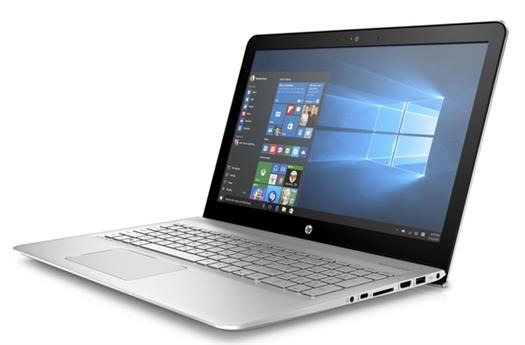
HP Envy 15, Envy 17 specification refresh has been done and these two laptops are now more powerful than before. HP Envy 15 2016 specs include 15.6 inch display with 1080p resolution, Intel Realsense technology, 1TB hard disk storage, 256GB PCIe SSD, Intel Skylake processors with integrated graphics and up to 16GB RAM. Asus Z240IC and Z220IC also come with Intel Realsense so it is not a new tech by any means.

HP Envy 15 17 2016 specs

Continue reading “HP Envy 15, Envy 17 2016 specs”

Nvidia Radeon 490 and 490x release date

It always happens that the closer the date of release of a highly anticipated product, the greater number of rumors and more weight they arise. On this occasion we get a rumor that the release date of the upcoming graphics cards AMD , based architecture Polaris , could reach the market in late June.

Nvidia Radeon 490 and 490x release date

Actually it is quite logical, as AMD promised that the first graphic architecture Polaris arrive in the first half of this year, so the end of June would be precisely the end of the deadline set by the manufacturer. In this case we speak of the theoretical AMD Radeon R9 490 and 490x, which would top end of the new graphics architecture that in this case not only changes lithography but also memory, because in this case we would have graphics memory HBM2 with twice the performance than the previous one.

This is what is supposed, in any case, since it is known that most graphics R9 400 series AMD would graphics memory GDDR5X and not HBM2, reserving the latter only for top graphics cards range that is precisely the first that always rumored to hit the market in late June. Anyway back to remind pair that does not leave doubt that what we are dealing with are mere rumors and no official confirmation of absolutely nothing by the manufacturer.

In fact, in the Capsaicin event that AMD held during the GDC event, the manufacturer showed a release schedule in showing that the HBM2 memory will not come until early 2017, so there is still a possibility that they Radeon R9 490 and 490x GDDR5X come equipped with memory and HBM2, which if I may think it would be a failure for AMD because NVIDIA itself has confirmed that its graphics are also Pascal will have HBM2 falling memory.

Recall that the AMD Radeon R9 490 and 490x form part of the Polaris 10 architecture, focused on the segment of high-end, while the graphics architecture Polaris 11 will arrive a little later will be focused on the mid-range and have graphics memory GDDR5X but will share lithography with Polaris 10.

Asus VivoStick TS10 review and price

Asus VivoStick TS10 review

Asus VivoStick TS10 review: This compact mini PC that only measures 139 x 36 x 16.5 mm and weighs 75 grams equipped inside an Intel Atom X5 Z8350 processor with four cores running at 1.44 Ghz, 2 GB of RAM and 32 GB eMMC internal storage (150 MB / s). Factory brings part of this internal memory occupied by the Windows 10 operating system Home Edition 64-bit, so that as we advanced is ready to plug in and start working.

Regarding connectivity, the Asus T10 VivoStick has a USB 2.0 port, one USB 3.0, a combo audio mini jack and logical HDMI port through which it connects to the television or monitor. It also has Wi-Fi 802.11ac and Bluetooth 4.1 connectivity, so you can pair the wireless devices you want without drawbacks.

Some configuration is needed, nothing VivoStick connect the T10 to a monitor or TV, start Windows 10 and we will find the desktop operating system of Microsoft. In addition, Asus gives the user who buys one of these teams 100GB free cloud storage (Asus WebStorage).

Additionally, the Asus VivoStick T10 comes with HyStream preinstalled software, a version of AirPlay iOS devices, and the VivoRemote Center software to simplify multimedia device operations if we use it as a media center connected to the TV lounge.

In principle, the Asus T10 VivoStick arrived yesterday to the Japanese market at a price of 21,500 Yen (around $ 195), and is not yet known when it will arrive on the European market or at what price. Galaxy S Tab Pro with Windows 10.

Riototro CR1080 specs and overview

Riototro CR1080 review

Riotoro , a new company that is based in California, United States, launches its new box Riototro CR1080 , a model which claims to be one of the smallest on the market but capable of accommodating motherboards in full size ATX case and power supplies that size and graphics cards up to 300 mm thanks to its internal design into separate sections.

Riototro CR1080 specs review: The new CR1080 of Riotoro measures 245 mm wide by 359 mm high by 394 mm deep and is built with SECC steel for its internal structure and ABS plastic decorative elements of the box. Has an I / O panel on the top of it with a button on the system, another reset, two USB 3.0 ports and two mini jack sockets for connecting headphones and a microphone. In its front it has an opening for the installation of a unit in 5.25-inch bay, as well as a fan of 120 mm in diameter with LED lighting, with space for installation of a second 120 mm fan to help cooling of the components that your users choose to install inside.

Riototro CR1080 review (1)

Continuing the theme of ventilation, the box has space to allow mounting or sink up to 120 mm in height or of a liquid cooling system that uses a single radiator size 120 mm on the front. At the bottom, there is room to install two 120 mm fans and in the rear, space for another 80 mm. At the top there is a generous opening that allows air outlet without too many restrictions, typical of positive pressure boxes.

Riototro CR1080 review (2)

Box Riotoro uses an internal inverted design by which the area of ​​the processor is at the bottom of the box, just in front of the airstream front fan and or graphics are placed on top of the same.

Riototro CR1080 review (3)

The box has bays for mounting two units dual 3.5 inch or 2.5 inch, and another for mounting a unit only 2.5 inch. The new Riotoro CR1080 can be purchased at Amazon at the price of $ 79.99.

MSI WT72 is company first VR laptop

MSI WT72 review

The virtual reality is on everyone ‘s lips lovers hardware in recent times, and manufacturers are rushing to introduce their products VR Ready for users interested in this business. MSI has its first team “certification” (internal) for virtual reality systems, the MSI WT72 of which I speak in today.

Basically what MSI has done has been to update one of its laptop models aimed at professional CAD design and adapt to new requirements with virtual reality systems to create the WT72. This is a team that has a graphics card NVIDIA Quadro M5500, Intel Core i7 or Xeon sixth generation and up to 64 GB of RAM DDR4 memory, so performance you will not miss with this combination of hardware.

vr laptop from msi

The biggest innovation is the inclusion of the new NVIDIA Quadro graphics M5500, a GPU that provides 35% more performance than the previous generation. Andy Tung, MSI CEO of America said about it that “The MSI WT72 with NVIDIA Quadro M5500 is the world ‘s first notebook that can literally with any task, including graphic design and virtual reality systems.”

To enhance the multimedia experience, MSI has integrated into the WT72 the Dynaudio sound technology, in this case with an audio optimizer Nahimic. They have also introduced new panels Ultra HD 17.3 inch True Color technology with Adobe RGB certification, SteelSeries backlit keyboard, and USB connectivity Thunderbolt 3 and 3.1. As you can see, MSI has taken its professional teams and has integrated them some of the characteristics of their equipment Gaming to create the new WT72. These are its characteristics such as we announced the manufacturer.

MSI WT72 specs

At the moment it is unknown when this new team will come to market and price, although seen your hardware can expect prices not suitable for many pockets (we speak of more than 4,000 euros a good insurance).

Download Lenovo A6000 TWRP custom recovery

Folks at XDA have released TWRP custom recovery for the Lenovo A6000. Flashing this Lenovo A6000 TWRP custom recovery will remove the stock recovery from the android phone and will allow you to flash custom ROMs, firmwares and all sorts of third party hacks. Installation guide is given below.

Download Lenovo A6000 TWRP custom recovery

1. Open Fastboot and Minimal ADB from PC. Download link. Also download the twrp image file from here.
2. Set device on bootloader
3. Type in command — adb devices
<if it shows Good if it doesn’t, don’t worry>
4. Type in command — fastboot boot recovery.img (or whatsoever is the file name e.g. twrp.img)

It will take a few seconds to flash to the TWRP onto the Lenovo A6000. That is it, you have successfully replaced the stock recovery with custom recovery on your Lenovo android phone. Go ahead and start flashing custom firmwares to enable extra and new features. 

Plextor M7V released

Plextor M7V review

Plextor has announced the launch of its new line Plextor M7V , a line of SSD drives profitable consumer happening to those already launched the Plextor M6V series last July and how good analysis and praise received by of its members. Available form factors of 2.5 inches and M.2, the units take advantage of the SATA interface 6 Gb / s.

Available in capacities of 128 GB, 256 GB and 512 GB, the M7V series is equipped with the latest Marvell controller, a leading manufacturer of chips SSD controllers. It Includes LDPC (Low Pressure Die Casting) latest technology to ensure data accuracy and a fast and reliable performance.

Plextor M7V review (2)

According to cross-coretech.com, the M7V series also features the highest quality NAND flash memory in TLC manufactured by Toshiba 15nm node, which generates cycles up to 2000 P / E, beating all its competitors. In addition, the exclusive firmware PlexNitro, performance can be optimized in SLC mode without sacrificing space of the SSD; extending the maximum performance.

The new Plextor M7V series represents the newest generation of standard SSDs, tailored to the needs of the general user and offering flawless performance and transfer speed of incomparable data. The M7V series also comes with a longer life time compared to other products of the same level, with the addition of optimal components and the development of a unique firmware combined with advanced manufacturing technology.

Plextor M7V review (1)

All Plextor SSDs undergo rigorous inspections teams most advanced SSD test in the world.not a single mistake or failure (error zero) is not allowed to offer the user the highest level of quality and stability. Through professional reading conditions simulation / actual writing, both M7V series as all Plextor SSD drives offer a measured time between failures (MTBF) of up to 1.5 million hours, significantly outperforming the reliability of long use term and ensuring the security of valuable data.

The units offer speed sequential transfer rates up to 560 MB / s reading in three models, with up to 500 MB / s write for the model 128 GB, 530 MB / s write for the model 256 GB and 530 MB / s write for the 512GB model.

Plextor has not disclosed the prices that will have these new models.

Doogee Y300 and X5S reviews: best budget phones

Doogee Y300 review. Doogee X5S review. Let’s start talking about the Y300 – designwise, it is reminiscent of the Sony Xperia but obviously much more affordable and with different characteristics. It is a smartphone 5-inch HD screen (1,280 x 720 pixels) IPS matrix that works with the latest version of Android operating system.

Doogee Y300 and X5S reviews

To enhance this display Doogee integrated into the Y300 MediaTek MTK6735 quad-core 64-bit SoC running at a speed of 1.3 Ghz, accompanied by a GPU Mali T720 and 2 GB of RAM to ensure smooth operation in any type of applications. Internal storage as the manufacturer has installed 32 GB of ROM, expandable memory using a micro SD card up to 32GB more.

Doogee Y300 review

This terminal input range incorporates a front camera of 8MP, while the rear, signed by Sony (IMX219 model) is 13 Megapixel and includes LED flash, auto focus and stabilizer. The terminal has Bluetooth 4.0, GPS, A-GPS, OTA, OTG, Dual SIM (Micro SIM) and connectivity with 2G, 3G and 4G networks. The battery is 2,200 mAh, ensuring sufficient autonomy for a day of intensive, two to three days with normal use.

On the other hand we have the X5S Doogee, a terminal also input range but lower than the Y300, which is reflected in a much lower price and therefore more suitable for all budgets. This X5S also has a 5-inch IPS display with HD resolution (1280 x 720 pixels), but in this case still has Android 5.1 operating system.

Doogee X5S review

The SoC built-in X5S is the same as the previous model (MediaTek MTK 6735) but functioning in this case a 1 Ghz in its four cores, also accompanied by an ARM GPU Mali T720 but in this case the RAM has been reduced just 1 GB and 8 GB internal storage, but fortunately they are expandable up to 32 additional GB with micro SD memory card.

Doogee X5S reviews

The cameras are also somewhat lower, because while the front has 5 Mpx, the rear has 8MP, but also has LED flash, auto focus and stabilizer software. Its battery is 2,400 mAh, and since the processor has a lower consumption this means that battery life is a bit higher, about two days intensive and between 3 and 4 days with moderate use.

Download Synology DiskStation Manager 6.0

Download Synology DiskStation Manager 6.0

The Synology operating system for your NAS, DiskStation Manager (DSM), announced its official version DSM 6.0 , which comes as a round number to be part of a major upgrade version that incorporates numerous enhancements and new features.

The list of new elements in DSM 6.0 is huge (can consult on their website ) and of course differs slightly depending on the Synology NAS you have. In all cases many new features , improvements and bug fixes are integrated, and that as noted by Synology, represents the beginning of a new era for the DiskStation and RackStation the company ‘s products.

Synology DiskStation Manager 6.0

“With DSM 6.0, Synology provides all the most advanced technologies that go far beyond simple data management. We designed DSM 6.0 to provide a complete server that improves productivity and efficiency in enterprise environments , “ said Michael Zimmeman, general manager of Marvell Semiconductor Inc.  ” We applaud Synology for what they offer in this new version, and we are delighted our ARMADA processors 32 and 64 bits are those that promote most of its units.”

We will not go into detail about all that this new version offers, because as we discussed before the list of changes and improvements is huge and almost won more enlisted on their website  so you can see for yourselves. We for our part we have already installed in a Synology DS216j and we have seen that in terms of the interface is not much changed, and it is true that most of the changes are related to the business environment for system administrators using Synology NAS for replication of backups for virtual LUNs and other environments. Honestly, we believe it is a very important and necessary update to install for all users mostly for security improvements and stability, but a user on foot and we will not provide anything new that we did not already (perhaps some performance).

The update can be performed directly from the control panel in the DSM currently have in your Synology NAS.