Broadwell-U powered Panasonic Toughbook 4k debuts at $2999

Panasonic Toughbook 4k was launched at the CES 2015 event and today the company is rolling out updated versions of it packing the newer Intel Broadwell-U processors. Specifications of this updated Panasonic rugged tablet includes 3840 x 2560 pixel resolution, Intel Core (Ivy Bridge) processor, 16GB of RAM, optional Nvidia Quadro K1000M graphics and big 20-inch IPS display with 4K resolution with aspect ratio of 15:10 and pixel density of 230 PPI.

panasonic toughbook 4k review

Continue reading “Broadwell-U powered Panasonic Toughbook 4k debuts at $2999”

Note 3 Neo ROM with Galaxy S6 and Note 4 features available for download

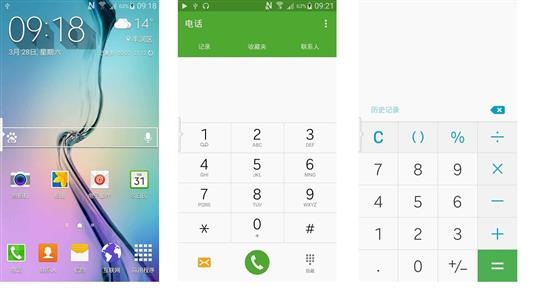
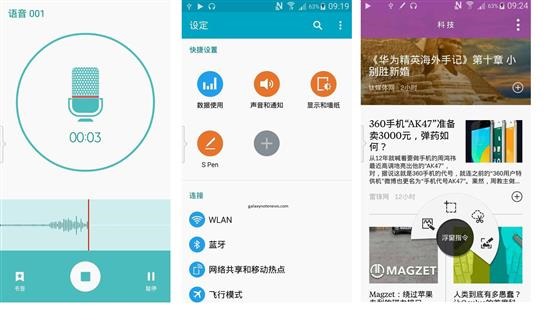
Samsung Galaxy S6 is a great phone but not all of us can upgrade to a new model. Note 3 Neo ROM with Samsung Galaxy S6 is now available on XDA and it works flawlessly.

Note 3 Neo ROM with Galaxy S6 and Note 4

Settings with air command included on S-PEN
Gallery white with Album mode fixed text remaining data mode to fix
SMS Lollipop Dainty
Contact app
S-Note from Note 4 ported
New SystemUI with new style + icon lollipop
New lockscreen s6 style
Added theme support on settings
Updated Google Play , Play service , Samsung Account
Added sketchbook
Samsung Gapps S6 extracted from System stock s6 G920F
Complete wallpaper stock s6 (include new wallpaper)
New icon HD from stock s6 (without borders black or cropped)
New Lockscreen S6 style
New Touchwiz launcher with folder + text color fixed
New Settings S6 Style modded
New Clock app style Lollipop
New calculator lollipop
Samsung Keyboard Lollipop finally fixed implemented
New Framework lollipop style
New Samsung Galaxy S6 Audio (Ringtone , Ui , Notification) extracted from system stock s6

To install it, place the ROM into the root folder and flash using CWM or TWRP for Note 3 neo. Flashing will take a while and soon your system will boot up.

Underclock Overclock Note 3 Neo and increase battery life of Galaxy note 3 neo

Artas182x has released Note 3 Neo kernel that allows you to easily underclock or overclock the device. It is compatible with all kitkat 4.4.4 firmware. To flash this custom kernel for Note 3 Neo, you will need custom recovery pre installed on your device.

note 3 neo underclock overclock

To flash follow these instructions:

1. Download the custom kernel from here.  
2. Boot into Note 3 Neo TWRP or CWM Note 3 Neo recovery
3. Flash the ZIP file
4. Reboot

Kernel features in detail:
Compiled with SaberMod 4.8 Toolchain
Added ROW (default), ZEN and SIO I/O Schedulers
Added PowerSuspend module
Enabled 1400 and 1500 Mhz frequency for A7 cores (use TricksterMod for example to enable)
Enabled 667 Mhz GPU frequency (enabled by default)
Compiled with optimized flags
Enabled more Power Saving tweaks
Added Dynamic FSync (enabled by default)
Some I/O optimizations and tweaks
Replaced LED colors wth more natural and gentle RGB
Configurable LED RGB through /sys/class/sec/led/
Added and enabled UKSM (better version of KSM)
Init.d support
Readahead increased to 2048

Download Note 3 Neo official CWM and TWRP, Root Note 3 Neo

The official TWRP and CWM for the Samsung Galaxy Note 3 Neo is now available online, courtesy of XDA. Folks at team win are people behind TWRP.

note 3 neo cwm twrp download

You can download TWRP or CWM from below given links:

It shall be noted that your warranty will be voided after flashing Note 3 Neo TWRP or Note 3 Neo CWM. It will also increase your knox counter. CWM is only meant to be used in dual SIM  variant which is N7502.

CWM Note 3 Neo installation instructions

STEP 1 :
– Download and setup ADB drivers for your device
can be found here Drivers
STEP 2 :
– Download the recovery from links given on the top.
– Download odin 3 Link
– Turn of your device and go to odin mode [ Vol down + power + home button (all at the same time) ] release it when you see Note Neo logo
– Press vol up to confirm
STEP 3 :
– Now that you are in odin mode connect your device via usb cable !
– Now open Odin3 3.09 that you have downloaded.
– If there is a pop-up like Installing ADB drivers let it get finished it is usually updates.
– Make sure the COM : xx (xx is usb port number it can be any number so don’t worry about it,just verify COM is lit up)
– Select the recovery (Link in STEP 2) ! Now select AP and browse to where you have .tar file and select it
MAKE SURE U UNTICK THE AUTO-REBOOT BUTTON
– Click Start

Root Note 3 Neo

Note 3 Neo root

-Download SuperSu (obviously the latest one) from here ——> Click here
– Copy that to internal sd card
– Power off your device and press vol up + power + home button (all at once) – Select install zip from sdcard —>choose zip from sdcard —> scroll down and flash UPDATE-SuperSU-v2.xx.zip


Download Note 3 TWRP for flashing custom ROMs

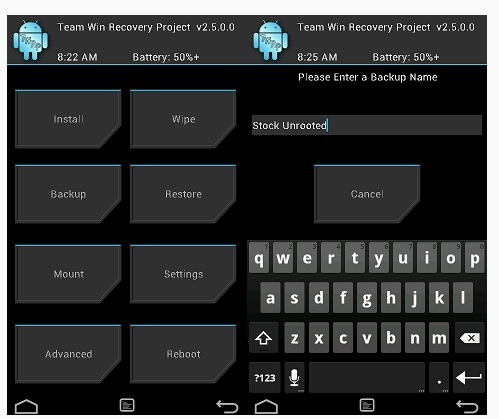
Team win has released latest version of TWRP for Galaxy Note 3. You can download Note 3 TWRP from the link given at the bottom of this page. The TWRP is the most popular custom recovery and many prefer it over CWM as it allows users to interact via touchscreen.

twrp note 3 download

In this Note 3 TWRP you can use onscreen keyboard to input data. In other words it is a must have if you are into flashing custom ROMs. Samsung is really sluggish in pushing firmware update.

This Note 3 TWRP also allows you to backup and restore partitions. Also after some time you may get bored of the user interface but don’t fret as you will be able to easily skin with bucketful of TWRP themes available online.

  • Samsung Galaxy Note 3 Canada (hltecan)
  • Samsung Galaxy Note 3 International Exynos (ha3g)
  • Samsung Galaxy Note 3 International Qualcomm (hlte)
  • Samsung Galaxy Note 3 Sprint (hltespr)
  • Samsung Galaxy Note 3 T-Mobile (hltetmo)
  • Samsung Galaxy Note 3 US Cellular (hlteusc)
  • Samsung Galaxy Note 3 Verizon (hltevzw)
  • Download Galaxy S6 lock screen for Note 3 N900

    If you don a Samsung Galaxy Note 3 N900, you can download the new Galaxy S6 lock screen on it. Samsung has a habit of tweaking and updating the lock screen of their Galaxy devices and the Galaxy S6 lock screen looks sleeker and sweeter than ever. It looks very clean and elegant. If you want to get all features of Galaxy S6 on note 3 then we suggest installing this ROM from galaxy note news portal.

    galaxy s6 lock screen note 3

    You can download it link given below. Then to install it, go into custom recovery of Note 4  and browse for the file you downloaded. Select Install to install the Galaxy S6 lock screen on Note 3 N900.

    To further make it like Galaxy S6, you can install touch wiz themes of S6 on Note 3 using our tutorial.

    Galaxy S6 ROM for Note 3 N9005

    Folks at XDA developers have ported Galaxy S6 ROM to Note 3 N9005 USA LTE version. The final build is very stable and is perfect for day to day use. It includes the new Samsung official memory manager and following Galaxy S6 features:

    galaxy s6 rom for note 3

    S6 transplant weather (can stretch the weather display optional AROMA)
    S6 transplant starter (5×5 optional AROMA does not currently support the overall theme S6)
    S6 transplant Calculator
    S6 transplant wallpaper
    S6 transplant recorder
    S6 browser transplant
    S6 transplant Calendar
    S6 transplant newsletter
    S6 transplant Samsung store
    Transplant S6 File Manager
    S6 transplant Task Manager
    S6 start-up tone
    S6 transplant dialers (AROMA optional)
    S6 transplant powerful intelligent assistant
    S6 transplant email

    samsung galaxy s6 rom for note 3

    Install it using clock work mod or twrp recovery for Note 3. It is great to see S6 features ported to Note 3. Just few days back Note 4 and S5 features were ported to Galaxy Note 3.

    Note 4 S5 ROM ported to Galaxy Note 3

    A new custom ROM brings Galaxy Note 4 and S5 features to Samsung Galaxy Note 3. First XDA developers ported Note 4 launcher to S4 and now they have ported Note 4 and Galaxy S5 features to Note 3 N900. Tural, an XDA user has ported Note 4 and S5 features to Note 3.

    Note 4 S5 ROM ported to Galaxy Note 3

    * Stock Russian based (BO6)
    * S5 Gallery (Lollipop)
    * UPSM
    * Toolbox
    * Sidekey (full work)
    * 3 dot Menu with app switch
    * Note 4 ,S5 Accuweather
    * 3d minit batery mod
    * New TouchWiz with Theme select
    * AOPS SystemUI
    * S Memo Lollipop
    * S5 style camera
    * MultiWindow all apps
    * Note 4 Music Player
    * Note 4 My files
    * Notə 4 voice recorder
    * Extra apps (Activity, S5 Toolbox Addon,S Reminder )etc.
    * 8 lockscreen Effect
    * Note 4 Multi User

    Here are the flashing instructions:

    1) Flash Stock Russian rom with Odin
    2) Root and open twrp or cwm
    3) Full Wipe Factory Reset
    4) Flash this firmware
    5) and reboot

    Galaxy Note 3 N900 Lollipop Android 5 ROM, has ultra power saving mode

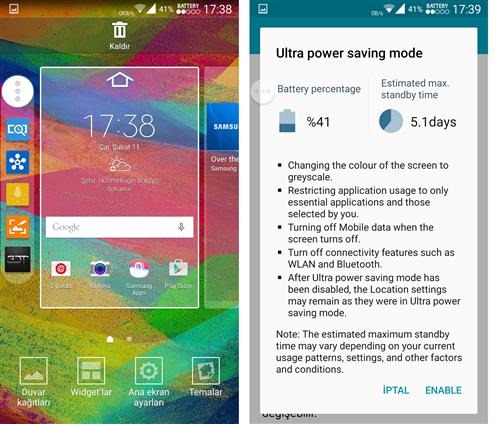
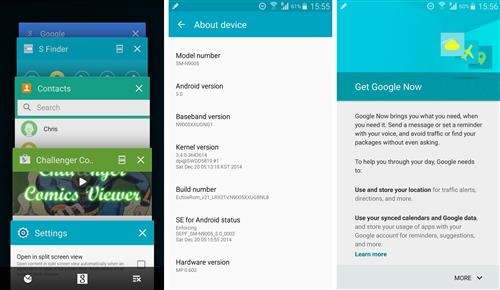
    You can now download the un official Android 5 lollipop firmware from XDA for the Samsung Galaxy Note 3 N900 model. Based on N900XXUEBOC4_N900ODDEBOB2_N900DDUEBOB1_HOME firmware, this new ROM features ultra power saving mode, emergency mode and customizable torch light settings. This custom firmware comes with pekaka advance tweak that adds following features:

    Galaxy Note 3 N900 Lollipop

    * stutas date_show mod|small/big/disable
    * stutas ampm show mod|small/big/disable
    * stutas clock position mod|left/middle/right/disable
    * Netspeed color
    * Statusbar clock color
    * Status expander clock color
    * Statusbar Signal icon color
    * Statusbar wifi icon color
    * Memkiller color
    * status bar color
    * StatusBarHeader color
    * quick setting container background color
    * quick setting tile background color
    * toggle slider color
    * sfinder qconnect background color
    * Locksrceen Carrier text and color
    * Quick setting button number
    * Enabled UI stock color(unchecked for stock,checked disable stock color to enable customer color mod)
    * Used battery color
    * Rest battery color
    * Num color in battery
    * Pullup app settings

    It is suggested by its ROM developer to do a full wipe before installing the firmware. You can download from following links:

    Flashing instructions:

    1. before flashing this ROM, your phone firmware should have been updated to lollipop 5.0 already
    2. need custom Note 3 recovery to flash.
    3. download ROM copy to your phone’s SD card
    4. just go to recovery to flash the ROM but before select full wipe.
    5. When the flashing process finishes, the phone will auto reboot into new ROM.