Change Moto X boot animations and starting logo, download few for free

If you do not like the boot animation of your Motorola Moto X, you can easily change it. Same goes for the logo – if you do not like it, you can change it easily. The only requirement is that you need a rooted Moto X which fortunately can done easily.

moto x boot animation

Installation instruction for changing Moto X boot animation are given below:

1. Download the file from here and rename it to bootanimation.zip
2. Copy to /system/media/
3. Set permissions to root:root and rw-r-r
4. Reboot.

Instructions for changing logo are:

1. Download and rename to logo.bin
2. Reboot to bootloader.
3. Run "fastboot flash logo logo.bin" (No quotes)
4. Reboot

That is it – you can enjoy and install custom bootscreen and logo on your Moto X.

Download Moto X official Cyanogen Mod 12, comes with ad blocker

Cyanogen Mod 12 a k a CM12 is now available for the Motorola Moto X. Cyanogen Mod has its own fanbase and the development is also much faster than the standard android that comes preinstalled on your Moto X. This particular ROM comes with ad blocker pre installed so no more ads in apps.

Download Moto X official Cyanogen Mod 12

The complete feature list includes:
Nav bar customizations;
Animated rotation tile;
Wake up on plug;
Development shortcut;
Clock and time clickable in expanded status bar;
Notification ticker;
Quick unlock;
PIN keypad shuffler;
Custom lockscreen shortcuts;
Answer calls with hardware home button;
Status bar clock tweaks (right, center or hide clock with many dates formats to show. Custom colors included);
Notifications counter;
Volume keys wake the device;
Ability to hide the alarm clock icon from status bar;
Dialer Lookup;
Profiles form CyanogenMod (new merges and lollipop style);
Protected apps (using trebuchet launcher);
Filter spam notifications;
CyanogenMod SuperUser;
Clear all button in recent panel with custom option (hide, top right or top left);
Privacy guard from CyanogenMod;
Quick settings pull down with one finger (right, left or off);
Smart pull down;
Configurable 0, 90, 180 and 270 degree rotation;
Toggle to not allow quick settings on secure lockscreen;
Brightness control through status bar;
Double tap status bar sleep;
Data activity indicators;
Call blacklist support;
Increasing ring tone;
In call vibrations;
Advanced reboot menu;
Option to hide adb notification;
Screen shot quick delete with confirmation;
Long press back to kill with configurable timeout;
Less frequent notifications sound;
Advanced keyboard features (auto rotation with timeout, disable full screen, selector notification, show enter key, volume key cursor control);
New Eleven music player and AudioFX from CyanogenMod;
Statusbar network speeds;
AOKP system animations;
Left handed navbar during landscape mode;
App circle sidebar;
Toast Animations;
Media Scanner on boot behaviour;
Gesture Anywhere;
Omniswitch;
Screenrecorder;
Weather banner;
Search bar in recents;
Ability to use Omniswitch instead of aosp recents;
Wakelock blocker;
Advanced powermenu;
Lcd density;
cLock;
Ad blocker;

Installation instructions are given below:

– Make sure you’re running a proper working Recovery (CWM or TWRP)
– Copy GApps and crDroid zip to your internal SDCard
– Boot into Recovery
– Wipe system,data and cache
– Flash crDroid zip
– Flash GApps zip
– DO A DATA WIPE / FACTORY RESET
– Reboot

Lenovo N21 complete specifications and release date

Lenovo N21 is a third generation chromebook for students after Lenovo ThinkPad X131e and Lenovo Yoga 11e. Chromebooks laptops have now established themselves as decent windows PC alternatives if you do all of your work in the web browser. The Lenovo N21 is a chromebook for students offering excellent specifications at a cheap price tag.

Lenovo N21 review

Lenovo N21 specifications as reported by chromium netbooks include a 11.6 inch display packing 1366 x 768 pixel resolution, Intel Celeron N2840 processor, 2 or 4 GB of RAM and 16GB of SSD storage. The screen of the Lenovo N21 has been given anti scratch and anti-fingerprint treatment as well.

The company knows that the students often mistreat their laptops and Lenovo N21 can withstand drops up to 70cm. Even the keyboard is water resistant and can withstand penetration of liquid up to a maximum of 330 ml. The touchpad is sealed to protect the underlying components.

The Lenovo Chromebook N21 makes use of haswell architecture which allowed its manufacture to make it completely fanless. This makes it virtually indestructible.

Lenovo N21 specifications

Processor: Intel Celeron Dual Core N2840, 1M cache, up to 2.58GHz
Screen: 11.6 “1366×768 pixel anti-glare
Operating system: Chrome OS
Memory: 2-4GB
Storage: 16GB SSD
Camera: 1.0MP rotatable
Audio: stereo speakers, built-in microphone in the webcam rotates along with it
Ports: 1 x full-size HDMI, 1 x USB 3.0, 1 x USB 2.0
Expansions: memory card reader 2-in-1
Networking: WiFi dual-band 7260 AC Wifi 802.11 ac / a / b / g / n 2×2 MIMO, Bluetooth 4.0
Battery: Lithium Polymer 3-cell 36Wh, range of up to 9.5 hours
Dimensions: 300 x 215 x 22.4 mm
Weight: 1,29Kg

Shuttle DS57U is first fanless PC with Broadwell

After launching Shuttle XH97V and SH97R6 nettops, the company has introduced world first fan less computer with Intel broadwell processor which represents fifth Intel generation. The new Shuttle DS57U incorporates Intel motherboard and processor socket Broadwell BGA  which means that the processor is soldered to the motherboard. The Shuttle DS57U is launched as successor to the Shuttle DS81 and DS47 which occupied exactly 1 liter volume. Its exact dimensions are 20 x 3.95 x 16.5 cm in case someone wants to double check.

Shuttle DS57U review

Shuttle DS57U specifications

The  Shuttle DS57U specifications include Intel Celeron 3205U dual-core processor that runs at 1.5 Ghz with two SO-DIMM sockets to install up to 16 GB of RAM DDR3L memory and a bay which is used to install an SSD / HDD 2.5 “drive with SATA3 interface. The Intel Celeron 3205U is manufactured using 14 nm manufacturing technology and consumes just 15 watts of power.

And since this Intel Broadwell Celeron 3205U CPU does not require active cooling, it runs very quite. is delivered as barebone computer. The retail price for the Shuttle barebone DS57U is about 232 euros (VAT included).

TechNexion Toucan-0700 runs Android on Freescale i.MX6 Processors

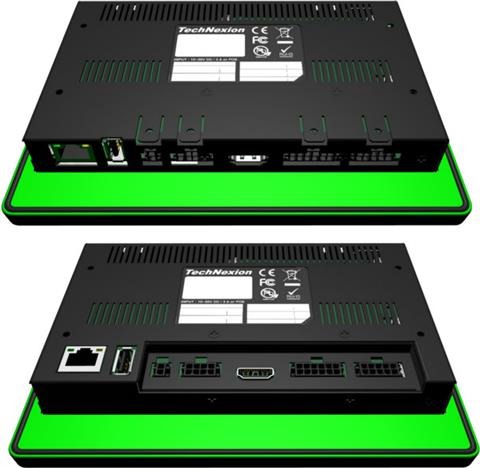
TechNexion Toucan-0700 is a HMI panel that is based on Freescale i.MX6 processor with a  baseboard following EDM standard for system-on modules. TechNexion Toucan-0700 features EDM1-CF-IMX6 SoM which was also used in Wandboard boards and runs Android 4.3 or Android 4.4 operating system.

TechNexion Toucan-0700

TechNexion Toucan-0700 specifications include Freescale i.MX6 Solo / Duallite Cortex A9 processor with Vivante GPUs, 512MB / 1GB RAM, 4GB eMMC flash storage + micro SD slot, 7″ LCD display with LED backlight, 1024×600 resolution, HDMI 1.4 for external display, 1x USB 2.0 host port, 1x USB OTG 3.0 connector and 7 Watt power consumption.

TechNexion Toucan-0700 review

TechNexion Toucan-0700 can be mounted using 4 mounting clips (included), or an optional 35×75 VESA Mount (MIS C. Standard). You can find its documentation on official company’s pages. It is on sale for 540.09 Euros without Wireless LAN / Bluetooth and 584.00 Euros with both of those wireless radios.

Asus MG279Q is a monitor with FreeSync support

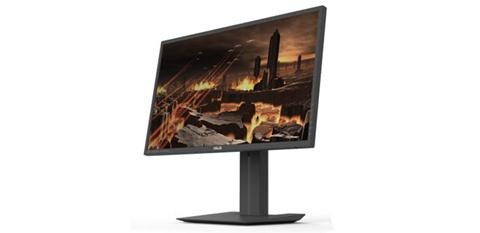
Earlier it was not know if the Asus MG279Q supports AMD FreeSync or not but today it was confirmed by an AMD representative that the Asus MG279Q will indeed support FreeSync technology. However it will be limited to a minimum of 40 Hz and a maximum of 120 Hz.

Asus MG279Q review

Here are the exact words of AMD,

AMD does not have a black or white list for FreeSync monitors, and while the monitor supports the standard DisplayPort 1.2a, it can operate at variable refresh rate (VRR) provided by the manufacturer.

An Asus representative confirmed that the new Asus MG279Q features variable refresh rates between 40 and 120 H which means it will be compatible with AMD FreeSync. Asus MG279Q specifications include a 27 inch screen with IPS type panel. It has resolution of 2560 x 1440 pixels and has refresh rates of 120 Hz. Asus MG279Q has a contrast ratio of 1000: 1, 350 cd / m2 brightness and viewing angles of 178 degrees.

Port selection includes DisplayPort 1.2a +, a mini Display Port, two HDMi and MHL port with two USB 3.0 ports. The monitor will hit the market shelves by the end of March at a suggested price of $ 699.

Super Talent DuraDrive ZT4 is rugged SSD for extreme conditions

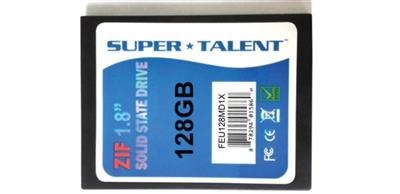
Super Talent DuraDrive ZT4 is the newest SSD in the market that is designed specifically for a commercial and industrial complications. The new DuraDrive ZT4 makes use of “Zero Insertion Force” 40-pin connector with IDE interface and like its predecessor is intended to be used in the aerospace , computer and medical systems including many other applications where reliability is a must.

Super Talent DuraDrive ZT4 review

Super Talent DuraDrive ZT4 has slightly smaller form factor than usual laptop SSDs. It measures 51.8 x 69.8 x 5 mm that allows it to be used in tight areas. The disc is completely sealed which in turn allows it to be used in environments of extreme heat / cold and even in adverse weather conditions.

Therefore Super Talent DuraDrive ZT4 is designed to operate at a temperature ranging from -40 to + 85 degree Celsius and is able to withstand shocks up to 1500G (off) and 16G (operating).

AOC Q2778VQE is a WQHD computer monitor

AOC Q2778VQE was launched today that features a 27 inch display packing 2560 x 1440 pixel resolution. AOC Q2778VQE is ideal for fast-paced games and movies. The screen of AOC Q2778VQE has an aspect ratio of 16: 9 and viewing angles of 170 degrees horizontally and 160 degrees vertically. Since many users make use of different ports to connect their devices to their computer monitors, AOC has equipped it with several ports that include Display Port, HDMI, DVI and D-Sub connectors. This is how it looks like.

AOC Q2778VQE

AOC Q2778VQE not only offers high performance but also come with nifty power saving modes like Eco Mode and e-Saver. In fact this computer monitor also meets strict regulations such as Energy Star 6.0 and TCO 6.0. AOC offers a on site replacement service for up to 3 years.

AOC Q2778VQE specifications are given below:
Line monitor    Pro-line
Monitor size    27 Inch
Display Format    16: 9
Brightness    350 cd / m 2 (type)
Contrast ratio    1000: 1
Dynamic Contrast Ratio    80M: 1
Response Time    1 ms
Maximum resolution    2560 × 1440 @ 60Hz
Connectors: D-Sub, DVI, HDMI and Display Port   

AOC Q2778VQE is now available at a suggested retail price of 399 euros  and you can find more details in the AOC website.

Download official Galaxy Note 4 SM-N910F 5.0.1 Lollipop ROM

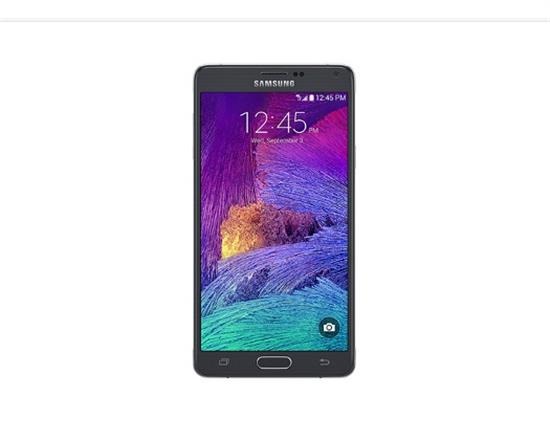
Official Android 5.0.1 lollipop is now available for Snapdragon variant of Samsung Galaxy Note 4 that bears SM-N910F model number. If you have not received the update on your Galaxy Note 4, then you can download the update by following the instructions given below and get it updated. The best part is that you will not lose your warranty or do any harm to your device if you flash this. Please note that it’s only for N910C. Knox stays 0x0 which implies Knox counter will not increase and warranty will not get void.

Download Galaxy Note 4 SM-N910F 5.0.1 Lollipop ROM

Installation instructions.

Extract (unzip) the firmware file – download link.
Download Odin v3.09
Extract Odin zip-file
Open Odin v3.09
Reboot phone in Download Mode (press and hold Home + Power + Volume Down buttons)
Connect phone and wait until you get a blue sign in Odin
Add the firmware file to AP / PDA
Make sure re-partition is NOT ticked
Click the start button, sit back and wait a few minutes

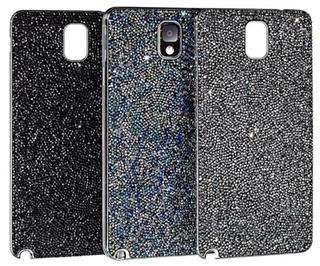
Review of Galaxy Note 4 Swarovski Battery Cover

Some people like a lot of bling on their phone and many of us resort to cheap Chinese bling cases but those who prefer quality choose Swarovski. The quality of Swarovski for the Samsung Galaxy Note 4 looks amazing and it really stylize your phone. Swarovski battery cover is adorned with crystals and is very easy to install.

Review of Galaxy Note 4 Swarovski Battery Cover

Simple remove your current battery cover and replace it the Swarovski case for Galaxy Note 4 and you are done. It fits just like the OEM case and adds minimum bulk, keeping your phone’s overall profile very thin. Here is its video review.