Dell Latitude 7285 specs: Latitude 7285 laptop with wireless charging

Dell Latitude 7285 is a tablet with wireless charging capability. It is a 2 in 1 detachable tablet that can be used in standard laptop mode as-well-as in tablet mode. Prices start at 1200 dollars for the tablet and Dell says you will have to pay extra for the keyboard, charging mat and other optional accessories. Unlike most 2-in-1 windows tablet-laptops, there are batteries inside both keyboard and tablet part.

Dell Latitude 7285 specs

Continue reading “Dell Latitude 7285 specs: Latitude 7285 laptop with wireless charging”

Poloniex disables Zcash Wallet: ZEC Deposits and Withdrawals disabled on Poloneix

Poloniex is a popular crypto currency trading website and it has made an announcement on Zcash’s trading webpage that it has temporarily disabled Zcash deposits and withdrawals until they hear from Zcash team. Zcash is about 1.1-1.2x more valuable than much more popular Ethereum but has been losing its edge due to this. This is what the Poloniex has to say about this crypto currency on their website.

poloneix zcash

Continue reading “Poloniex disables Zcash Wallet: ZEC Deposits and Withdrawals disabled on Poloneix”

ASRock Beebox J4205 mini PC Specifications: Beebox J4205 mini PC with Apollolake price details revealed

ASRock J4205 review

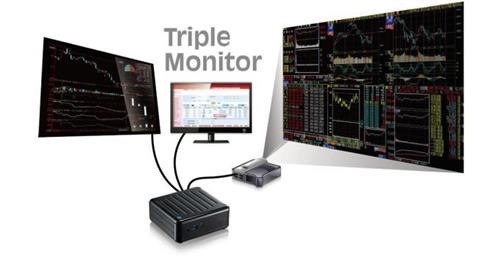
ASRock Beebox J4205 is a powerful mini PC that can run upto three displays. It is ideal for home use, work and media center computer. ASRock Beebox J4205 specifications include Intel Pentium J4205 apollolake processor, upto 16GB of DDR4 RAM, 32GB of eMMC flash storage and slots for storage.

Continue reading “ASRock Beebox J4205 mini PC Specifications: Beebox J4205 mini PC with Apollolake price details revealed”

Nexus 4 Android Nougat 7.1 download: Nexus 4 unlegacy android project ROM

Nexus 4 users are used to vanilla android experience and what better than having latest android 7.1 nougat ROM onboard? This is pure android ROM and there are no annoying applications onboard. Since this ROM is a port, the developer has made sure that everything works out of box. This included some changes that were required to support the Nexus 4 hardware.

Nexus 4 Android Nougat 7.1 download

* Linux kernel 3.4.y merged in (currently 3.4.108 * mostly security patches and minor bug fixes)
* BFQ IO scheduler (official kernel 3.4 release), set up so GUI processes have the highest priority
* F2FS support from kernel 4.9 (for /data only no point of f2fs on /cache)
* SELinux in Enforcing mode

It is important that system folder is unmounted before you install this ROM. Also since this ROM is without gapps, it is required that you install opengapps’ micro.

If you want stock like setup, disable the following built-in (AOSP) apps:
– Android keyboard (once you installed Gboard)
– Browser
– Calculator
– Camera
– Clock
– Email
– Gallery

Rooting is simple as well. Just download and flash latest SuperSU to root the android phone. So if you like plain android experience on your nexus 4, this is the ROM you should install.

Download Android 7 Nougat ROM for Moto E 2015

Moto E 2015 may no longer be getting updates to latest android but there are several ROM developers that are churning out Android 7 Nougat updates for the android phone. This particular ROM is called AOSP Extended and it gives you stock user interface with some customizations with the custom developer’s theme engine. This gives you smooth and lag free experience out of box.

Download Android 7 Nougat ROM for Moto E 2015

Here are features of the Android 7 Nougat ROM for Moto E:

*  DUI(Fling/Pulse/Smartbar)
*  Substratum Theme Engine
*  Inbuilt SuperSU
*  Privacy Guard
*  Expanded Desktop
*  Dashboard suggestions/summaries (Enable/Disable)
*  Statusbar Clock/Date customizations
*  Statusbar Traffic Indicators
*  Notification count
*  Dt2s on Statusbar
*  QS quick pulldown
*  QS Brightness Slider(Enable/Disable)
*  QS Tiles Animations
*  Force expand notifications(Enable/Disable)
*  Immersive Mode messages(Enable/Disable)
*  Flashlight Notifications
*  Immersive Recents
*  Toast icon
*  MediaScanner behaviour on boot
*  Heads up Notifications(Enable/Disable)
*  Power Menu Customizations
*  Additional Battery Saver steps
*  Volume Rocker tweaks(Wake/Music seek/Keyboard cursor control/Swap in landscape mode)
*  Spanish Translations
*  PT BR Translations
*  Update Fling Logo
*  Add gestures back to settings app
*  QS haptic feedback
*  One tap data & Wifi tile
*  Auto brightness icon toggle
*  Breathing Notifications
*  Clickable clock and date in statusbar header
*  Long press gear icon in statusbar header launches Extensions
*  Show 4G instead LTE switch
*  Night Mode is back
*  Night Mode QS Tile
*  Long press caffeine tile action
*  Customize QS Rows/Columns
*  Customize small QS Tiles
*  StatusBar brightness control
*  Lockscreen Shortcut
*  Double tap on lockscreen to sleep
*  Quick Unlock for PIN/Password
*  Battery Styles and percentage
*  Change default file manager to MK Explorer
*  Add FMRadio
*  Add support for Jio4G Voice App
*  Navbar QS Tile
*  Flip Button Animation
*  Unlink Notification volume
*  Status bar clock Seconds
*  Partial ScreenShot Type
*  Screenshot Delay
*  Slimperience browser
*  Pixel’s bootanimation(Experimantal)
*  Pixel’s UI(Navbar/Accent/Pixel launcher)
*  OMS7
*  Camera sound toggle
*  Advance Ambient Display
*  Longpress power button on lockscreen for torch
*  Disable FC
*  Wakelock Blocker
*  Toggle Lockscreen Media Art
*  Toggle Lockscreen music Visualizer
*  Ticker
*  Bluetooth QS tile easy toggle(one touch)
*  CM’s Eleven Music Player
*  Disable QS on Lockscreen
*  Invert Ambient display’s Color
*  Toggle Dynamic notification card’s color
*  Low Battery Notification Toggle
*  Hide Clock/Date/Alarm text from lockscreen
*  Lockscreen Clock’s Font customizations
*  Weather on lockscreen

Here are installation instructions:

*  Download the ROM and GApps of your choice
*  Backup each and every partition from Moto E TWRP Recovery
*  Make a full wipe system, data, cache, dalvik
*  Install the ROM
*  Install GAPPS package
*  Wipe cache.
*  And at last Reboot.
[First boot will take few minutes. Keep patience.
Clean Flash is always recommended.

The One Car Accessory Everyone Needs

Preparing for the unexpected is critical when you are on the road. Tires get flats, cars breakdown and accidents happen. Mobile devices go a long way in getting help in a short time when problems arise. People use their mobile devices for directions, locating assistance, calling friends and family or the authorities if an accident occurs, but a mobile device is useless if it has a dead battery. Having a portable power bank orcar charger gives you the power to get help during an emergency.

portable car charger

Continue reading “The One Car Accessory Everyone Needs”