The ASUS P565 is a windows mobile device that is using the fastest processor for mobile phones. ASUS even advertises it as the world’s fastest PDA-phone. Well, it should be fastest Windows Mobile phone and not the fastest PDA-phone. With a 800MHz processor in it’s heart, the ASUS P565 surely promises great speed.

Unboxing
We did it’s unboxing few weeks back and here is what we got in the package.

ASUS P565
AC adapter
A really sleek leather case
Battery (1300mAh)
Getting started CD and Bonus CD
mini-USB cable
Wired headset
some papers

Overall, the packaging is pretty basic. No diamond-shaped box. ASUS has kept it simple.
Design
The ASUS has put a lot of effort in giving P565 a stylish look. From the front, it has the traditional business PDA looks. But, most of it’s back is covered with high-quality leather, which makes this unit stand out from the rest of the crowd. It also gives it a man-ish look.

Buttons
Like the recent trend that can be seen in devices like HTC DIAMOND, TOUCH HD, ASUS has not put a lot of buttons in this device. It does have a nice directional pad (D-PAD).On the front, you can find these buttons in sequence from left->right: answer key, ASUS glide launcher, ok button and end key.
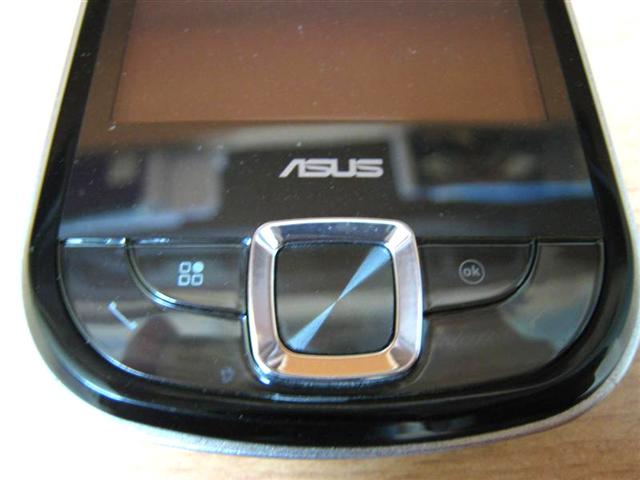
There is also a front-camera, which lets you do video calls and a LED which tells you about various notifications like network availability, bluetooth and WiFi status.

On the top, you can find the power button.

On the bottom, you can find the traditional mini-USB port for syncing purposes. Headphones also must be connected via mini-USB.

On the left side, you can find the volume control buttons and a GPS label, which does nothing. On the right side, you can find camera button, which supports auto-focusing an object when you press it a little.

Screen
The screen has VGA resolution. The screen is flushed and mesmerizing to look at. It is at par with HTC DIAMOND’s screen quality, if not better. But, there is one thing that made me like the screen more than HTC DIAMOND: It’s screen sensitivity. It feels almost like I’m using capacitive screen. You don’t need to apply much pressure to select objects on the screen.
I used Slide-to-Unlock (S2U2) application to demonstrate the sensitive screen. Notice, that I didn’t have to apply much pressure like you have to do on HTC Diamond and HTC Touch Pro.
Connectivity
The ASUS P565, being a high-end device, comes with all the connectivity options a modern device should come with. It has Wifi b/g, Bluetooth 2.0+EDR, HSDPA, UMTS 2100 and a SiRF StarIII GPS. All worked well as expected.
The ASUS P565 comes with a micro-SD slot, which is SDHC compatible. It is hidden under the SIM-slot. This makes it little hard to get to accessible, but you won’t be changing the micro-SD slot all the time. Will you? If yes, consider some other device. Sadly, most of the Windows Mobile devices share the same story.
The device comes with a mass-storage utility. But, the sad part is that it is only USB 1.1. If you are transferring few MP3s, then you may not notice the difference, but if you are transferring a 700MB movie, then it may take an awful amount of time to transfer the data.
Speed
The Intel Marvel PXA930 800MHz processor is the heart of the ASUS P565. It is fast and certainly makes the whole Windows Mobile experience better. Like it’s younger sibling ASUS P552W, it also comes with an underclocking utility. It is true that you won’t be needing the all that horsepower all the time. The utility allows you to toggle between “power-saving”, “automatic” and “turbo” mode.
Speed Comparison
Compared to the HTC Diamond, it does feel faster. Here is a little comparison video, where I have used both ASUS P565 and HTC DIAMOND side-by-side. Here is a quick video, where I’ve tested the browsing speeds of both the devices. Both are running the Opera Mobile 9.5. ASUS P565 really shows it’s power when it comes to processor intensive task like web browsing. The Opera Mobile 9.5 truly shines on the ASUS P565, where it not only loads faster on the P565, but the web browsing too is noticeably faster on it as compared to HTC DIAMOND.
I also did some basic tests like making a new MS Word file, opening Excel and Powerpoint Mobile. The speed of both devices were similar with P565 being slightly faster in those tests. Of course, the speed won’t be that noticeable in such tasks as they don’t take the CPU to it’s limits. But, the ASUS P565 impresses us, where it should: in the processor intensive tasks like web browsing.
Some Benchmarking
Benchmarks speak a lot about the performance, if not everything.


To keep the competition fair, lets rule out ASUS P552W from the scene as it is a QVGA device.


Stylus
The stylus is fully plastic and is quite light weight. But, on the brighter side, it is nicer to use than the one found on HTC DIAMOND as it is longer, thus making it more comfortable in the hands.

Battery Life
The ASUS P565 comes with a 1300mAh battery, which easily lasted me a day with normal usage under “automatic processor mode”. My normal usage includes a typical business day with 3-4 hours of phone calls, some SMSes, 40 mins of wifi browsing and normal PIM functions.

If you plan to use GPS all the time, get a car charger as the battery won’t last a long time before it dies.
Camera
The camera is 3MP and takes decent pictures. Since there is no flash, you must make sure you have good lightning conditions in order to take decent photographs.


Comparisons
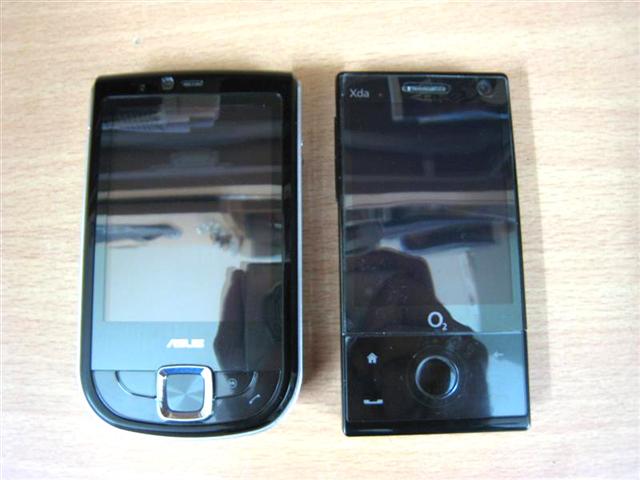
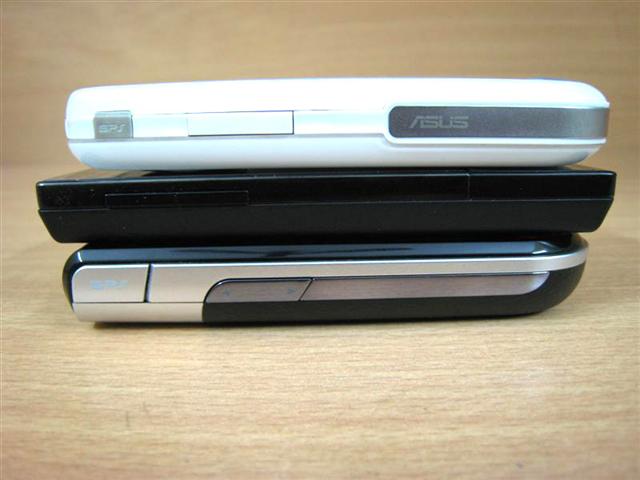
The ASUS P565 is not a huge device by any means. My hands quite man-ish and it feels great in my hands. The leather finish is actually quite helpful as it acts as a firm grip while holding the device.

Glide Interface
The glide interface is same as found on ASUS P552W. I’m just using the same content from it’s review.
It has 3 modes:
- Life: This gives you a big analog clock and covers full screen
- Business: This gives you a world clock
- Original: This brings back the start button with a special ASUS today plugin. This is quite similar to the HTC’s TouchFlo interface.


Some screenshots of Life interface:


You can swip your finger to right or left to move between the images. Tap once to hide the buttons

Here are few screenshots of the Business screenshot


ASUS has bundled few goodies too. They have included simple backup/restore utility and a call filtering software.


They have also included a finger-friendly music player called EziMusic, which is relatively simple to use.

They have also skinned the WMP mobile.

A small, but useful application called meeting time planner, which is nothing but tells you the time of the other city compared to your city.

Remote Calender, an application that lets you sync your calender with the Google Calender is also included.

A simple ZIP application to unzip files on the go.

Youtube and Flickr application also been included to uplaod videos and photos respectively. Voice dialing is also included as-well-as Remote Desktop.
Conclusion
The ASUS P565 is finally something, which promises to give some strong competition to the HTC’s offerings. It’s great build-quality are appreciated. Leather back gives it a touch of class. With the most powerful mobile processor under it’s hood, you surely can enjoy the feeling of having the fastest Windows Mobile phone in hand. The screen is great, but the glide interface leaves a lot to be desired. It is not on par with the excellent HTC’s TouchFlo3D interface. ASUS is right on path to give HTC some real tough competition, if they do the marketing right.

Price: It is available for around $600-$700 depending on the region from where you are buying it.
—
Pros:
- Great professional design
- Leather finish is a great touch. It gives it a premium device feeling for sure
- Flushed screen
- Responsive screen
- Speedy processor (Intel PXA930 800MHz)
- Auto-Focus 3MP camera takes decent pictures
- Quite light at 120gm
- Nice included case
Cons:
- Glide interface requires a lot of work to be done
- It may be the fastest Windows Mobile, but no way the fastest PDA-phone.
- Micro-SD slot not easily accessible
- Only 56MB of free RAM after bootup out of total 128MB RAM
- 5MP cameras are on the rage right now although the 3MP camera in it performs quite nicely
- No 3.5mm headphone jack