Asus K01A Specifications, another 7 inch cheap tablet

It is clear that the Taiwanese computer manufacturer ASUS will largely switch to Intel SoCs, for instance in upcoming Memo Pad and Fonepad 7, the company might just use another cheap Intel Atom processor in another 7 inch tablet which was spotted by the name of K01A.

Asus K01A Specifications

The Asus K01A was spotted on FCC, a U.S. telecoms regulator and is pretty much on the verge of being released in U.S. While there are no pictures of it we do know, thanks to FCC some specs of it such as:

7 inch display
TN panel with 1024 x 600 pixel resolution
802.11n Wi-Fi, Bluetooth 4.0
3200 mAh 12.2 Wh battery
4GB flash storage
Micro SD card slot
Rear camera, front webcam

asus k01a

Given its low resolution display and poor internal storage, the Asus K01A will cost very less.

Root Samsung galaxy note 2014 10.1 LTE by auto CF

Here are the instructions on how to root the Samsung galaxy note 2014 10.1 LTE edition

Rooting Instructions for Note 10.1 (2014 edition)

1.Boot into Download mode. Do this by turning Off Tablet. Then, hold Volume Down + Power. Follow the instructions on the screen
2.Flash autorootp600mj4.tar.md5 with Odin v3.09 (put in AP slot, don’t change any other settings, click start)
3.Let it do its trick. Confirm root.
4.Reboot into download mode again and flash the stock mj4 recovery provided

That is it you have finally rooted the Note 2014 tablet. If you followed the steps correctly it should not take more than 30 seconds to root it.  All credits go to Chainfire for coming up with AutoRoot and for his SuperSU App.

Root Samsung galaxy note 2014 10.1 LTE

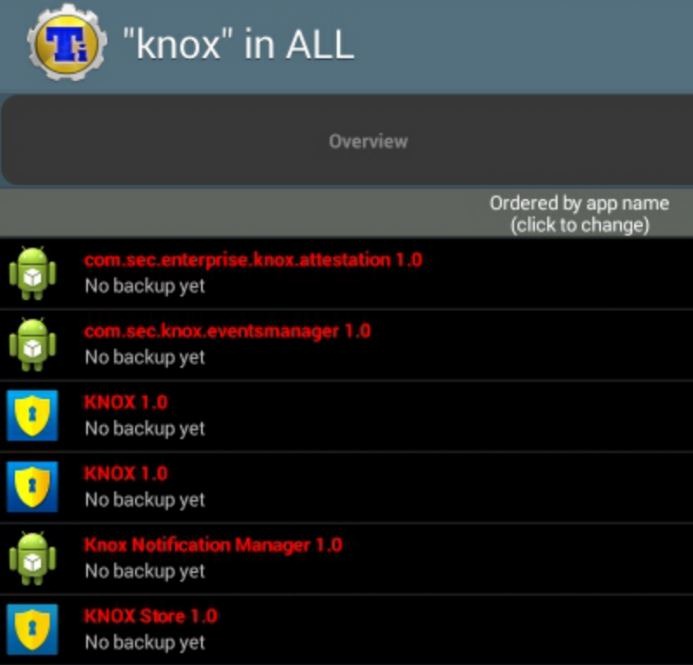
After the root, you must freeze the all six Knox 1.0 apps (both of them) and the KLMS Agent 1.0 (com.samsung.klmsagent). Otherwise you will get security warnings.

Bloatware Free Galaxy Note 10.1 2014 LTE ROM

Like all Samsung devices the Galaxy Note 10.1 2014 LTE comes with tons of bloatware. Thanks to XDA, there is a bloatware free firmware for the Galaxy Note 10.1 2014 LTE. Here are the features of it.

Android OS, 4.3 JellyBean ([BMC2)
MultiCSC (ATO,PHN,BRI,SER,TGY,AUT,BGL,BTU,DBT,LUX,DTM,EUR,I TV,NEE,PHE,ROM,SEB,SEE,SIO,TMN,TPH,XEF,XEH,XEO,XSK ,ABS,ACR,AFG,AFR,ECT,EGY,FWD,JED,KEN,KSA,KSS,KSZ,L YS,MAT,MED,MID,MRT,MWD,PAK,SAC,THR,TMC,TUN,TUR,WAN ,WTL,XFA,XFE,XFM,XFU,XFV,XSD,XSG,XSI,XSM,XST,XSZ)
Rooted mit su binary and SuperSU app v 1.93
Busybox v 1.21.1
Deodexed System Apps and Framework
Zipaligned
Touchwiz
Multi Screen
and all other Stock ROM Apps and Functions
many System Apps moved to DATA for more free System Space and easyer deinstall. (~295MB)
Knox removed (Apps, Container etc)
OTA Updater removed (Disable Menu Software Update)
Disable Bootsound
build.prop Tweaks for better Battery Life and smoother ROM
Added Camera Option to disable the Camera ShutterSound over the Camera App Options
Added Enable Camera during Call
Disable Converting Effect Between SMS / MMS
Set SMS send and receive Limit to 999
Samsung KitKat Batterie Logo
Gear Manager (1.6.132701)
Sketchbook HD (2.9.0)(Samsung Galaxy Edition)
new Wallpaper included
all Apps now avaible in the floating S-Pen Window and the MultiWindow Selection
1% Battery MOD included
4-Way Reboot MOD (Extended Reboot)
Faceunlock for Lockscreen unlock
enable Bootanimation.zip for Custom Bootanimation
added StockyROM Bootanimation

How to flashing the Galaxy Note 10.1 2014 LTE ROM

Download ROM from this link
P605-xxxx-StockyROM-VX.X.zip push to your Tablet
boot in the CustomRecovery
MAKE A NANDROID BACKUP!
if you flash my ROM for the first time, a full wipe is absolutely necessary
Cache and Dalvik Cache wipe
install ROM over CustomRecovery (wait a few minutes)
reboot your Device (the first boot can take a little bit more time 10-15min)

Bloatware Free Galaxy Note 10.1 2014 LTE ROM

How to flash Modem (+ NON-HLOS) (Only if you have trouble with WLAN or LTE)

Modem Pack download and unpack (Download in the second post #2)
now first flash with Odin V3.09 modem.bin over CP – PDA
Reboot in Odin Mode
flash NON-HLOS.bin over CP – PDA
Reboot Device
Now you are ready

Apple iMac: Bluelounge Jimi Review

Apple hide the USB on the back of iMac computer to keep the looks clean and clutter free. It worked for most except for those who use USB drives often and find it inconvenient to attach and detach them. Now there is a accessory called Bluelounge Jimi that extends the USB port in such a way that you no longer have to go to the back of iMac to attach / detach your USB flash drive.

Bluelounge Jimi Review

Made of tough black plastic, it is exclusively designed for the iMac slim aluminum unibody model (released November 2012) or later. It works with all 4 USB ports of 21” and 3 of 4 ports available on 27” iMac.

How To use Bluelounge Jimi

Plug Jimi into a USB port at the back of your iMac.
Align the bottom of the “J” straight down.
Snap it into the air vent at the bottom of the iMac.

Its flexible body allows you to plug into a port of your choice on your iMac. Costs 15 dollars.

Verdict – Never again will you have to crane and reach around to access the USB port behind your computer. Jimi makes it easy.

Acer Travelmate B115 and Aspire E3-111 Specifications, Fanless and Touchscreen Laptops

Acer Travelmate B115 and Aspire E3-111 are two laptops that the company is working on right now and would be releasing in about a week. Interestingly their specifications have already been leaked by Acer itself on their official website including high resolution pictures.

Folks at notebooksnews were first to discover these two laptops and they say that both will come with similar specifications and the only difference between them is the use of Celeron in E3 and Pentium in B115.

Acer Travelmate B115 Specifications

11.6 inch display
1366×768 pixel resolution
Intel Celeron N2830 processor clocked at 2.16 GHz
4GB RAM
500 gigabytes hard disk drive
LAN, Wi-Fi
SD card reader, 2x USB 2.0, 1x USB 3.0 ports
HDMI, VGA
1.3 kg weight

Aspire E3-111 Specifications

11.6 inch display
1366×768 pixel resolution
4 gigabytes of RAM
500GB HDD
Intel Pentium N3520
LAN, Wi-Fi
SD card reader, 2x USB 2.0, 1x USB 3.0 ports
HDMI, VGA
1.3 kg weight

Acer-TravelMate-B115-Aspire-E3-111-specifications

Price of either is EUR 330 or USD 450.

Acer Iconia B1-730 HD Specifications, With Intel Atom Z2560

The Acer Iconia B1-730 is the latest 7 inch tablet from Taiwanese giant. The tablet is already up for pre order on Amazon Germany which tell us more about Acer Iconia B1-730 HD specifications and they surely are a bump from its predecessor.

Acer Iconia B1-730 HD Specifications

Acer Iconia B1-730 HD Specifications

* 7 inch IPS display
* 1280×800 pixel resolution
* Intel Atom Z2560 processor clocked at 1.6GHz
* 16GB flash storage
* 1 gigabyte of RAM
* Bluetooth 3.0, 802.11n Wi-Fi
* 3700 mAh battery
* 320 grams
*Android 4.3 operating system

The listed price is EUR 139 which is quite cheap. Visually the B1-730 is going to be same as B1-720 and the changes are going to be seen under the shell only. An Austrian trader has already listed it for May 7 2014.

The official Acer store already has listed it along with its cover.