LG has put the product page of it’s upcoming Netbook, LG X110. Unfortunately, they have not mentioned it’s price on the website. The best part is the inclusion of the HSUPA module. I hope it won’t be too pricey. There seems to be no linux version or even Windows XP version.
When someone upgrades to something better and stronger, there is a feeling of comparing which always arises. Sooner or later, one may even question himself, if the upgrade was really required. If yes, then can both of the gadgets co-exist?
In my case, I got the ASUS EEE 1000H. I’ve two ASUS EEE 701s already, both upgraded to 2GB RAMs too. Let me get the comparison straight:
Where does 1000H towers overs 701:
Bigger display: It has 10.2″ display compared to the 7″ display of EEE 701.
Better resolution: It has 1024 x 600 resolution compared to the shabby 800 x 480 of 701.
There is so much rage in the netbook arena. With so many companies jumping into the Netbook arena, it definitely becomes difficult for the number one netbook manufacturer, ASUS to stay as the leader. With the ASUS EEE 1000H, it seems like they have made the ultimate netbook so far. Combined with fast processor, ample storage space, great upgrading options and EXCELLENT battery life, they seem to have got everything right
A little HISTORY
Last year, ASUS was the first one to introduce netbooks into the market. It was due to the Asus, the term netbook became popular. ASUS first came with the EEE PC 70x series which included 700, 701 and 702. Those models became very popular due to their low price tags; good build quality and ruggedness. After few months, it launched ASUS 900, which was similar to EEE 701 but with bigger(8.9″) and better screen(1024 x 600). Size increase was marginal too. After a month, they came out with EEE 901, which sported Atom processor and bigger battery. 901 is still selling very well. Some even said that the EEE PC 901 is the best balance of power and mobility.
I personally own two EEE 701s. They work very nice for me. I upgraded to 900, but returned it as it also had the exact keyboard as 701. It is not that I hate the keyboard of 70x series. It is great for 15min data entry but definately not for prolonged durations. I didn’t upgrade to 901 just due to one reason. The reason was that I have been yearning for a better keyboard. Sooner, my wish was answered by ASUS when they introduced the ASUS 1000H. According to ASUS, the keyboard of the 1000H is 95% of the normal laptop size keyboard. This makes me a happy camper for sure!
Bootup
The EEE PC 1000H boots up very quickly. Definately, it boots faster than my 701 which has my personal nLited verson of XP professional. The EEE PC 1000H comes with Windows XP Home edition(too bad they don’t have XP professional option).
KEYBOARD = Perfect for typing and great for the bloggers
The size of the keyboard of the ASUS EEE PC 701 was just ok. It is perfect to enter small URLs and do some basic editing. If you had plans to write a lot on the keyboard, then, I would really not prefer you to write on the small keyboard of the 701.
On the other hand, the keyboard of the 1000H is simply fantastic. Infact, I’m writing the whole review on the keyboard of the ASUS 1000H. I feel like typing on the full keyboard. Asus claims that it is 95% of the full keyboard. The first time I started using this keyboard, I’d to make no adjustments at all. The keys are of good size and they have excellent tactile feedback.
SafeWallet is a powerful and highly secured storage application allowing you to securely store various types of information. Use SafeWallet to store business and private information and enjoy easy-to-use interface! Use SafeWallet to store information such as: credit cards information, online passwords, bank account info, registration codes, ATM PINs, emergency contacts, addresses, serial numbers and create your own card templates for your own custom information!
Highly Secure Technology – Backed with 256-bit AES encryption engine that meets US government standards! Protect your information with encrypted wallets, Auto-Close preventing SafeWallet from running at the background or while connected to a holster and more!
Look what I received today! It is the new Sansa Fuze from Sandisk. Sandisk has been a quick learner from it’s past mistakes. It has taken the feedback from it’s customers and has come out with a feature-rich product which provides it’s users a great multimedia experience everytime they use the Sansa Fuze.
Stay tuned for the complete review :)
Here are it’s quick specifications:
Size: 3.1 x 1.9 x 0.3 in
Capacities: 2GB, 4GB, 8GB
microSD memory slot (SDHC supported)
Screen: 1.9”, 64k color, 224×176 pixel
Audio: MP3, WMA, WAV, AAC
Video: Converted MPEG-4 20FPS
Battery: 24 hours audio / 5 hours video
update: it finally received it’s full review at ApoTheTech.com click Here to read it.
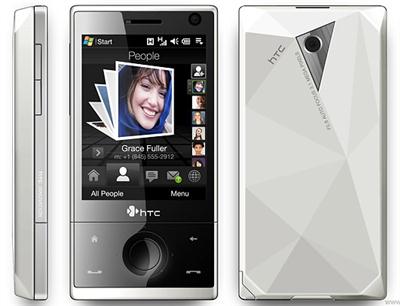
Well, I do not know if any other device other than the HTC Diamond and Diamond Pro currently posses this cool feature or not, but the feature is actually very useful especially if you are in a meeting and a call comes in.
I’ve made a video and have demostrated this very useful functionality.
If you are an owner of the sexy HTC Diamond, there is one thing that will annoy you the most especially if you are coming from some other Windows Mobile device: the device won’t wake up when an SMS comes in.
Just make the following changes in the registry of the HTC Diamond. You can use any of the registry editor.
Go to HKLMDriversBuiltInRIL > find the DisableSMSWakeUpEvent > Change value to 0 > Soft Reset.
Some popular registry editors are “Resco registry”. It comes with Resco File explorer. You can also use PHM Registry Editor to perform the same action but the developer of PHM registry editor is no longer offering the application on his website.
Klaxon 2 is a Windows Mobile G-Sensor and Light Sensor Enabled Alarm Clock. This application lets you snooze the alarm by shaking the phone or you can turn it on by nearby lights.
The application is simply amazing piece of application! You can download Klaxon 2 for here

 LG has put the product page of it’s upcoming Netbook, LG X110. Unfortunately, they have not mentioned it’s price on the website. The best part is the inclusion of the HSUPA module. I hope it won’t be too pricey. There seems to be no linux version or even Windows XP version.