Gfycat Minute-Long GIF Support Added

Gfycat has added a new GIF feature that promises to transform how we share short form content: longer GIFs that fully capture product demos, gamer reels, tutorials, and DIYs. Until now, the Gfycat supported only 15 seconds GIF which was not enough most of the time. The company listened to its customers and has added support for minute-long GIFs now.

Gfycat Minute-Long GIF

So, now the users do not have crop or speed up their highlights, or find other ways to “hack” Gfycat’s 15-second limit. Users begged and pleaded for longer GIFs to fully capture their moments of glory. In response, Gfycat decided to roll out one-minute GIF support so gamers could create better highlight reels, makeup artists could create better DIY videos, and chefs could better demonstrate their recipes.

Richard Rabbat, Gfycat CEO said

Gaming is a 91 billion dollar industry, and obviously we want to ensure that gamers bring out their inner creator through the tools we provide to make the best possible content. The short video has become a core part of how we interact today, whether that’s in the form of a GIF, a snap, or an Instagram video, what we’re witnessing is a seismic shift in communication.

Samsung S8 ROM for Galaxy Note 3: Download S8 firmware for Note 3

If you fathom all the amazing features of the Samsung Galaxy S8 on your Note 3, a developer has ported Samsung S8 UI and other amazing S8 applications for the Note 3. To flash S8 ROM for Note 3, you will need root permission and Note 3 TWRP custom recovery. ROM is said to be very stable and everything is working like a champ. So you can easily use it as your daily driver.

Samsung S8 ROM for Galaxy Note 3

Here are the Samsung Galaxy S8 features included in this ROM – SMusic , TouchWizHome , SBrowser , VoiceRecorder , Icons , SamsungNotes , GameHome , Weather , WeatherWidget , SamsungTheme , Audio , Fonts , sounds , GearManager , VideoList , Wallpaper , Build.prop , Themed SystemUI(StatusBar) , SamsungContact , SamsungIncallUI.

You can download the ROM from here and put in your phone’s storage. Then flash it in TWRP. The ROM also comes preloaded with Samsung galaxy S8 wallpapers for the best possible S8 feel.

This is an excellent ROM for those who are not yet ready to switch to new hardware like S8 and want to use their Samsung Galaxy Note 3 as much as possible. This year, Samsung will be releasing Note 8 which might be right time to upgrade. Until then, you can simply install S8 ROM on your Note 3.

Galaxy Note Fan Edition ROM for Note 3: Download Galaxy Note FE ROM for Note 3

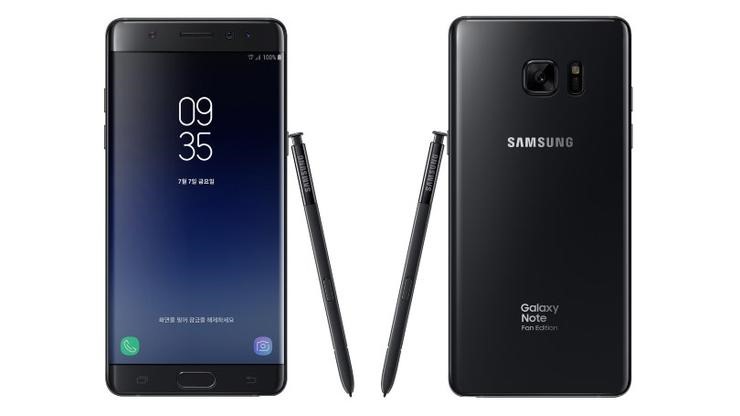
Samsung released Galaxy Note Fan Edition to reuse the parts of the Note 7 which was recalled due to battery issues. Now, a developer has churned out Samsung Galaxy Note FE ROM for Note 3 which brings the new Galaxy S8 UI and other enhancements that are introduced in the Fan Edition ROM. Before you flash this ROM, keep in mind that it is compatible with only qualcomm version of Note 3 which means N9005 / N900SK.
Galaxy Note Fan Edition ROM for Note 3

Also, you will need current kernel option supported so make sure to install kernel before ROM installation in order to avoid problem. Kernel is included in the package. Here are the features of the ROM.

* AOD Touch Enable / Disable
* Disable AOD Touch in the pocket
* AOD Auto/Manual Brightness control
* AOD position moving to prevent Burn-in
* Bluelight Filter
* Folder lock on the homescreen
* Fastest Perfomance
* Multi-languages supported
* 106 multi CSC
* Supports over 90 national system languages

* AOD/Bluelight is working on any kernel
* Lsskernel 3.8UX
* Magisk V12 & MagiskSU
* SuperSu 2.79 SR3
* Systemless Xposed 87.1 topjohnwu
* Updated lastest system app

Following things are not working right now.

* Sidesync, black screen but presentation mode is working
* VoLTE
* Video call
* S-View is not supported
* Bootloops with Jio Sim
* Spen cursor is misaligned

Here is how to install it.

Root permission and Custom recovery  – PhilZ Touch / CWM 6.0.5.0 / Note 3 TWRP 2.8.7.0
Make sure your phone is fully charged to 100%

Step01. Backup your data.
Step02. Perform a factory reset on recovery.
Step03. Recovery runs the ROM file.

Instructions for install the UX.

Aroma Installer
Step 4. Select the language you want to use for the installation.
Step 5. Select "MagMa-NX Custom Firmware Install".
Step 6. Select the device you are using.
Step 7. Select the kernel to use.
If you installed the kernel before installing the ROM
Select "[Kernel preinstalled] Do not install the kernel".
Step 8. Select the CSC of your carrier.
Step 9. Select the debloat App. (Keep default option if possible)
Step 10. SystemUI, UDS, and the color of the battery icon displayed in the status bar.
Step 11. Select the launcher you want to use. (Default: S8 Launcher)
Step 12. Select the Add user selection option.
Step 13. Select the type of camera app you want to use.
Step 14. Select the sound mode you want to use.
Step 15. Select the gps locale in your area.
Step 16. Select the type of rooting.
Step 17. Select the wipe method.
Step 18. Now click Next to install the ROM as you chose so far.
Step 19. When the installation is complete, click Next to reboot the system immediately.
Step 20. Wait approximately 15 ~ 20 minutes and the system will be booted and the first system setup screen will appear.

Step 21. After the initialization is complete and the home screen is displayed after booting is completed, run the "Live wallpapers" app on the second home screen.
Step 22. Select "HOME AND LOCK SCREEN" and select the desired background.
Step 23. Press "SET AS WALLPAPER" to finish setting up Infinity wallpapers.
Step 24. Now, when you press the power button to turn off the screen, the AOD screen is displayed and the Infinity wallpapers are applied.

Galaxy S5 Mini Underclock Overclocking ROM

You can overclock or underclock Samsung Galaxy S5 Mini by flashing the Slim6 Marshamallow ROM. The developer has enabled graphite, strict aliasing, memory sanitize, cortex tuning and pthread. There are a few build.prop tweaks as well. He has removed camera, gallery, browser, email and STK. A host of useful applications have been installed which include:

Galaxy S5 Mini overclocking

– MiXplorer – A fantastic file manager – http://forum.xda-developers.com/show….php?t=1523691
– Viper4Android – http://forum.xda-developers.com/show….php?t=2191223
– Material Design Xposed installer ( Note you still need to install the framework.This can be done via the app) http://forum.xda-developers.com/xpos…aller-t3137758
– Substratum Theme Engine – A Layers theme manager – http://forum.xda-developers.com/andr…ratum-t3423623
– Kernel Adiutor-Mod – http://forum.xda-developers.com/andr…ernel-t3333549
– Adaway – Ad Blocker app
– Nova Launcher – https://play.google.com/store/apps/d…launcher&hl=en

Here are some overclock  / underclocking controls.

* Compiled with self built optimized UBER 6.3 toolchain
* Unlocked CPU frequencies: 1500MHZ,200MHZ and 300MHZ
* Updated Linux kernel from 3.4.39 to the latest 3.4.113
* Added many optimizations (You can see all of the optimization flags in the makefile on the kernel source page)
* Enabled graphite
* Fading LED’s
* Added Drivedroid Support

Added GPU governors include Zzmoove , Hyper , Alucard , Darkness , Nightmare , Wheatley , Smartassv2 , Dancedance , Pegasusq. Added I/O schedulers : Zen , Sio , Fifo , Fiops , Tripndroid , Vr

Installation instructions:

– Download the zip file https://www.androidfilehost.com/?fid=457095661767139637
– Copy to your phone
– Reboot into Galaxy S5 mini TWRP recovery mode (Volume-Up + Home + Power button)
– Wipe Dalvik/art Cache, Cache, System and Data (inside Wipe -> Advanced Wipe)
– Install Slim6
– Install GAPPS
– Reboot

Dell Latitude 7285 specs: Latitude 7285 laptop with wireless charging

Dell Latitude 7285 is a tablet with wireless charging capability. It is a 2 in 1 detachable tablet that can be used in standard laptop mode as-well-as in tablet mode. Prices start at 1200 dollars for the tablet and Dell says you will have to pay extra for the keyboard, charging mat and other optional accessories. Unlike most 2-in-1 windows tablet-laptops, there are batteries inside both keyboard and tablet part.

Dell Latitude 7285 specs

Continue reading “Dell Latitude 7285 specs: Latitude 7285 laptop with wireless charging”

Poloniex disables Zcash Wallet: ZEC Deposits and Withdrawals disabled on Poloneix

Poloniex is a popular crypto currency trading website and it has made an announcement on Zcash’s trading webpage that it has temporarily disabled Zcash deposits and withdrawals until they hear from Zcash team. Zcash is about 1.1-1.2x more valuable than much more popular Ethereum but has been losing its edge due to this. This is what the Poloniex has to say about this crypto currency on their website.

poloneix zcash

Continue reading “Poloniex disables Zcash Wallet: ZEC Deposits and Withdrawals disabled on Poloneix”

ASRock Beebox J4205 mini PC Specifications: Beebox J4205 mini PC with Apollolake price details revealed

ASRock J4205 review

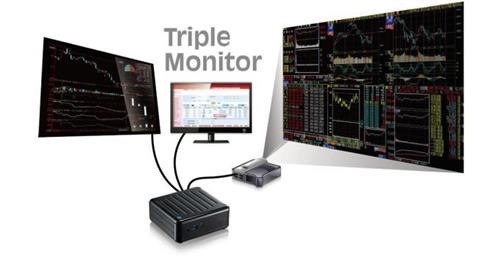
ASRock Beebox J4205 is a powerful mini PC that can run upto three displays. It is ideal for home use, work and media center computer. ASRock Beebox J4205 specifications include Intel Pentium J4205 apollolake processor, upto 16GB of DDR4 RAM, 32GB of eMMC flash storage and slots for storage.

Continue reading “ASRock Beebox J4205 mini PC Specifications: Beebox J4205 mini PC with Apollolake price details revealed”

Nexus 4 Android Nougat 7.1 download: Nexus 4 unlegacy android project ROM

Nexus 4 users are used to vanilla android experience and what better than having latest android 7.1 nougat ROM onboard? This is pure android ROM and there are no annoying applications onboard. Since this ROM is a port, the developer has made sure that everything works out of box. This included some changes that were required to support the Nexus 4 hardware.

Nexus 4 Android Nougat 7.1 download

* Linux kernel 3.4.y merged in (currently 3.4.108 * mostly security patches and minor bug fixes)
* BFQ IO scheduler (official kernel 3.4 release), set up so GUI processes have the highest priority
* F2FS support from kernel 4.9 (for /data only no point of f2fs on /cache)
* SELinux in Enforcing mode

It is important that system folder is unmounted before you install this ROM. Also since this ROM is without gapps, it is required that you install opengapps’ micro.

If you want stock like setup, disable the following built-in (AOSP) apps:
– Android keyboard (once you installed Gboard)
– Browser
– Calculator
– Camera
– Clock
– Email
– Gallery

Rooting is simple as well. Just download and flash latest SuperSU to root the android phone. So if you like plain android experience on your nexus 4, this is the ROM you should install.