BenQ S6 MID unboxed [MID]

Midmoves have posted some great pictures of the BenQ S6 MID. For those who don’t know about this little MID from BenQ, it is a Mobile Internet Device (MID) with built-in 3G, 2GB SSD, 512MB RAM and a 4.8-inch WVGA display (800 x 480).

BenQ S6 MID unboxed

We have heard great things about it including it’s great browsing capabilities along with breezy HSDPA’s 7.2 MBPS speeds, it surely can be the best MID of all times. Again, my major complain is the poor screen resolution. You can get the resolution in a much smaller Windows Mobile devices these days like HTC TOUCH HD (review) and Sony Ericsson Xperia X1(review)

Keep an eye on midmoves for the full review of the BenQ S6 MID.

Viliv X70 – another Atom Powered MID [MID]

Atom powered MIDs seem to be on the rage now! Viliv has unveiled another MID based on Atom platform. It appears that most of the companies are now jumping from Arm-based architecture to Atom-based architecture.

It comes with Intel Atom Silverthorne (Z520) processor clocked at 1.33GHz and a 7-inch WSVGA display (1024 x 600). Although, it sounds a little odd, when engadget is calling this MID a handheld.

Here are it’s specifications:

  • Atom Silverthorne 1.33GHz processor
  • choice of SSD: 8GB/16GB or HDD: 30GB/60GB
  • Windows XP or Linux
  • 1GB RAM
  • optional WiMax module (mobile broadband)
  • Bluetooth 2.0+EDR and WiFi b/g (no ‘n’)
  • Weight: 660g
  • built-in GPS (Sirf Star 3)
  • SDHC slot
  • dimension: 210(w) x 117(h) x 22.5(d) mm

It is nice to see that Viliv is giving Windows XP as an option unlike the Gigabyte M528, which has been giving a headache to it’s users in getting the XP working. Also, folks at Viliv claim that X70 would give upto 6 hours of battery life. That would be quite difficult to achive considering the fact that it is running on Atom processor and not on a ARM based platform, which is much more power-frugal. The inclusion of SDHC slot and Sirf Star GPS are nice additions.

[myviliv]

Installing Windows 7 on Fujitsu U810 or U1010 [UMPC]

Fujitsu U810 has been around for almost 1.5 years. Windows Vista on it’s 800MHz processor was not amazingly fast. This forced many people to switch to Windows XP or XP Tablet. Andre from katastrophos has posted the steps to install the Windows 7.

First of all, you need to download the Windows 7 BETA from Microsoft. Then, burn the ISO to a DVD and use an external DVD drive to install it via USB.

The Setup.exe on the driver CD will complain that the operating system is unsupported. To circumvent this problem, just start the setup in Vista compatibility mode:
Right-click on “Setup.exe”, “Properties” -> “Compatibility” -> “Run this program in compatibility mode for:” “Windows Vista”.

Install the drivers and utilities in following sequence:

Drivers
04. Button Driver
05. Camera Driver
07. Fingerprint sensor (driver)
08. FUJ02B1 Device Driver
09. FUJ02E3 Device Driver
11. Pen Driver
12. Pointer device driver

Utilities
03. Button Utilities
07. Fujitsu System Extension Utilities

The Auto-Rotation is not working at the moment. You have to do that manually. After installing Windows 7, you will get a Experience Index of 1.5. That is due to the processor. Score of rest of the components are ok for UMPC.

OQO Model 2+ benchmarked [UMPC]

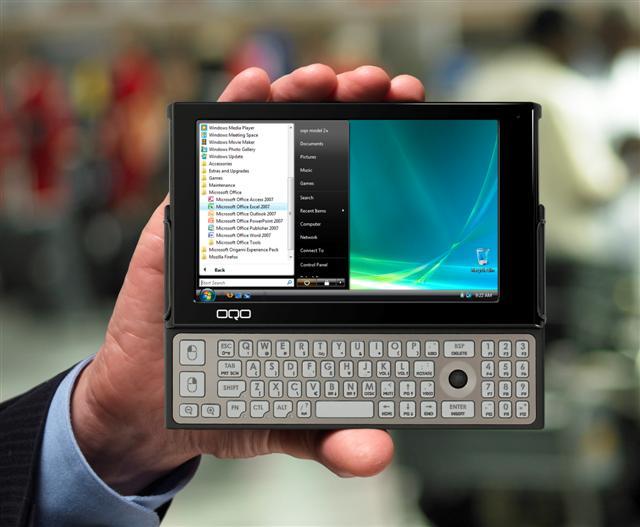
The OQO Model 2+ was revealed at the CES 2009. The best thing about the OQO Model 2+ is the use of the fastest Atom processor so far, the Atom Z540 CPU running at 1.86GHz. OQO also beefed up the RAM to 2GB, which made everything even more smoother than before.

OQO Model 2+ benchmarked

Jenn, over midmoves have done some benchmark tests on the new OQO 2+. Here is the screenshot of Windows Experience Index. It is quite odd on the Windows Vista’s way of judging  the base score by taking into account the lowest score rather than taking the average score into consideration. Nevertheless, we can easily make out that Vista seems to be quite usable on the little machine from OQO.

Here are the scores from the CrystalMark, which are not shabby at all comparing to the other UMPCs and Netbooks in the market.

Benchmarks aside, the main aspect of the OQO Model 2+ that stops me from getting one is the low resolution WVGA display, which can natively show only 800 x 480. Folks at OQO should have put in a minimum of 1024 x 600 pixel display which is more common on the netbooks and UMPCs these days. A WVGA display can ruin the whole user experience if you are running a lot of applications concurrently or you are running a lot of tabs in firefox/IE/Chrome.

AIGO MID with Windows 7 will be launched later this year

Aigo has announced that by the end of this year, they will be coming up a MID that will be powered by Windows 7. Yes, you read that right. A Windows 7 powered MID is in the works at Aigo.

Will they use their current MID, shown in the picture above to run the Windows 7? Only time will tell. Windows 7 is way MID and Netbook-friendly OS than the fat and bulky Vista. The Windows 7 feels as-snappy-as the Windows XP and looks as great as the Windows Vista. It would be great to see the Aigo MID running Windows 7