Price of 8.9-inch and 7-inch SSD models going to drop – Sadly, not for a good reason

Various netbook vendors including the two netbook giants, Asus and Acer are dropping the prices of their SSD-equipped netbooks. Hold your horses though as the reason behind the price is not good. They are reducing the price in order to clear the inventory.

Remember that it is not even two years when the first netbook was launched. The original concept of the netbook was to be a cheap, rugged and easy-to-carry around device. Unfortunately, to keep the prices down, the netbook vendors used the SSDs with low storage space. This turned a lot of people off. The future of netbooks clearly showed HDD-equipped netbooks which would allow the users to cram a lot of data. This marked the downfall of SSD netbooks.

True, there are a lot of people around who would prefer SSD-equipped netbook instead of HDD-eqipped netbook, but until and unless, the SSD manufactures are able to get the prices of bigger SSDs down, people are always going to get inclined to the ones with HDD as that will provide them bigger storage space.

[via digitimes]

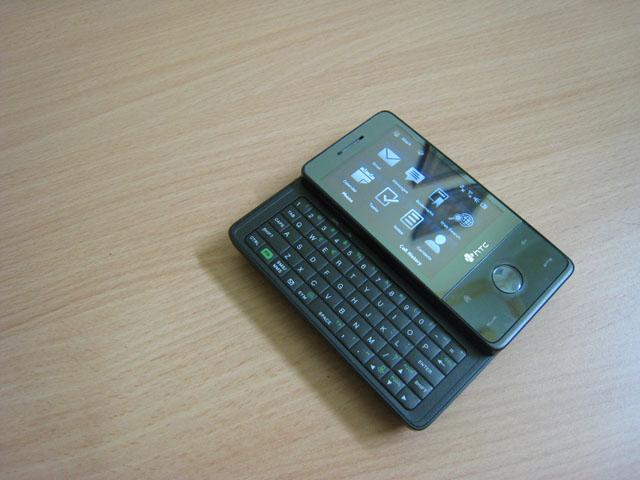
HTC TOUCH PRO review = HTC DIAMOND + Keyboard

The HTC TOUCH PRO was launched by the HTC last year. Following the immense success of the HTC TYTN II, HTC came out with another groundbreaking device. This time, the scene was little different. The HTC TOUCH PRO is built on the design of the sweet and sexy HTC DIAMOND. The DIAMOND was without the keyboard and to make the proper successor of the HTC TYTN II, it needed to have a keyboard built-in. So, here we have, the HTC TOUCH PRO

Design

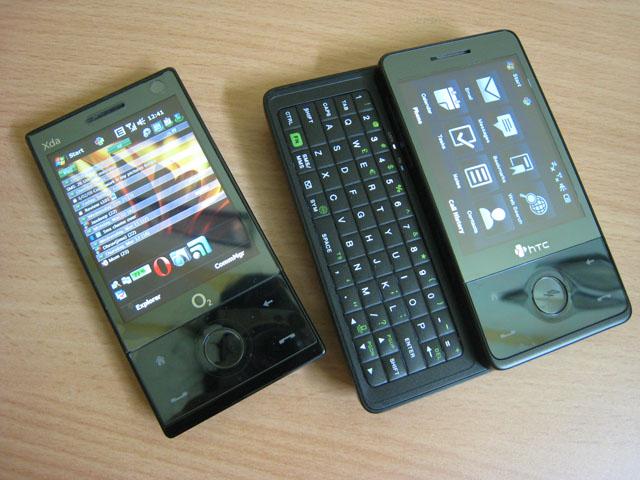
As mentioned above, the HTC TOUCH PRO is built along the design of the HTC TOUCH DIAMOND. No doubt, they both look very similar from the front side.

From the front, the TOUCH PRO looks exactly like the TOUCH DIAMOND except for the fact that it has curves along the sides.

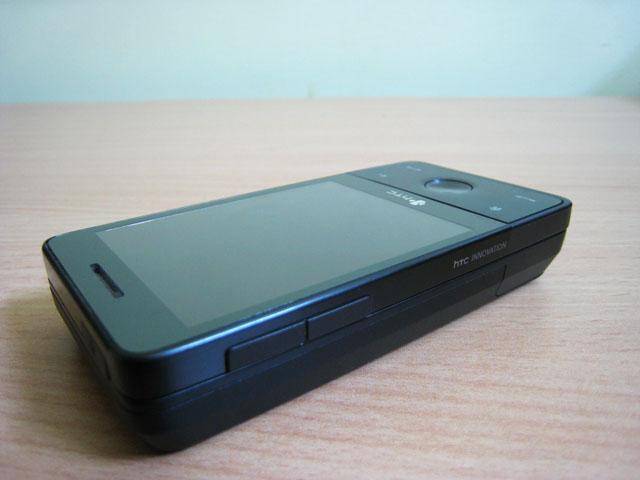
On the left side of the device, you will find the familiar volume buttons.

The right side of the device is completely naked. As it must have been clear by now, the HTC wanted to keep the device as minimalistic as possible. However, a camera button the right side of the device would have been appreciated.

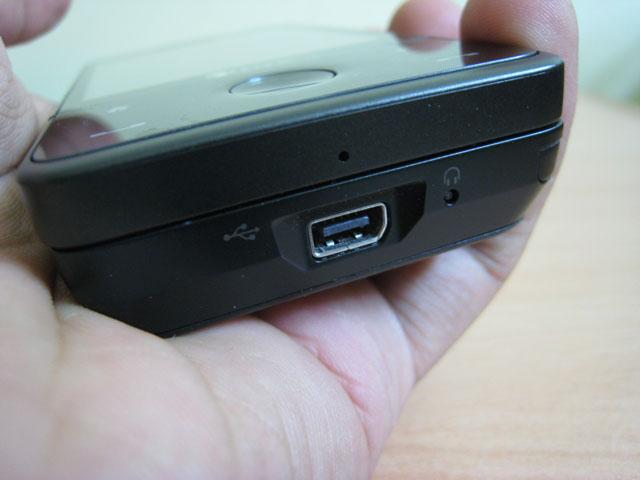
On the bottom of the device, you will find the HTC’s mini-USB hub which is used for both charging the device and for plugging in the headphones. Another nice improvement over the HTC DIAMOND is the placement of the soft reset button which is placed on the bottom of the device rather than the putting it beneath the cover, which was quite annoying as you had to remove the cover everytime you had to do soft reset the device.

Thickness of the device is considerably larger than the very slim HTC DIAMOND. The reason behind this is the incorporation of the keyboard, which we will covered in the next part.

Keyboard

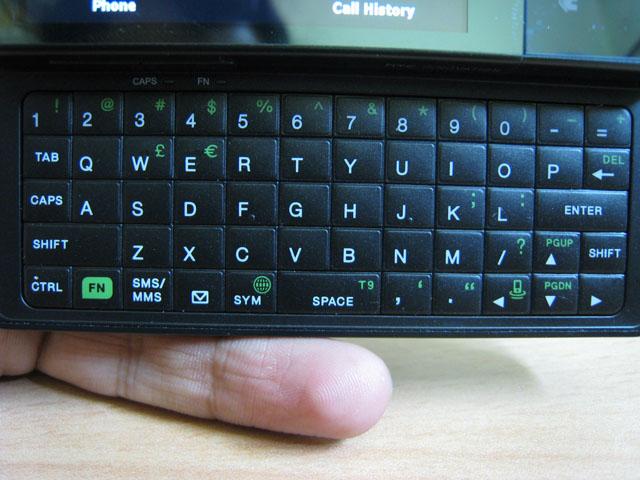
The HTC TOUCH PRO comes with a very usable keyboard. The placement of the buttons is very well defined and they give the user good tactile feedback. Although, you need to make sure that your nails have been properly cut. Otherwise, you will have a hard time pressing the right key

Camera

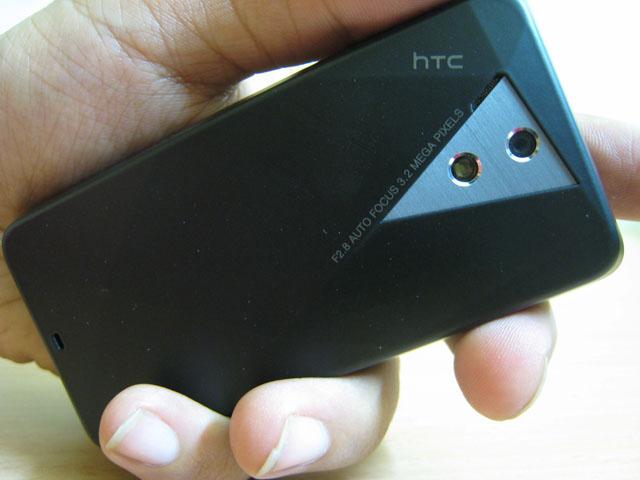
The HTC TOUCH PRO features an auto-focus 3.2MP camera. The camera is exactly the same as the TOUCH DIAMOND except for the fact that it has a small flash light too. We found it to be pretty weak.

Here is how the auto-focus works. As-soon-as you gently place you finger over the round-DPAD, it start doing auto-focus. When the auto-focus is done, simply press the D-PAD button to capture the picture. Please note that the TOUCH PRO’s camera also captures video at QVGA resolution.

Storage

The TOUCH PRO comes with a generous 288MB of RAM and 512MNB of ROM. Out of that you get 110MB free RAM and 232MB of free storage  memory. This means that you will probably never run out of RAM. To expand the storage, it comes with a micro-SD slot that has full support for SDHC cards. This means that you can easily pop-in a micro-SD card upto 32GB in theory. The 16GB micro-SD card have already started to hit the market and can be found  for pretty reasonable prices on some online stores.

The micro-SD card is located behind the back panel. So, every time you need to change it, you will have to remove the back panel. So, make sure that you get the biggest one that you can find (and afford).

Phone

The phone picked up strong signals and we faced no problems in using the device even in low signal areas too.

Battery Life

The Touch Pro comes with a 1350mAh battery. Fortunately, the HTC did not go for the 900mAh battery which they used in Diamond. Even then, let’s keep in mind that the TOUCH PRO comes with a VGA display; a zippy processor and tons of connectivity options. If you use the WiFi, it would drain the device within 2-3 hours. So, it is recommended to keep it off when not in use. Overall, with moderate use, you should be able to get a full day of battery life.

Software

The TOUCH PRO uses Windows Mobile 6.1. But, that is not the highlight. HTC introduced the TOUCH FLO 3D, which makes interacting with the device much simpler than before. Now, even if you’ve never used Windows Mobile, you will face (almost) no problems in using the device.

To learn more about the TOUCH FLO 3D, see the software part of review of HTC FUZE.

Conclusion

I’m glad that HTC understood that there are people who require a hardware keyboard to type upon rather than completely relaying on soft keyboard completely. Couple that with powerful processor, VGA display and TV-capability, HTC has got a winner in their hands.

VISIT HTC TOUCH PRO official webpage

Specifications:

Processor Qualcomm® MSM7201A™ 528 MHz
Operating System Windows Mobile® 6.1 Professional
Memory ROM: 512 MB
RAM: 288MB
Dimensions 102 mm (L) X 51 mm (W) X 18.05 mm (T)
Weight 165 g (with battery)
Display 2.8-inch TFT-LCD flat touch-sensitive screen with VGA resolution
Network HSPA/WCDMA:

  • Europe/Asia: 900/2100 MHz
  • Up to 2 Mbps up-link and 7.2 Mbps down-link speeds

Quad-band GSM/GPRS/EDGE:

  • Europe/Asia: 850/900/1800/1900 MHz

(Band frequency and data speed are operator dependent.)

Device Control TouchFLO™ 3D
Touch-sensitive navigation control
Keyboard Slide-out 5-row QWERTY keyboard
GPS Internal GPS antenna
Connectivity Bluetooth® 2.0 with EDR
Wi-Fi®: IEEE 802.11 b/g
HTC ExtUSB™ (11-pin mini-USB 2.0, audio jack, and TV Out* in one)
Camera Main camera: 3.2 megapixel color camera with auto focus and flash light
Second camera: VGA CMOS color camera
Audio Built-in microphone, speaker and FM radio with RDS

How To: upgrade both HDD and RAM in Lenovo S10

I’ve been using the Lenovo S10 from the past couple of days and I am very impressed with the unit. Not only I’m impressed with the superb built quality, but also the software part for which I will write about in a day or two.

In this article, I will show you how easy it is to upgrade the HDD and RAM of the Lenovo S10. Unlike some Netbooks in the market (say, Acer Aspire One), you will not have to open the whole unit just to upgrade basic hardware like RAM or HDD. Folks at Lenovo has made it simple for the end user to easily upgrade the HDD or RAM, if he wishes to.

Here are the instructions:

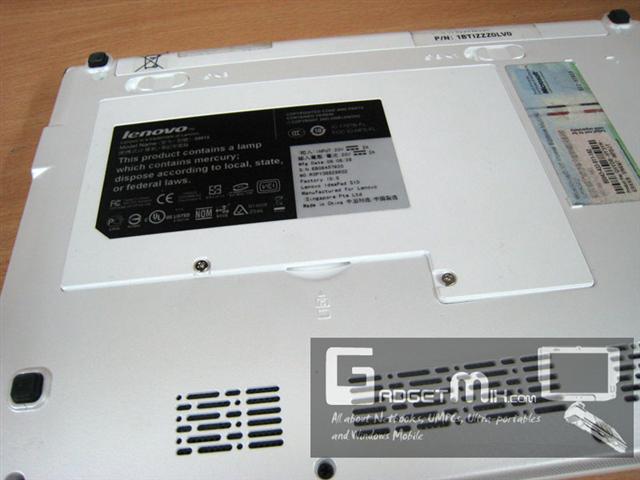
1. Flip the unit over such that it rests on its front cover. You will see two screws that provide the access to the HDD and RAM.

2. Unscrew the two screws. You will need Jeweler’s scewdriver to unscew them. Once done that, carefully remove the back panel starting from one side.

3. Here you will find access to the HDD (left side) and RAM (right side). Just a little pull towards the left will take the HDD out. You can swap it with a SSD or HDD of your choice. To take the RAM out, gently push the holders in opposite direction to which they are pointing to and then pull the RAM out carefully. Put in the RAM of your choice. Upto 2GB can be used.

Here is the HDD used in the Lenovo S10.

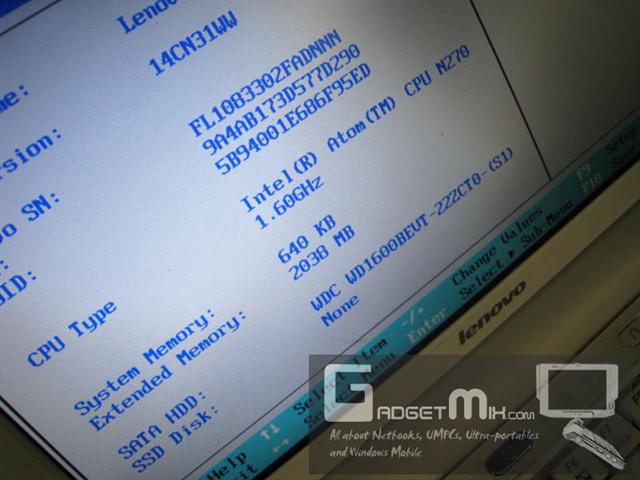
4. After upgrading, make sure to go to the BIOS and check if the S10 has recognized your RAM properly or not. You can enter BIOS by pressing the F2 key of your keyboard immediately upon bootup.

Asus offering SSD upgrade for EEE 901

Asus Taiwan is going to start SSD upgrade program for Eee PC 901 lineup. I think may be pay around $1500 TWD ($43) and your SSD will be upgraded to the next highest capacity. It goes like this:

  • 4GB to 16GB
  • 16GB to 32GB
  • 12GB to 24 GB

Note: it is clearly mentioned in the below given press release that no upgrades will be offered to the ones with built-in 3.5G

ASUS Press release [via x-gadget]

credit: Ai via contact form

The boring "Seamless Netbook" is now shipping

Seamless Corporation has made available their own netbook, which was being promoted by Tyra Banks. There is nothing so special in specifications and it looks like those cheap netbooks in the market. Although, one thing that makes it little different from the inside is the processor that it uses. It uses the VIA C7-M 1.6GHz Processor instead of the usual Intel Atom that is being used by almost all the modern netbooks.

Specifications:

  • VIA C7-M 1.6GHz Processor
  • 10.2 inch screen 1024×600 resolution
  • 120GB HDD
  • 1GB RAM
  • Wi-Fi
  • 3 cell or 6 cell battery
  • 1.3 megapixel webcamera

via

UMID M1 launches in Korea (plus typing demo video)

UMID M1 has finally been launched in Korea. This tiny 4.8-inch little monster runs on Intel Atom processor and promises a whoping 6 hours battery life, which should be enough for a full day use. However, due to its small size, do not even think about writing a novel on this small device. According to slashgear, the keyboard is surprisingly nice for thumb-typing.

The base model starts at $465 and goes upto $532 for high end model.

Here is the thumb-typing demo:

[via slashgear and pocketables]

Touch Pro 2 will be made available all around the world (unlike Touch Pro 1)

HTC has confirmed via their Twitter feed that they will making available the HTC TOUCH PRO 2 in every country.

“To answer the big question on everyone’s minds, the Touch Pro2 will be broadly available in all major markets, including North America. We have not announced a launch date for the Touch Pro2 in any country yet. But we did announce we will start to roll it out late Q2. “

This means that unlike Touch HD, which did not make it to the US, the Touch Pro 2 will debut in US around the time it debuts in other parts of the world

[HTC touch pro 2 official webpage]

Trimble's new rugged UMPC: Yuma


The Yuma UMPC by Trimble is all about ruggedness combined with power and strength. Sporting the MIL-STD-810F and IP67 ratings, it also comes with an Intel Atom N270 processor @ 1.6GHz and 32GB SSD drive. On the connectivity front, it has built-in WiFi, Bluetooth and GPS. It also has SDIO and Express card slots for expansion.  There is no words about its price tag yet. It is supposed to be made available in the month of April, 2009.

Specifications

  • 7-inch WVGA touchscreen
  • 1.6GHz Atom N270 processor
  • 32GB SSD
  • Built in WIFi, Bluetooth and GPS
  • Express Card
  • SDIO slots
  • Two geotag-enabled cameras

via

HTC TOUCH DIAMOND 2 screenshots [Windows Mobile]

The HTC TOUCH DIAMOND 2 was launched last week at MWC 2009. The DIAMOND 2 is an update to original Diamond. One of the most obvious improvements that the Diamond 2 brings over the Diamond-1 is the bigger and higher resolution screen. The screen is now WVGA as you can easily make out from the following screenshot.

The higher resolution enables you to see more than the normal VGA screen of Diamond-1.

Like the TOUCH HD, which also sports the same resolution, it also shows weather data of the coming days on the same screen.

Stock tab is the new tab which was not there in the Diamond-1. It basically shows the stock information like their current price and whether there is a increase or decrease in its value.

The calender tab is a much welcomed addition to the Touch Flo interface. It looks nice and works great too. A nice update for those who just got tired of the built-in calender.

Another improvement is the updated SIP (soft input panel).

Calculator has also been a given a nice facelift.

Commentary: Although the Touch Diamond 2 still uses the Windows Mobile 6.1, HTC has (again) done  a commendable job of giving Windows Mobile a new look. Quite a lot of improvements in terms of usage and functionality can easily be seen and observed. It is also nice to know that the HTC has promised a Windows Mobile 6.5 upgrade to the Diamond-2 users.

Opera Mobile 9.5 technology preview with Google Gears support [Windows Mobile]

Folks at Opera have rolled out a technology preview which brings Google Gears to the mobile devices. On the mobile devices, Google Gears will enhance the web experience as it allows the pages to be cached in the background.

How to install?

Installing Gears is pretty easy. Install our Opera Mobile 9.5 technology preview build, go to the Gears web site and click the “Install Gears” button

Links:

[Opera Labs]

credit: Jamie (submitted via contact us form)