Windows 7 on the EEE PC 701? – No, we are not kidding [Netbook]

Raine over eeeuser has been to be install the Windows 7 onto the EEE 701. Now, the installation of Windows 7 on this EEE is not just-another-Windows7-installation on a netbook. The EEE 701 has a small 4GB SSD. The footprint of Windows 7 is over 8GB.

So, how to do it?

You will have to nlite the Windows 7 install. This means that you will have to take a lot of components out of the standard Windows 7 install to reduce to a much smaller foorprint.

To make you work easier, he Raine has been kind enough and has posted the configuration settings of his nlite install. This will reduce much of your work.

Here are the steps:

1. Vlite: Follow these Vlite settings

; vLite preset file
;
;#Environment:
; vLite v1.2
; Framework 2.0.50727.1434
; Microsoft Windows NT 6.0.6001 Service Pack 1 64-bit
;
;#Target:
; Windows 7 ULTIMATE 32-bit
; Version 6.1 English (United States)
; vLited with v1.2 beta (02/01/2009 02:48:10)
;
[Compatibility]
ACDSee / XnView
Halo 2
Zoom Player
DVD Treasury
Hauppauge WinTV
Logitech Setpoint
DriveimageXML
MediaPortal
Recommended
; Recommand
Aero Glass
; Aero Glass
Scanners and Cameras
; Scanners and Cameras
Internet Explorer
; Internet Explorer
File and printer sharing (Server)
; File and printer sharing (Server)
Windows Update
; Windows Update

[CustomHide]

[Components]
;# Accessories #
Accessibility
; Accessibilit
Welcome Center
; Welcome Center
;# Multimedia #
Sample Pictures
; Sample Pictures
Screensavers
; Screensavers
SideShow
; SideShow
Wallpapers
; Wallpapers
;# Drivers #
Diva Server
; Diva Server
Printers-Generic printer
; Imprimantes-Generic printer
Modems
; Modems
QLogic Fibre Channel Adapter
; QLogic Fibre Channel Adapter
Scanners
; Scanners
Storage controllers-Adaptec
; Storage controllers-Adaptec
Storage controllers-Elxstor
; Storage controllers-Elxstor
Storage controllers-IBM ServeRAID
; Storage controllers-IBM ServeRAID
Storage controllers-ICP vortex
; Storage controllers-ICP vortex
Storage controllers-Intel (Matrix)
; Storage controllers-Intel (Matrix)
Storage controllers-nVidia
; Storage controllers-nVidia
Storage controllers-SiS
; Storage controllers-SiS
Storage controllers-Via
; Storage controllers-Via
TV Tuners-ADS Technologies
; TV Tuners-ADS Technologies
TV Tuners-ASUSTeK Computer Inc.
; TV Tuners-ASUSTeK Computer Inc.
TV Tuners-AVerMedia Technologies, Inc.
; TV Tuners-AVerMedia Technologies, Inc.
TV Tuners-Compro Technology Inc.
; TV Tuners-Compro Technology Inc.
TV Tuners-Creatix
; TV Tuners-Creatix
TV Tuners-Hauppauge
; TV Tuners-Hauppauge
TV Tuners-KNC ONE GmbH
; TV Tuners-KNC ONE GmbH
TV Tuners-KWorld
; TV Tuners-KWorld
TV Tuners-Lumanate, Inc.
; TV Tuners-Lumanate, Inc.
TV Tuners-Philips Semiconductors
; TV Tuners-Philips Semiconductors
TV Tuners-Pinnacle Systems
; TV Tuners-Pinnacle Systems
TV Tuners-TerraTec Electronic GmbH
; TV Tuners-TerraTec Electronic GmbH
TV Tuners-VidzMedia Pte Ltd.
; TV Tuners-VidzMedia Pte Ltd.
;# Network #
Distributed File System (DFS)
; Distributed File System (DFS)
Simple TCPIP services
; Simple TCPIP services
Telnet Client
; Telnet Client
Telnet Server
; Telnet Server
TFTP Client
; TFTP Client
Windows Collaboration
; Windows Collaboration
Windows Mail
; Windows Mail
;# Hardware Support #
Firewire (1394)
; Firewire (1394)
Floppy Disk Support
; Floppy Disk Support
Infrared Support
; Infrared Support
Internet Small Computer System Interface (iSCSI)
; Internet Small Computer System Interface (iSCSI)
Microsoft Multi-Path Bus
; Microsoft Multi-Path Bus
Modem Support
; Modem Support
Printer Support
; Printer Support
Smartcards
; Smartcards
Fax Support
; Support Fax
TV Tuner support
; TV Tuner support
Windows HotStart
; Windows HotStart
XBOX 360 Controller
; XBOX 360 Controller
;# System #
Help
; Aide
BitLocker Drive Encryption
; BitLocker Drive Encryption
Performance Counters
; Compteurs de performance
Parental Controls
; Controle parental
Disk Quota
; Disk Quota
IMAPIv2 Burning Support
; IMAPIv2 Burning Support
Reliability and Performance Monitor
; Moniteur de fiabilit et de performance
Run a legacy CPL elevated
; Run a legacy CPL elevated
User Account Control (UAC)
; User Account Control (UAC)
Windows Defender
; Windows Defender
Windows Easy Transfer
; Windows Easy Transfer
Windows SAT (Performance Index)
; Windows SAT

[Options]
DEP (Data Execution Prevention) = Default
; DEP (Data Execution Prevention) = Default
User Account Control (UAC) = Disabled
; User Account Control (UAC) = Desactiv�
AntiSpyware Realtime Protection = Default
; D�sactiver AntiSpyware Realtime Protection = Defaul
Memory requirement = 256MB
; Besoin en m�moire = 256MB
AutoPlay = Disabled
; AutoPlay = Desactiv�
Paging Executive = Disabled
; Paging Executive = Desactiv�
Power scheme = Balanced
; Power scheme = Balanced
Power button = Default
; Power button = D�faut
Sleep button = Default
; Sleep button = D�faut
Control Panel – Classic View = Default
; Control Panel – Classic View = D�faut
Show hidden files and folders = No
; Montrer les fichiers et les dossiers cach�s = Non
Show protected operating system files = No
; Montrer les fichiers du syst�me d’exploitation prot�g�s = Non
Show extensions for known file types = No
; Montrer les extensions des fichiers connus = Non
IE Phishing Filter = Default
; IE Phishing Filter = Default
IE Phishing Verification Ballon Tips = Default
; IE Phishing Verification Ballon Tips = Default

[Services]

[Protection]

[Drivers]

[Unattended]
SkipAutoActivation

[Hotfixes]

[LanguagePacks]
2. Install in a virtual machine. Clean the winsxs. Disable the indexing (makes it snappier) and compress drive (saves a lot of space). You can also delete the DVD Maker folder (since there is no dvd burner on this thing) and Microsoft Games (I don’t like them).
3. OPTIONAL: Use Vispa to set your desired settings (error reporting, scheduled task and so on).
RECOMMENDED: Disable hibernation (in cmd: powercfg.exe -h off) and pagefile. If you do so, reboot before ghosting.
4. Use Norton Ghost 8 to make the ghost image of it.
5. On your EEE, restore your image on the SSD
6. Reboot on WinPE (since the boot manager is broken) and enter the following in Command:
BCDEDIT /set {bootmgr} device boot
BCDEDIT /set {default} device partition=d:
BCDEDIT /set {default} osdevice partition=d:
This will fix the boot manager and allows Se7en to start on SSD. And yes, the d: is correct, Se7en uses two partitions.

Reboot

Note: Make sure you compress the drive after the install to regain 700-900MB

Commentary: The Windows 7 is running surprisingly nice on the EEE 701. The only issue is the unable to run the Windows Live messenger and its inability to get into standby with the SD card inserted.

Samsung NC20 Unboxed [Netbook]

Sasha over Netbooknews.de have done an unboxing of the Samsung NC20, which is still one of the best netbooks in town. It sports a 12.1″ display with 1280 x 800 resolution, which puts it into the ultra-portable section. However, what differentiates it from the ultra-portables like SONY VAIO TT is the usage of 1.3GHz VIA Nano U225 processor.

Here is the unboxing video:

Click here to see tons of Samsung NC20 pictures

Viliv S5 officially announced, pricing details [MID/UMPC]

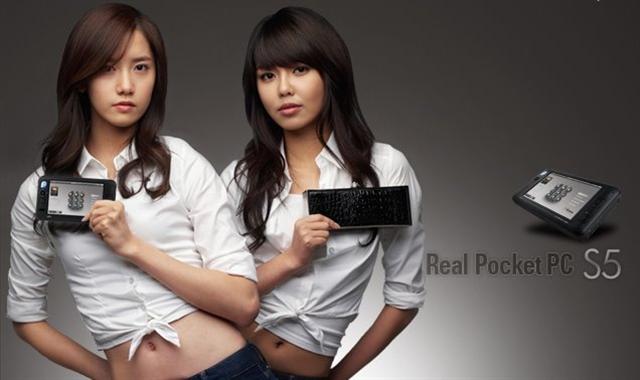
The Viliv will be launching the higher spec model of the S5-series for $649. The premium model that will be launching in US will come with:

  • standard Windows XP
  • 1GB RAM
  • Intel Atom Z520 processor clocked at 1.3GHz
  • 60GB HDD
  • 1024 x 600 resolution
  • GPS
  • Haptic feedback

It is a fairly decent UMPC for those who can live without keyboard. Personally, if I’m out to buy a MID/UMPC for myself, I would get one with keyboard as it makes the URL entry and document-editing so easy.

3G and WiMax versions are in the works.

Here is a video of it running iTunes. The screen seems to be very sensitive and the unit feels snappy too.

The Viliv S5 will be available in March 2009 for a price of $649.

Commentary: Price is acceptable for those who do not want to enter a lot of data. If you enter a lot of data, look for something else. Fujitsu U820 is a good choice for those who want to have a small device with built in keyboard

Note: Fujitsu U820 is available in Asia as Fujitsu U2010

[via umpcportal]

Watchout when you are buying an External HDD for your OQO! [UMPC]

There are many people who struggle to run their external HDD in their OQOs. Why? Because the OQO has only 1 USB port and some of the external HDDs require two USB ports to power themselves.

Some people think that the OQO does not provide enough power via its USB port. No, that is not the case. The OQO models are fully USB 2.0 compliant and provide upto 500mA of power to the USB device for them to work. If your device requires more than that or if it requires two USB ports, then you are out of luck.

Make sure that the peripheral that you are buying works with the power provided by the OQO and uses only one USB port.

[related OQO forum post]

TomTom 6 working on HTC SHIFT! [UMPC]

In HTC Shift, you will find Vista and Windows Mobile under the same hood. Unfortunately, it is stripped down version of Windows Mobile. It also does not let you access storage card when you are in Snapvue (Windows Mobile side). Also, the size of maps are big and there is no way you could squeeze them in Snapvue unless you are using a very tiny and less detailed map.

Here is a video of TOM TOM 6 working inside Snapvue:

Now, there is a little hack to make the Snapvue see the storage card. Here is how to do it:

– Install Total Commander (make sure you have liberated the Shift).

Continue reading “TomTom 6 working on HTC SHIFT! [UMPC]”

Fresh Windows Mobile 6.5 screenshots – MarketPlace by Microsoft CONFIRMED [Windows Mobile]

Here are some fresh screenshots of the leaked ROM taken from HTC TOUCH HD. I’ve given explanation for the screenshots wherever it was required. First is the rumored sliding panel interface. Also, notice how nicely the wallpaper blends with the start menu. Next is the lock screen.

Windows Mobile 6.5 screenshots

Honeycomb interface is working on HTC TOUCH HD. Here are couple of screenshots. You can customize the positions of the hexagonal boxes. Also, the first screenshot shows the soon-going-to-launched Marketplace by Microsoft. It is rumored to be launched at MWC, 2009.

Windows Mobile 6.5 screenshots

Incoming Call interface has been a huge facelift. It now shows two sliders: one to answer the call and other to reject the call. Also, the menus are a lot more finger-friendly. That will let you to use your device without taking the stylus out of its silo.

Windows Mobile 6.5 screenshots

The best news according to me is the CONFIRMATION of market place in those screenshots. Only Microsoft has the funds and the resources to make the application store for Windows Mobile successful. We hope that it is real and it is not a simple link to the Mobile Application store

Windows Mobile 6.5 screenshots

UPDATE: Although the market place is not working yet, but its presence in the ROMs gives us an assurance that it will be available and working in the final release.

credit: juelu at pocketpc.ch (submitted via contact form)

Comparison pictures of 900mAh and 1340mAh batteries [HTC DIAMOND] [Windows Mobile]

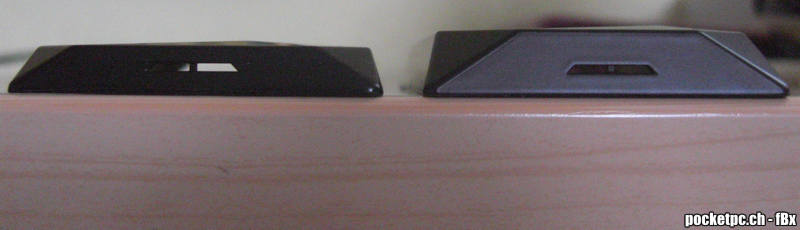
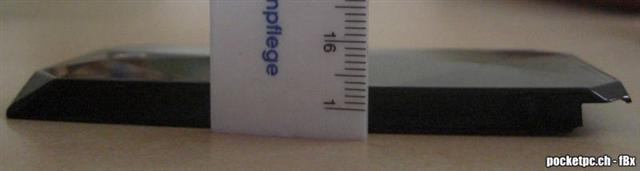
The HTC DIAMOND does not win any awards for its battery life. Let’s face it, even with average use, you won’t be able to last a full day with the stock battery, which has just 900mAh juice. HTC chose style over function on this device and I support their decision. Here is a picture of the extended battery sitting side-by-side with the stock battery.

Here is another one:

[xda-devs post] [pocketpc.ch blog]

Opera Turbo to speed up your (mobile) web browsing [Windows Mobile]

Just when you thought browsing couldn’t get any faster, Opera unveils its latest innovation for better browsing, Opera Turbo. This all-new, turbo-charged way to surf will make its exclusive appearance at Mobile World Congress in Barcelona from February 16-19, 2009.

Currently, the mobile web browsers like Opera Mobile do all the heavy-duty jobs like downloading the webpage; optimizing the webpage and then rendering it on the device. This takes a lot of CPU power, whcih means faster battery consumption. Opera Turbo takes away the much of the load by optimizing the webpage at the Opera servers and then it send the optimized data to the device. This speeds up the operations and makes the device use suck less power. Overall, it also reduces network traffic.

Due to Opera Turbo, even the people with devices with weak hardware configurations will be able to enjoy better performance.

The Opera Turbo will be unveiled at Mobile World Congress

[related press release]

The new imate 810-F has lifetime warrenty! [Windows Mobile]

Imate is going to unveil a truly peculiar phone for the consumer market, which is weatherproof, shockproof and can withstand extreme temperatures. On the top of scoop, it runs Windows Mobile and comes with all the latest bells and whistles like digital compass and accelerometer coupled together with WiFi, Bluetooth, GPS and 3G. Imate also promises to give you lifetime warranty on it. What more do you want?

Special emphasis is given on its security side. It comes with an application called Secure i-Q, which lets you lock the device; erase data and even trigger an alarm in case it gets stolen. The 810-F will be unveiled at Mobile World Congress next week in Barcelona, Spain

[via mobilechoice]