EEE S101 vs Sony Vaio TZ – not a netbook battle

We know it would be unfair to battle Asus Eee PC S101 against Sony Vaio TZ, which is actually a highend ultra-portable. Although the S101 is considered expensive in the netbook world, but it is around $1000 cheaper than the VAIO TZ. The Vaio TZ has strong points like higher resolution screen(1366*768) and steller 7 hour battery life, but S101 has its strong points too. The EEE S101 is slimmer and it has a larger and better trackpad. Although the resolution is netbook-ish (1024 x 600), but then, it will save you a $1000 too!

[via EEEuser]

PointUI 2 for Windows Mobile released [freeware] [Windows Mobile]

Point UI has released BETA of Home 2, which is set to replace the old version one. The Point UI is extremely popular mobile shell, which makes basic functions of your Windows Mobile device easier to access. It also makes the whole user-experience more finger friendly.

The only officially supported devices are:

  • HTC DIAMOND
  • SONY ERICSSON XPERIA X1

It has quite huge running process footprint of around 14MB, which is quite huge by Windows Mobile standards. Other than that it runs great on my HTC DIAMOND.

Download it from here

Fennec milestone released for HTC TOUCH PRO – It crashes, crashes and crashes [Windows Mobile]

Fennec takes a whopping 24MB storage space to install. Since, it is available for only HTC TOUCH PRO at the moment, the storage space should not be a big problem. It takes nearly 25-30 secs to start the application, which is unacceptable for any mobile device. Opera Mobile 9.5 takes somewhere between 4-7 seconds, which is the maximum time any mobile application should take.

So, how does it work? Well, first of all, you need to take that keyboard out just to type the URL as currently it does not support any SIP. This alone rules out keyboard-less devices in the market. Regarding its performance, it is seriously bad. It crashed on every desktop website I tried. I tried to open these websites on the HTC TOUCH PRO:

  • ApoTheTech.com
  • Engadget.com
  • EngadgetMobile.com
  • Mozilla.org

Out of all these, only Mozilla.org opened and that too over a long duration. By long duration, I mean nearly 2 minutes over a fairly fast WiFi connection. All the other sites just crash the application and it quits. Here are a couple of screenshots that I took with my HTC TOUCH PRO.

CONCLUSION: Although the release is pre-alpha (milestone), but if it is unable to open any desktop website except Mozilla.org, then why release it even?

If you wish, you can download the CAB file directly from here

Note: You need to copy the CAB file to the device and execute it from there to start the installation

Note to HTC DIAMOND users: You can install the CAB file, but you would not be able to enter any URL since it does not support SIPs (soft input panel) yet. Alternative way to enter text is via connecting it to your desktop and using activesync+pocket controller combo.

Yawn, PocketGear application store launched [Windows Mobile]

The PocketGear has launched an App Store for Windows Mobile. For those of you who know about the Palm’s App store, this news is not new. The Palm App Store was nothing but a link to PocketGear’s IE Mobile friendly webpage.

This makes the so-called new PocketGear application nothing new.

http://appstore.pocketgear.com/winmo/

It is high time that someone release a proper App Store for the Windows Mobile. One endeavor is Gecko, which is still in its infancy stage. All hopes now lie on the Microsoft to release a proper application store for Windows Mobile.

Note to the developers: to submit your application to the App Store, follow this link.

PROOF: Screens of HTC TOUCH DIAMOND and HTC TOUCH PRO are NOT same [Windows Mobile]

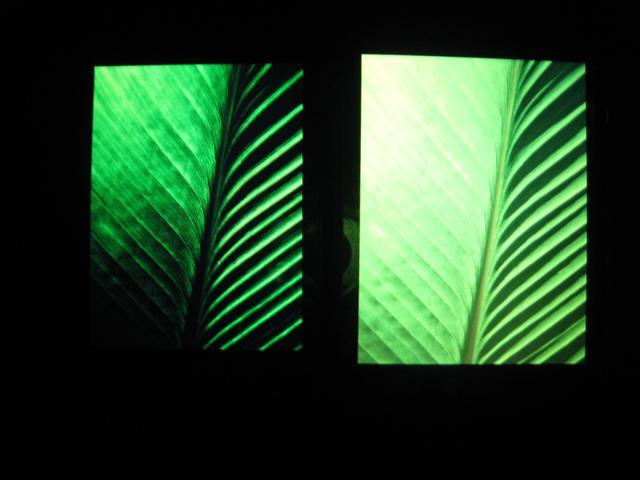
Let the pictures say the story. The one on the left is the HTC DIAMOND and the one on the right is the HTC TOUCH PRO.

As you can see, on the HTC DIAMOND’s display has much more saturation and the image looks much more dense on the Diamond’s display as compared to HTC TOUCH PRO.

Also, on the  Diamond’s display, the white color is more whiter, while on Touch PRO’s display, the white appears as pale yellow although my camera was not able to differentiate effectively, but in person, the difference can easily be observed.

(one more image after the break) Continue reading “PROOF: Screens of HTC TOUCH DIAMOND and HTC TOUCH PRO are NOT same [Windows Mobile]”

Battle of Netbook processors: VIA Nano vs Intel Atom [Netbooks]

Kai Schmerer at ZDnet has done a thorough comparison of two of the most used processors in netbooks: VIA Nano and Intel Atom.

Here are some of the highlights:

Intel manufactures the Atom using a 45-nanometre (nm) feature size, while VIA still uses 65nm technology. For this reason, the VIA Nano uses more power than Intel’s Atom

Speed wise, the VIA Nano out-performs the Intel Atom processor in almost all the fields

In the Internet browsing performance, the Intel Atom processor takes twice as much time when compared to the VIA Nano processor.

And power consumption-wise, the Intel Atom processor perfomed better than the VIA Nano processor.

Read the whole comparison here

HP to offer ONLY 3 versions of Windows 7 for the Netbooks

Not to let the consumer be baffled by the plethora of Windows 7 versions, HP has made it clear that it would be offering just 3 versions of Windows 7 which would include Professional and Home Editions as-well-as the Starter edition. Starter edition, as usual will be limited in a way that it will allow only 3 applications to be running at any particular instance.

Although the choice of Starter edition will be nice for the netbooks that will be targetted for the young students market, where they do not need a lot of applications to be running concurrently. This way, the OEMs will be able to cut even more costs.

[computerworld]

Acer Aspire One Netbook (AOD150) now available in US [Netbook]

read Acer Aspire D150 review

Acer has now officially launched the highly awaited Acer Aspire one 103, which is going to be known as Aspire One AOD150 in US. The models are starting from $349.99, which means that Acer is going to follow the same plan which they followed for the original Acer Aspire one, which too was launched at mere $399 last year.

Here are the words directly from the Vice President of Acer America, Sumit Agnihotry,

“The new 10.1-inch Aspire One has something for everyone, whether a business user continuously on-the-go, a young student needing an introductory PC, or tech aficionado seeking a lightweight, secondary device with enduring battery power. Netbooks are an ideal solution for those who want a balance of mobility and productivity for quick and easy access to the Internet and other computing needs.”

Here are the specifications of the new 10.1 Acer Aspire One netbook (once again):

  • Intel® Atom™ Processor N270 (1.60GHz)
  • Windows XP® Home with Service Pack 3
  • 10.1-inch WSVGA Acer CrystalBrite™ TFT LCD 1024 x 600
  • Mobile Intel® 945GSE Express Chipset
  • 1024MB DDR2 533 MHz SDRAM Single Channel Memory
  • Integrated Intel® Graphics Media Accelerator 950
  • 160GB SATA 5400RPM Hard Drive
  • Multi-in-1 Digital Media Card Reader
  • Acer InviLink™ 802.11b/g Wi-Fi CERTIFIED®
  • Acer Crystal Eye Web Camera
  • Two Built-in Stereo Speakers
  • Three USB 2.0 Ports
  • 6-cell Li-ion Battery (4400 mAh)
  • 2.95 lbs.
  • 10.2” (W) x 8.0” (D) x 1.31” (H)

NoStylusWarning application won't let you loose that stylus [Windows Mobile] [HTC DIAMOND]

I’m sure many of us have lost their stylus some way or other. This little application called “NoStylusWarning” comes from a person who lost his stylus twice and finally decided to write an application which monitors the stylus state (if it is in there or not).

Features:
– notification icon and balloon for switched on device
– vibration for suspended device
– monitoring g-sensor to detect moving
– monitoring light sensor to detect stylus loosing in pocket/pouch
– running in unattended mode to detect events in suspended mode
– smart minimize (X using your default setting, to minimize, use the menu)

Installation / requirements:
– .Net 3.5 is required as well as an HTC device with g-light and stylus sensor (which includes HTC DIAMOND, TOUCH PRO and TOUCH HD)
– just copy the EXE file to your device via activesync’s explore feature along with the sensors.dll to the same directory on the device. Then, you may create a shortcut to the Start Menu>Programs to easily launch the application.

Download this nifty application