The arrival of the new graphics cards NVIDIA GeForce RTX 2080 and 2080 Ti has awakened a huge fever of leaks of what will be these new graphics cards.
Continue reading “Palit, EVGA, ZOTAC, PNY GeForce RTX 2080 Ti Specifications and images”

The arrival of the new graphics cards NVIDIA GeForce RTX 2080 and 2080 Ti has awakened a huge fever of leaks of what will be these new graphics cards.
Continue reading “Palit, EVGA, ZOTAC, PNY GeForce RTX 2080 Ti Specifications and images”

Despite being only a few hours away from the official launch of the new NVIDIA GeForce RTX 2080Ti and RTX 2080 graphics cards, leaks continue to occur with respect to the new cards. Although this last leak is more the confirmation of something that we had already talked about in the past. And it is the fact that NVIDIA has chosen to provide its Founders Edition model with a heatsink that would dispense with the traditional blower type heatsink, by one equipped with two fans on its body.
If you are looking for vanilla experience on your Samsung Galaxy S9 and S9+, there is no better ROM than the Resurrection Remix, whose developer has churned out many quality ROMs for various Samsung and non-Samsung android devices in the past. This is a ROM for Exynos devices only and bre5 vendor is needed before you install this ROM.
Installation instructions for this ROM:
* Install the S9+ TWRP and make sure it’s fully functional
* Download the build and flash it through TWRP. Download link
* Install the Gapps and addOnSU if you want. This will give you optional root access.
Default density is set to 560 on the S9 and if you think the text is too small, change it to 600/640.
This is a great ROM that is based on cyanogen mod, slim, omni and original remix firmware builds. It is a perfect mix of performance, features and customization. A lot of things have been tweaked by the developer and included in this ROM for the S9 and S9+. Everything works on the official Lineage build is working on this ROM.

Despite the fact that smart televisions carry more and more functionalities and allow us to reproduce all kinds of content, sometimes it is preferable to have a computer directly connected to have total flexibility. Today we analyze the ECS LIVA Z2, a mini PC with Windows 10 and Intel Gemini Lake 14 nm processor capable of decoding HEVC by hardware, the codec used by 4K videos.

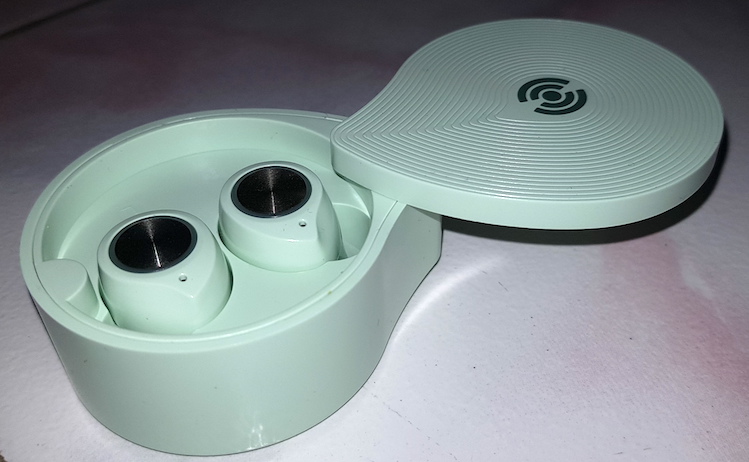
Yevo Labs has churned out Yevo Air, a wireless airbud that works with your iPhone seamlessly. It features Bluetooth 4.2 and 6mm drivers that give you better and louder sound than Yevo 1, its predecessor. Battery life is around 3.5 hours and the case too has battery inside. A 15 minute quick charge will give you 45 minutes of use.
Continue reading “Yevo air wireless earbuds for iPhone released”
Mobile markets can be difficult to predict. All we know for sure is that there are going to be new apps coming out at an incredible rate for as long as smartphones remain popular – and possibly long after, depending on what sort of device ultimately replaces what we currently think of as the modern smartphone. Even so however, there are certain trends and tech developments that can allow us to at least make educated guesses about forthcoming trends in the market.


Last May, HP announced the renewal of its range of HP Omen 15 gaming notebooks, renewal in which, in addition to some small changes in the design to improve cooling and screen hinges, the manufacturer has taken the opportunity to install state-of-the-art hardware, such as an Intel Coffee Lake processor or NVIDIA GTX 1060 or GTX 1070 graphics. We have already had this new portable gaming in our hands, and then we leave you our experiences.
Continue reading “HP Omen 15 2018 review: gaming laptop is renewed to be more powerful and compact”
ZOTAC has completely renewed its ZBOX C series mini PCs, including the new Intel Coffee Lake processors inside, replacing the current Kaby Lake core processors. The new C series will be able to mount up to Intel Core i7 quad-core processors with Intel HyperThreading technology enabled.


Intel has modified the format of its line of solid storage drives Intel SSD DC P4500, adapting it to the new rule type format. With this new format, the company has managed to create the SSD with the highest capacity in the world, with an internal capacity of up to 32 TB, much greater than SSD with more traditional formats.
Continue reading “World largest SSD is Intel SSD DC P4500 with a capacity of 32 TB”
If you just bought a Samsung galaxy S9 Plus and thinking of installing third party (custom) ROMs on it, you will have to get hold of its TWRP, which is a custom recovery. This will pave the way for installing all those amazing firmwares available on the xda developers.
Keep in mind that once you have installed TWRP custom recovery on your Galaxy S9+, your warranty will be voided as it trips knox to 0x1. Also, it is meant to be installed on only SM-G965F/FD/N exynos variants only.
Installation instructions for installing Galaxy S9+ (Plus) TWRP recovery are given below.
0. Make sure you enabled developer settings by pressing the build number several times and have the OEM unlock enabled
1. Boot into download mode by pressing: bixby, volume down and power
2. Download the latest Odin version, open it
3. Download the recovery file from below and put it into the AP tab. You can download it from here.
4. Untick “auto reboot” in odin and flash the file
5. After flashing, boot into twrp. Make sure to NOT allow system to be modified till you disable dm-verity! (otherwise your phone will be stuck at bootloop). Alternatively flash my stock patched kernel to the boot partition (install, install img, check the kernel, check boot partition, done). Find the patch kernel here
6. To disable encryption you need to format data