
Wayne Schulz of GearDiary.com has posted unboxing of the HP ipaq 910.

It is a nice quad band GSM, HSDPA device. You can see the further unboxing pics here
Wayne Schulz of GearDiary.com has posted unboxing of the HP ipaq 910.
It is a nice quad band GSM, HSDPA device. You can see the further unboxing pics here

“Managing the contacts has never been easier! The Sunnysoft contacts lets you manage your contacts without taking the stylus out of the silo and all that with just one hand!” Continue reading “Sunnysoft contacts v1.3 reviewed!”
All of us want our data to be secure. Have you ever been in a situation when you have lost all your data and do not know what to do? This wont happen again. Bought a new device? Want to make configure to just like your previous device quickly? Or do you want to flash a new ROM but you just don’t have the site to set-up it? Well you can do all that with the new SPB Backup v2.0. It’s better and it’s improved!

A FULL BACKUP lets you make a backup of all the data on your device.
A CUSTOM BACKUP lets you choose the data you wish to backup. You can even make a backup of your selected data from the various categories like PIM, Emails, My Documents, Program Files, System data, etc.

In SCHEDULED BACKUP you can fix the days and time in a week when you want the backup to be made. When scheduled backup is enabled, SPB Backup would automatically make a backup of all your data on the set day and time every week.

Now lets see some of the important settings of SPB Backup v2.0.

As you can see in the above screenshot, there is an option to stop all other processes before the backup process starts. Also, you can choose to create log files in case of any errors in the backup process.
If you keep the “create stand-alone restorer” ticked, then you need to have SPB Backup installed in your device, while restoring the data.

This option lets you make your backup password protected. Link to SPB Backup version 1.0 review.

It is clear from the above screenshot that you can select the files or the data of which you do not want the backup to be made.
SPB Backup v2.0 also runs on smartphones. Here is a screenshot of SPB Backup v2.0 running on a Windows mobile standard device(aka Smartphone)

It also supports ROM upgrade mode, i.e you can restore your old backup even after a ROM upgrade.
Another very useful feature of SPB Backup v2.0 is that it supports device upgrade mode, i.e you can restore the backup of one device in another.
Now, you can very easily sync your backup to your desktop. In that case, your backup file is automatically copied to your desktop when you sync your device to your PC. Also, now you can extract and explore the contents of the backup file in your desktop itself. Here are some screenshots of the desktop tool


—
Pros
Cons
In my opinion, none :)
—
Webpage: http://spb.com/
Price: $24.95 (upgrade from version 1 will cost $9.95)
Product version: 2.0
Installer size (cab): 1.42 MB
Supported languages: English, German, Italian, French, Spanish, Portuguese, Russian, Traditional Chinese, Simplified Chinese, Japanese, Czech
Registration type: Shareware
Supported OS (device): Windows Mobile 2003, 5.0, 6.0, and 6.1
Supported OS (desktop): Windows 2000 SP3+, 2003, XP, and Vista
Size in ROM:1.42 MB
RAM consumption: 150 KB on configure stage; up to 6MB during backup process
Rumors are great when they finally come true and the rumored Samsung i900 is finally about to be a reality. Called the Omnia, this is one Windows Mobile device that should be strong competition for the upcoming 3G iPhone and when you look at what this device comes with, it may well top the new HTC Touch Diamond. At a glance you get Windows Mobile 6.1 Pro, a 3.2-inch WideQVGA display (240 x 400 pixels) and an optical mouse much like the one found in the Samsung i780. A 5 megapixel auto focus camera using face and smile detection is a big attraction for those that want a decent camera with their device. In addition there is a built-in GPS receiver.
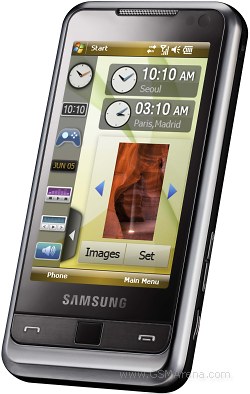
Samsung i900 Omnia waistline is only 12.5mm and the brushed metal back certainly adds to its refined looks. That figure along with the other dimensions makes it rather identical to the Apple iPhone. Most importantly the i900 shares with the iPhone the same massive internal memory – both an 8GB and a 16GB i900 versions will be available with the microSD still present for further expanding those with up to 16 gigs worth of storage.
There’s a hot new version of WorldMate Professional available for your mobile phone. Download it for Free, and start receiving automatic real-time alerts for delayed and canceled flights. Be the first one informed when your flight is delayed or cancelled, so you can act immediately, and avoid the lines and chaos at the airport.
Gain access to your itinerary details, global weather forecasts, world clocks, currency, clothing size and measurement converters, tip and tax calculator and more. With the NEW and FREE WorldMate for Windows Mobile you will save money, time and hassle when on the road. Download now from your PC or over-the-air directly to your device. For additional premium services – Go Pro and get the WorldMate Professional subscription.
Download free Worldmate here
FlexMail 4 is a full-featured award-winning (2004/2005/2006/2007) Email application that works with your device’s built-in Messaging client to provide the best Exchange and IMAP connectivity available on Windows Mobile! Use FlexMail to improve your ActiveSync or SMS messaging with our multiple signature support, multiple folder searches, and cross-account email copies and moves. Use FlexMail to connect with the best IMAP feature-set on Windows Mobile with easy to configure yet powerful folder settings. Set each folder to download differently, notify of new messages, and get email using PUSH use IMAP IDLE.

FlexMail 4 is a major upgrade from FlexMail 2007 and offers many huge changes including:
* Better IMAP features support (server search to filter messages, server-side messages parsing, more message operations done over IDLE, single attachment download etc.)
* Supports MMS on most devices
* IMAP server folders redesign (more settings, easier to use) Continue reading “WebIS Flexmail 4 released!”
