EEEbuntu 8.10 officially launched!

The latest version of highly awaited EEEbuntu has been officially launched. The EEEbuntu is a customized verison of Linux that is specially developed for the EEE PCs. The EEEbuntu is based upon the latest Ubuntu 8.10 (hence the name EEE buntu 8.10) and uses Array as the kernel.
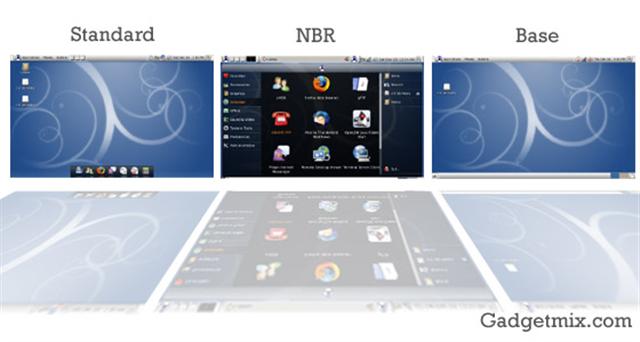
It comes in 3 flavours (yum!)

  • Base: As the name implies, this contains the bare minimum stuff for the system to work. This is recommended for the Linux geeks who prefer to install just what they want. So, this is not for the newbies
  • Standard: This is a full featured flavor which contains everything with full set of office and multimedia applications. It provides full desktop experience to complete the whole package.
  • NBR: Stands for Netbook Remix. This is a version which includes the famous Netbook Remix Launcher over the standard install.

The best part is that everything is already pre-configured. Everything from drivers to even web-browser! Please note that it is meant to be installed on EEE pcs only Continue reading “EEEbuntu 8.10 officially launched!”

Review: EEE PC system shrinker

The EEE PC with SSDs come with not-so-spacious space. The EEE PC 701 comes with just 4GB SSD. Out of this, a lot of storage space is taken by the OS itself. Now, not all of us have the time and courage to nlite the Windows XP OS. Those who have installed full Windows XP on their system have to deal with low-disk space problems.

ASUS understood this and they have come up with EEE PC system shrinker: A utitlity that cleans your system by deleting unnessary files. The system shrinker is a stand alone application and thus can be put anywhere on your system. It is also very small in size (just 272kb).

Continue reading “Review: EEE PC system shrinker”

Holiday Guide – Find out which Netbook, UMPC and Mobile Phone is most bang for a buck this holiday season?

No doubt that we are still bearing the effects of depression right now. We need to make wise choices. We just cannot afford to step into the market and get the latest shiny stuff. I’m not saying that we should get old stuff, but in this article I’m going to enlist the best products at best prices. I’ll also give you the names of the best ones too!

Holiday Guide - Find out which Netbook, UMPC and Mobile Phone is most bang for a buck this holiday season?

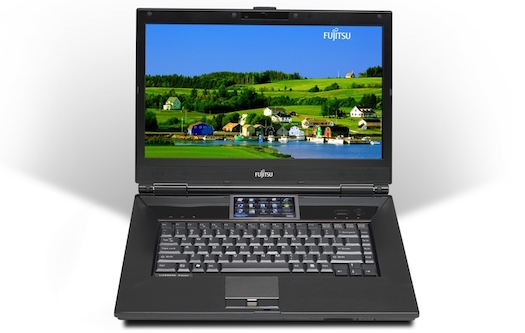
Most-bang-for-a-buck UMPC: Fujitsu U810/U1010

Ultra-mobiles are popular for their huge price-tags. Their sales are not counted in millions like iPhone and HTC Diamond. Last year, the Fujitsu U810 (US) and U1010 (Asia) were quite out-of customer’s reach. Both were >$1000 and thus was not very popular among customers. This is not the scene this year. They can now be bought for around $700-800 now making it a very attractive package. For nearly $700, you are getting a UMPC that runs vista fine (you can use XP too), comes with decent HDD, 1 GB RAM, clamshell design and reputed brand name in tablet PCs, Fujitsu. You cannot go wrong with it.

Best UMPC: Fujitsu U820/U2010 Continue reading “Holiday Guide – Find out which Netbook, UMPC and Mobile Phone is most bang for a buck this holiday season?”

Cyber sport Orbita Mouse

Introducing the Cyber Sport Orbita Mouse, the Mouse which has a spinning scroll-wheel that replaces the right and left buttons. This gives you 3-axis control over objects in 3D  and you can also use this to make quick scrolls in documents. Orbita communicates wirelessly over 2.4GHz “zero lag” RF to the USB charging base. It is set to go on sale in January 2009.

Other features include:

  • Revolutionary Continuous Scrolling
  • Ergonomic Cylindrical Design
  • Virtual /Actual Control Knob interface
  • Jog Wheel Horizontal Scrolling
  • Programmable Interface with vmulti function platforms
  • Compatibility: Windows 2000, XP, Vista, Mac OS X 10.3.9 and later

Visit Cybersport

Gateway to launch LT1001j Netbook in Japan

Gateway plans to launch netbook “LT101j” in Japan. Gateway is made by Acer. So the LT1001j has been called brother of  the Acer Aspire One by some. This beautiful netbook will be launched in the end of the month. It will be Gateway’s first netbook in Japan.

Features:

  • Intel Atom N270 1.6GHz Processor
  • 8.9-inch WSVGA display
  • 1GB of RAM
  • 160GB HDD
  • 3-cell battery
  • Windows XP home
  • WSVGA (1024 x 600)
  • Weight: 1.06 kg

[aving USA]

Windows Mobile: How to force an application to run in VGA-mode

Here is a simple but very helpful trick. We see so many VGA devices around. Many of the applications are VGA-ready, but the developers have not made tweaked their applications to use the VGA resolution.

For example: There are two adobe reader versions for Windows Mobile. One is already VGA-aware, which means that you don’t have to apply an hack/tweak to make it use the VGA resolution. But, the other one is infact more functional and faster in operation. Sadly, it was out quite a long time ago, when the VGA devices had not landed. But, a simple hack can make it use the true VGA resolution.

First of all, get a copy of Tweaks2k2.net (for windows mobile). The trial version lets you run it for 3 times. After that you will have to register. Also, it is a great application for those who don’t want to fiddle with the registry.

Now, here is the screenshot of the Adobe acrobat Reader 2.0 without the VGA hack. Notice, that you just cannot see or make out anything on the document. All the screenshots are VGA. Click on them to see the screenshot in the VGA resolution.

After applying the hack:

Not satisfied? Here is the one with images. In non-VGA mode, you will able to see only a quater of the page! Continue reading “Windows Mobile: How to force an application to run in VGA-mode”

New HTC Touch HD ROM now available

There is a new ROM for the Hong Kong users of Touch HD. It promises to mix some minor issues and also upgrades the (GSM) radio.

Fixes:

* Resolves the following CSL Real-time Stock Quote & Foreign Exchange Service issues:
1. The last input box in Edit Stock cannot be selected by touch screen.
2. The stock ticker on top sometimes does not start from right to left.
3. After entering the stock symbol in the instant stock lookup, the Back button may not show on the right side.
* Fixes the font size display problem in Opera.
* Resolves the issue of getting an error when downloading songs from CSL WAP site with .m4a format.

As always, we would like to remind you that this upgrade will wipe off you data on your device, except the storage contents. So, make sure to backup your data. Happy Upgrading!

Download the new ROM from here

SBSH Safewallet Pro for S60 released

Are you a  S60 user? Do you carry sensitive stuff in your device? If the answers to both of those questions is yes, then this application is a must-have for you.

SafeWallet Pro includes a mobile version for your S60 phone and a PC companion keeping your wallet synchronized all the time! Use SafeWallet Pro to store credit cards info, passwords, bank account info and much more.

  • Your Wallet: User friendly design, securely carry your sensitive information everywhere you go, create cards based on templates, favorite cards, folders structure and much more
  • Security First: Using only the best encryption technologies. 256bit AES encryption, as adopted by the U.S. government, along with security practices based on intelligence forces experience put together to protect your sensitive information
  • PC Companion: Including a fully featured PC Companion for easier data entry. Synchronize your wallet between your phone and PC

click here to visit the product page for more details.