Samsung NC10 in Blue [Netbook]

Just a couple of days back, we told you about the the Samsung NC10 which was released with the pink color. Now, it is available in blue. There is no difference in feature set of the original NC10 and the blue version of it.
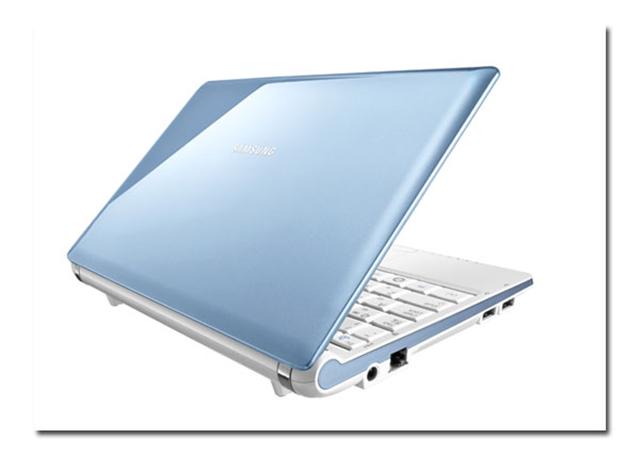
Samsung NC10 in Blue

Specs of the Blue Samsung NC10:

Item Weight 1.3 Kg
Product Dimensions 30 x 22 x 10 cm
Item model number NP-NC10-KA02UK
Form Factor NetBook
Screen Size 10.2
Processor Brand Intel ®
Processor Type Atom N270
Processor Speed 1.6 GHz
Processor Count 1
RAM Size 1 GB
Hard Drive Size 160
Graphics Card Description Media Accelerator 950
Operating System Windows XP Home
Lithium Battery Weight 695 grams

While most of the (male) professionals would not like to carry the pink color along with them, the blue color would be less embarrassing to carry. Personally, I would still go for the black color. [NotebookItalia]

Some tips to Optimise your HP mini 1000 [Netbook]

There is an ongoing discussion going over at MyHPMini forums regarding optimizing your HP Mini 1000. The tips and tricks are dividing into 2 sections: one regarding optimizing the speed and other regarding optimizing the storage.

Optimise your HP mini 1000

Speed

2 GB RAM upgrade (PC2-4200 one stick) from Corsair or Centon (tiger direct). It gives you more memory, so more memory demanding programs will run well. Some examples of programs that I’ve found that run better are Office 2007, Picassa, and Quicken
RAM caching or RAMdisk: Some of the “lagginess” you might be noticing with web browsers and other programs can be attributed to slower SSD/hard drive speeds. By putting your internet cache on your RAM (RAMCache), you lose that lagginess

Read ApoTheTech’s RAMdisk article here

Storage Capacity

Get a big SDHC card like 16 GB SDHC card (currently selling for around $30 on various online stores)
Move “My Documents” to SDHC card – see this link for more information on how to do that
Move windows XP temporary files directory to SDHC card
On-line file storage: There are many free on-line file storage services out there. Here are the ones I know about: box.net ( 1 GB free ), adrive.com (50 GB free, sync software with paid), Microsoft Skydrive (5 GB free, no desktop sync option), and http://www.mesh.com (5 GB free plus synchronization software).

Fennec to be released for Windows Mobile in February! [Windows Mobile]

Mozilla is all set to release Fennec for Windows Mobile next month. They are in the final stages to rule out some minor bugs and then it will be released for the HTC TOUCH PRO.

Here are the words from folks at Mozilla itself

We are targeting a Milestone release for the first week of February, targeting the HTC touch pro. We are two patches away from the meta goal of building from trunk.

Although from their words, they are targeting just HTC TOUCH PRO at this moment, but we are pretty sure, it would run on devices like HTC DIAMOND just fine. For those who don’t know what is Fennec, it is a version of the Firefox browser adapted for mobile phones and other small computing devices.

There are already many web browsers for Windows Mobile available just Windows PCs, but Firefox rules over all of them. The release of Fennec is very important for the Windows Mobile as the IE mobile 6 is still in it’s infancy stage and is too slow on the current hardware.

Thanks to Larry for the tip!

[mozilla link]

Read ApoTheTech‘s HTC TOUCH PRO review

i-mate is not dead! I-mate to launch a new smartphone at Mobile World Congress [Windows Mobile]

To all those who though that i-mate is dead, you are all wrong. I-mate is all set to launch it’s revolutionary device powered by Windows Mobile at Mobile World Congress, 2009 that is going to be held next month.

i-mate will be unveiling its brand new product – one which sees them break new grounds with a revolutionary mobile device that’s like nothing else.

We have seen in the past too that i-mate often announces great devices, but fails to deliever them at right time. A couple of years back, when they announced their revolutionary “Ultimate series”, they promised to shake the whole mobile market, but they failed to deliver them on time. Nearly after an year, they came out with “ultimate range”. But, by then, they were already surpassed by the competition and the whole “ultimate range” utimately failed.

We hope that their so-called “revolutionary” device is made available in the market soon after it’s announcement.

via MSmobiles

Will ACER Smartphone be powered by Windows Mobile OS? [Windows Mobile]

Acer is going it’s first Acer branded smartphone on February 16, 2009. It will be unveiled at the Mobile World Congress coming this February. It has been quite a while since the Acer acquired the company Eten. Since then, we have heard numerous rumours of Acer branded smartphone.

Will ACER Smartphone be powered by Windows Mobile OS

Now, the main question that comes to our mind is: Will it be powered by Windows Mobile? Chances are that yes, it will be powered by Windows Mobile since the Eten licence for Windows Mobile has not expired yet.

All I want is the Acer to use the Intel PXA930 800MHz processor (also used by ASUS P565) or the 1GHz processor by Marvel and not the pathetic Qualcomm processors which power the latest Touch series by HTC (including Diamond, Touch HD and Pro). [via pocket-lint]

TIP for Netbooks with small SSDs – move data to SDHC card or other external storage [Netbook]

Many people still go for the SSDs models for netbooks due to their rugged nature and more reliability. Manufactures often go for the SSDs with smaller storage capacities to keep the price of the netbooks down. The user of the netbook often has to face storage problems. I advice all of these users to use these tips to have some more free storage memory on their netbook.

Move location of “My Documents” to storage card: Do this by right-clicking on “my documents”>properties and change the target

Move the TEMP files to RAMdisk

  1. Press ‘windows’+break
  2. Go to advanced tab
  3. Click on Environment Variables
  4. For User Variables TEMP and TMP, edit and change it to R:/Temp where R: is our RAMdisk
  5. Do the same for System Variables TEMP and TMP too

Also, I would advice the users to use the RAMdisk to keep their device clutter-free. Move the Temporary internet files and firefox’s cache to the RAMdisk for performance and storage gains.

For IE:

  1. Go to Tools>Internet Options
  2. Under Temporary Internet Files, click on Settings
  3. Click on Move Folder and select R:/IEtemp

For FIREFOX:

Type browser.cache.disk.parent_directory in the filter box. If it does not exists, make one and give it this value R:BrowserCache and restart firefox

Here “R:” means your RAMdisk. Learn more about RAMdisk here.

ClarionMiND MID from Clarion coming soon [MID]

Clarion joins the MID and also a portable navigation system powered by Intel Atom processor. Hardware-wise, it is pretty weak. It comes with quite low capacity 4GB SSD with mere 512MB RAM. And don’t get your hopes up by the Intel Atom processor as the clock speed is quite pathetic, 800MHz. On the funny side, the Clarion calls the WVGA 800×480 resolution screen high-resolution.

It comes with Google Maps and offers full Internet Browsing thanks to (custom version of) Firefox.

It also offers traffic updates provided by Traffic.com. Although it has just 4GB SSD, but it comes with micro-SD slot, which lets you to expand the memory easily. Clairon’s new MID is intelligent enough to switch from mobile mode to car mode when placed into Car’s cradle.

Features and Specs:

  • 4.8” WVGA (800×480) LCD display with Touch-Screen
  • Intel® Atom™ Processor
  • 800MHz Clock Speed
  • 512MB DRAM
  • 4GB SSD Flash Memory
  • Built-in Wi-Fi® IEEE 802.11 b/g
  • Built-in Bluetooth® 2.0 + EDR Dial-up Networking (tethering)
  • Built-in GPS Antenna/ Receiver
  • Built-in Amplifier and Speaker
  • Rechargeable Battery
  • 2 USB Ports (Standard/ Mini)
  • Headphone Jack
  • microSD Card Slot
  • One Touch Keys
  • Docking Station Connector

Price is not so friendly. You will have to shell out $699 to get yourself one of these MIDs. Personally, I find it quite over-priced considering the fact that it comes with a low powered processor and pathetic amount of RAM.

[ClarionMiND link]

Sunnysoft Releases InterWrite 10 Keyboard [Windows Mobile]

Sunnysoft today announced the availability of their own SIP, Sunnysoft InterWrite 10 Keyboard.

Sunnysoft InterWrite Keyboard displays a unique virtual keyboard on the screen and enables you to use the touch screen to type text in any supported language. Eight keyboard modes are available to significantly improve the your experience of inputting on handheld devices. It offers a visible feedback of the key currently pressed on the main layouts so you can easily see what key is pressed while moving your finger. Advanced SmartChoice menu will do its best to fulfil all of your needs as well.

Click here to visit Sunnysoft Interwrite webpage

More features: Continue reading “Sunnysoft Releases InterWrite 10 Keyboard [Windows Mobile]”