HTC Diamond does not wake up when a SMS comes in

If you are an owner of the sexy HTC Diamond, there is one thing that will annoy you the most especially if you are coming from some other Windows Mobile device: the device won’t wake up when an SMS comes in.
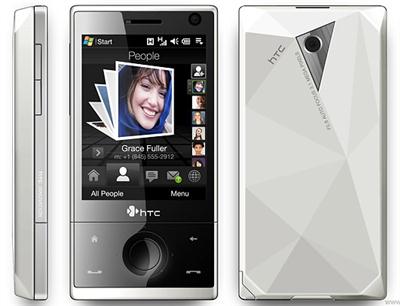
htc diamond does not wake sms comes in

Just make the following changes in the registry of the HTC Diamond. You can use any of the registry editor.

Go to HKLMDriversBuiltInRIL > find the DisableSMSWakeUpEvent > Change value to 0 > Soft Reset.

Some popular registry editors are “Resco registry”. It comes with Resco File explorer. You can also use PHM Registry Editor to perform the same action but the developer of PHM registry editor is no longer offering the application on his website.

HTC Diamond offers true USB 2.0 speeds

I am well aware of the fact the Nokias and Sony ericssons have having the USB 2.0 speeds from quite some time but this news is not so old for the Windows Mobile devices. The maximum speed the windows mobile devices could achive was just USB 1.1.

click on the image to see the bigger version

The HTC Diamond offers true USB 2.0 . I was able to transfer a 700MB movie, “Never Back Down” to my Diamond in less than 4mins!

Vito SMS-Chat reviewed! – version 1.16

Want the best and easiest way to manage your SMSes? The messaging application of the Windows Mobile a lot to be desired. VITO SMS-chat is one application that promises to fill the gap.

Now, what gaps am I talking about? Well, you will know them all and the cure of all of them after reading this review.

Superb and elegant Interface

Take a look at the below given screenshot. One would easily think that it is not from Windows Mobile as it has never been so finger friendly. Thanks to great guys at Vito Technology, they came up with a extremely finger friendly application. You don’t need to take out that small stylus anymore just to read an SMS or to send an SMS. The main window contains all the SMS chats that you have done so far. They are sorted by date.

Continue reading “Vito SMS-Chat reviewed! – version 1.16”

Review: Egress – the best way to read news on your mobile device!

Are you really serious about reading news and RSS feeds on your Windows Mobile device? If yes, the Egress is the application you have been waiting for. It lets you read your favorite news and RSS feeds in a simple, yet elegant interface.

Installation

The installation of the Egress was pretty much straight forward and user friendly. Upon installation, you are asked if you would like to switch the today plugin on.

Continue reading “Review: Egress – the best way to read news on your mobile device!”

PhatWare CalliGrapher updated to version 8.7

“PhatWare Corporation, a leading provider of software products and professional services for mobile and desktop computers, announces the release of the CalliGrapher 8.7. To address the customer’s needs in a fast-growing market of phone-enabled Pocket PC devices, the new version of CalliGrapher has been optimized for better performance on latest Windows Mobile devices and includes improved handwriting recognition engine. The new version also addresses several compatibility issues reported since the previous CalliGrapher release.”

If you have been a fan of Phatware products, like me, then you would love this update. I’ve been using Calligrapher from couple of years and have enjoyed every bit of it.

All the 8.x users can upgrade for free

All other registered owners of any previous commercial version of CalliGrapher can purchase CalliGrapher 8.7 Upgrade for $24.95. (click here to purchase one)

Pharware Calligrapher official page: Link

PE Explorer Suit Review – for Windows Mobile Professional

You don’t need to be a rocket scientist to discover that the built-in file explorer is slow and lazy even for light tasks. But, since the windows mobile is a great and popular platform among the developers, it has great support from the developers and we are not just depending on microsoft for applications. PE explorer suit caters to the needs of those people who want and expect a lot from a powerful platform like windows mobile.

Installation

The installation was simple and straightforward. The installer installed a cab file and I faced no problems. Continue reading “PE Explorer Suit Review – for Windows Mobile Professional”

CnetX Flash Format review – for Windows Mobile Professional

CnetX Flash Format is a storage card utility that helps you to keep your memory card in perfect shape. It has all the features that you will expect from a pro-flash format utility. It also makes sure that it stays in perfect shape.

CnetX Flash Format review

Installation

As usual( and expected ), I did not face any problems in installation it. It is small in size and it would be harder to find once it is installed. Why? Read on

Continue reading “CnetX Flash Format review – for Windows Mobile Professional”

FTP browser for Windows Mobile: CedeFTP 2.5 reviewed

CedeFTP is a FTP file browser for windows mobile professional AKA Pocket PC devices. It has all the features one would expect from a regular FTP client that one uses on the PC. The CedeFTP is fast, reliable and easy-to-use!

The CedeFTP 2.5 flaunts the classic look. It does not have soft keys or fancy graphics. But, that does not matters much to the mobile professional who generally use the stylus to get their critical work done.

Let’s us open/inititiate a new FTP session by going to File>Open

Continue reading “FTP browser for Windows Mobile: CedeFTP 2.5 reviewed”