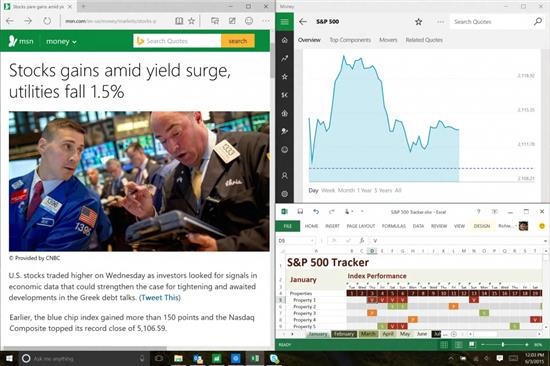
#Windows10fail, Early Adopters Show Frustration on Twitter

Windows 10 is an amazing operating system that brings heaps of new features to the table. However all is not rosy for the Microsoft and the early adopters who were eagerly waiting for Microsoft to release final copy of Windows 10. For most the upgrade went fine but most of them faced issues. Here are few of the tweets we saw on twitter to give you an idea.

#Windows10fail

Continue reading “#Windows10fail, Early Adopters Show Frustration on Twitter”

Plantronics RIG 500 Series headphones, designed for eSports

Plantronics RIG 500 is a eSports headphone that comes with interchangeable components to get the perfect comfort. Supported by the ESL, the RIG 500 include soundproofing on the handset, while allows air to circulate. Also included is a digital USB adapter that offers Dolby 7.1 surround sound, and support for 24-bit audio.

Plantronics RIG 500 review

Plantronics designers have created a headset for all kinds of possible players, eliminating unnecessary weight and complexity.

Plantronics RIG 500 review

The Plantronics RIG 500 Series headphones can be configured in two different configurations. First is the vented one where there is greater air flow and better heat dissipation. In the second config, the player is completely isolated from external noises, allowing players to concentrate. There will be several models of it.

Plantronics RIG 500 reviews

* RIG 500 – Stereo headset with microphone system “Flip-to-mute”, which turns off the microphone when rotated – € 59.99.
* RIG 500HD – Headphones with USB 7.1 Dolby surround sound – € 79.99.
* RIG 500E – Edition E-sports with surround sound, two spares for headphones (“vented” and “isolating”), detachable microphone, USB adapter and stereo analog cables – € 129.99.

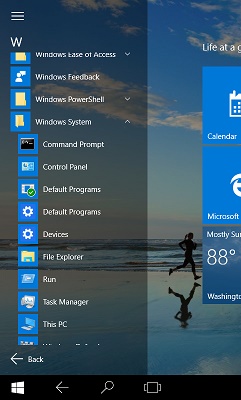
Windows 10 upgrade for 32GB Acer W3 W4 Asus T100 Dell tablets

We all bought a lot of those cheap 32 GB windows 8.1 tablets and have been wondering how to fit that huge Windows 10 update on their tiny drives with 8GB backup partitions. Well here is how you do it. This process has been tested on Acer W3, W4, Asus T100, Dell 32 GB windows tablets. First and foremost download the Windows 10 directly from this link (media creation tool). Download it on a different computer and not on your Windows 8.1 tablet.

Windows 10 upgrade for 32GB Acer W3 W4 Asus T100 Dell tablets

Continue reading “Windows 10 upgrade for 32GB Acer W3 W4 Asus T100 Dell tablets”

Download Galaxy S6 Keyboard for Note 4

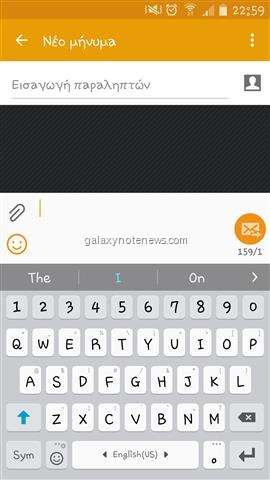
Both Samsung Galaxy Note 4 and Galaxy S6 are popular phones but since the Note 4 was released before S6, it did not get improved Galaxy S6 keyboard. Fortunately it was made available for download by custom ROM developers.

Download Galaxy S6 Keyboard

Install Samsung Galaxy S6 Keyboard for Note 4

To install the Samsung Galaxy S6 Keyboard for Note 4, download this file and flash it in recovery. To put your Note 4 in recovery mode, hold down volume up + power button. Then browse for the file you downloaded earlier and press power button to flash it. It will only take few seconds for the flashing process to complete.

Then do a reboot. The Galaxy S6 Keyboard is working perfectly on my Galaxy Note 4. It is important to note that you must be on Lollipop to use it.

Download Galaxy Note 4 Bloatware removal script for Lollipop (N910C and N910F)

Bloatware removal script for Samsung Galaxy Note 4 (N910C and N910F models) is now available for download. There are two variants of this bloatware removal script. First is the light version that does not deletes Samsung Music, Accuweather, Samsung Account, Yahoo weather service and some widgets.

Download Galaxy Note 4 Bloatware removal script for Lollipop

The full version of the bloatware removable Note 4 script deletes a lot of stuff that includes:

* Air Wake Up * Ant Hal Service * Ant Plus Plugins * ANT Plus test * ANT Radio Service * Automation Test * Basic Dreams * BC Service * Beacon Manager * Beam Service * Choco EU Kor * Chrome * Chromcast Framework Service * Chrome Customizations * Cool EU Kore * DiagMonAgent * Drive * Drive Link * Drive Link Remote * Dropbox * DSML * Dual Clock Digital * Easymode Contacts Widget * ELM Agent * Evernote * Facebook * Facebook Messenger * Facebook Pages Manager * Factory Camera FB * FB App manager * FB Installer * Flipboard * Flipboard Briefing * Fota Client * Gmail * Google TTS * Google Plus * Hangouts * Hancom Office * Hw Module Test * Interactive Tutorial * Insatgram * KIES * KLMS Agent * Knox Agent * Knox Wizard Client * Maps * Mirrorlink * Mobile Printer * Moble Tracker * Noise Field * OmaCP * PhaseBean * Play Music * Play Banca * PageBuddy * PENUP * Play Games * Power Sharing * Preload Instalaer * Rose EU Kor * RNB * RNB Shell * Samsung Apps Widgets * Samsung Billing * Samsung Link Platform * Safety Assistance * SNS * Sec Factory Phone Test * S Printer Spooler * STK * Stret * Switch Knox * Switch Knox Plus * Talkback * Tap and Pay * TuiService * TrimApp * Videos * Velvet * Web Manual * WhatsApp * Wlan Test * YouTube

Flashing instructions for Galaxy Note 4 Bloatware removal script

You Must be rooted and have custom recovery like TWRP installed
Download file from here.
Reboot into Recovery
Install Script
Reboot. That is it.